When people hear the phrase “IP attack,” they often picture something highly technical and far removed from daily business operations. In practice, it usually means an attacker is abusing internet traffic, network addressing, or exposed services tied to your public IP addresses to interrupt operations, hide malicious activity, or both.
For a small or midsize business, that can look surprisingly ordinary at first. A website slows to a crawl. Remote staff cannot connect to the VPN. VoIP calls start dropping. Cloud apps feel sluggish. Then the pattern sharpens: traffic spikes, firewalls strain, and customer-facing systems stop responding.
The good news is that an IP-based attack is not something an SMB has to face blindly. The organizations that recover fastest tend to do three things well: identify the issue quickly, follow a defined incident plan, and restore service through tested continuity steps.
What an IP attack usually means for SMBs
“IP attack” is a broad label, not a single attack type. Most often, it refers to malicious activity that targets or abuses the Internet Protocol layer. Two of the most common examples are IP spoofing and distributed denial-of-service attacks, or DDoS.
IP spoofing happens when an attacker creates packets with a falsified source IP address. That fake address can hide the sender, impersonate another system, or support a larger attack. Spoofing is often used to make malicious traffic harder to trace and easier to deliver at scale.
A DDoS attack is different in purpose, though it often overlaps with spoofing. Instead of sneaking in, it overwhelms. Attackers use many compromised devices, often called a botnet, to flood a target IP address, server, or service with traffic. Each device may send only a portion of the traffic, but together they can exhaust bandwidth, CPU, memory, or application resources until legitimate users are locked out.
For SMBs, the distinction matters because response priorities may differ. A spoofing issue may point to weak filtering or a broader intrusion attempt. A DDoS event usually demands immediate mitigation and continuity measures to keep the business operating.
Common indicators of IP spoofing and DDoS attacks
An IP-based attack rarely announces itself with a clear label. It tends to show up as degraded performance, unexplained outages, or suspicious traffic patterns. According to CISA guidance on DDoS response, typical indicators include network latency, sluggish applications, high CPU and memory usage, unusually high traffic volumes, and websites that become inaccessible.
The challenge for SMBs is that these symptoms can resemble everyday IT issues. A saturated internet circuit might look like a bad ISP day. A slow firewall might seem like aging hardware. That is why good monitoring and baseline traffic data matter so much.
Watch for patterns like these:
- unusual inbound traffic spikes
- public website outages
- remote access failures
- unstable VoIP quality
- firewall or router resource exhaustion
- cloud applications that suddenly lag
The table below can help teams connect symptoms to fast first checks.
| Symptom | What it may indicate | Immediate check |
|---|---|---|
| Website timing out | Volumetric DDoS or app-layer flood | Review edge traffic, CDN, WAF, hosting alerts |
| VPN unavailable | Attack on firewall, VPN concentrator, or ISP saturation | Check concurrent sessions, bandwidth, appliance load |
| High CPU on firewall | Flood of packets, malformed traffic, or exhausted inspection resources | Review logs, session tables, dropped packets |
| Internal apps feel slow | Shared bandwidth exhaustion or east-west spread from compromised devices | Compare WAN usage to normal baseline |
| Traffic from unexpected geographies | Botnet activity or scanning | Review geolocation data and block rules |
| Alerts tied to forged addresses | IP spoofing attempts | Verify ingress and egress filtering policies |
Why small and midsize businesses feel IP attacks faster
Large enterprises often have multiple internet providers, dedicated security operations teams, upstream DDoS mitigation, and redundant hosting paths. Most SMBs do not. That does not mean they are unprotected. It means the margin for error is smaller.
A single internet circuit can become a single point of pain. One overloaded firewall can affect email, phones, cloud applications, remote users, and vendor access at the same time. If the public website, customer portal, and VPN all pass through the same edge environment, one attack can ripple across the whole company in minutes.
Many SMBs also depend heavily on Microsoft 365, SaaS platforms, remote work tools, and multi-location connectivity. That reliance raises the operational cost of even short disruptions. A two-hour outage is not just an IT issue. It can stall scheduling, sales, service delivery, and client communication.
That is why response speed matters more than technical perfection in the opening phase.
First-hour response steps for an IP attack
The first hour should focus on control, clarity, and service preservation. Teams do not need every answer immediately. They do need a process that assigns roles, confirms scope, and starts mitigation without confusion.
NIST guidance on incident handling stresses rapid detection, loss reduction, mitigation of exploited weaknesses, and service restoration. For SMBs, that usually translates into a simple but disciplined playbook.
A practical first-hour response should look like this:
- Confirm the attack: Determine what is affected, when symptoms began, and whether the issue involves a website, firewall, VPN, cloud app, or internal host.
- Activate the incident plan: Contact the preassigned decision-makers, technical responders, ISP, cloud provider, and any outside security partner.
- Isolate what you can: Remove compromised systems from the network if malware or lateral movement is suspected, and separate critical services where possible.
- Deploy mitigations: Apply rate limits, ACLs, geo-blocking, traffic scrubbing, CDN protections, or upstream provider controls based on the attack path.
- Monitor and document: Track traffic patterns, service status, changes made, timestamps, and business impact throughout the event.
Communication deserves equal attention. NIST’s small business guidance recommends a basic incident response plan that spells out who to call and what, when, and how to report. That matters because internet-based attacks often disrupt the same channels people rely on during a crisis. If VoIP is down and email is delayed, your team still needs an out-of-band way to coordinate.
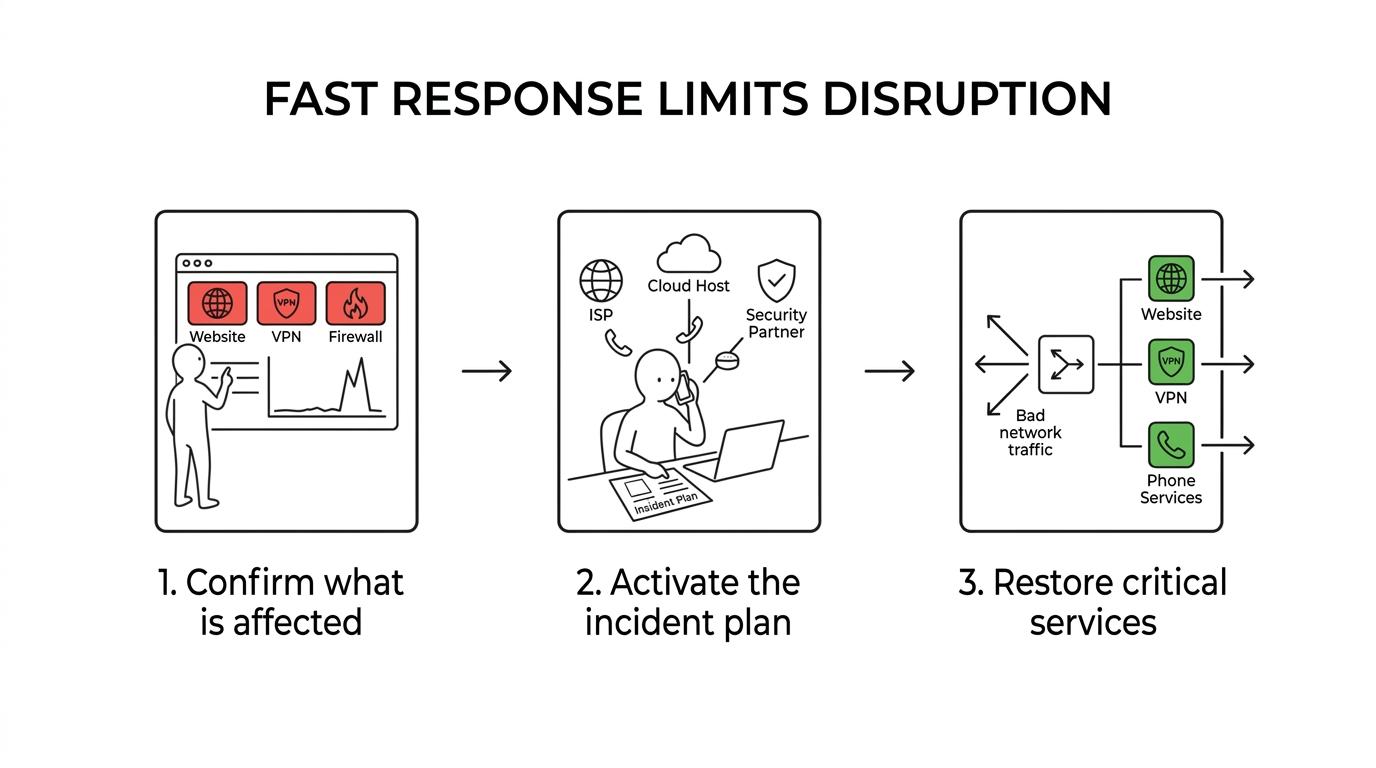
CISA also recommends a DDoS business continuity plan with alternatives for critical applications, especially communications. A backup collaboration app, mobile call tree, or alternate ISP path can be the difference between disruption and shutdown.
Network protections that reduce IP spoofing and DDoS risk
No single tool stops every IP-based attack. Good protection comes from layers that filter bad traffic early, limit blast radius, and make abnormal behavior easier to spot.
At the network edge, filtering is foundational. Ingress filtering checks incoming packets and helps block traffic with suspicious source headers. Egress filtering examines outbound traffic and can prevent devices inside your environment from sending spoofed packets if they become compromised. These controls are not glamorous, but they are practical and effective.
Other controls add resilience around the edge. Segmentation keeps public-facing services separate from core business systems. Redundant internet connectivity provides a fallback when one path is saturated. Cloud-based DDoS mitigation and content delivery networks can absorb or distribute malicious traffic before it reaches a local firewall.
Strong defenses often include the following:
- Ingress filtering: Screens inbound packets for invalid or forged source details
- Egress filtering: Stops internal systems from sending traffic that should never leave your network
- Segmentation: Limits how far performance issues or compromise can spread
- Traffic baselining: Makes unusual spikes and abnormal destinations easier to recognize
- Provider-level mitigation: Pushes large traffic floods upstream where more capacity exists
For many SMBs, the best move is not to build every layer alone. It is to combine internal controls with support from the ISP, hosting provider, firewall vendor, and managed security partner.
Incident response planning for IP attack scenarios
The businesses that handle IP attacks well usually prepared before the outage started. Their plans are not always long. They are just clear.
A useful incident response plan should define roles, escalation contacts, decision authority, reporting duties, and continuity actions. It should also cover who speaks to customers, who works with technical providers, and who approves emergency changes like geoblocking, traffic rerouting, or temporary service shutdowns.
Keep the plan practical:
- Primary contacts: internal lead, executive approver, ISP, cloud host, security partner
- Backup communications: mobile numbers, messaging app, alternate email, non-VoIP phone path
- Critical systems list: website, VPN, phones, line-of-business apps, customer portal
- Reporting duties: legal, regulatory, client, and contractual notification steps where required
- Recovery test schedule
One detail often overlooked is the “who to call” portion. During an active event, nobody wants to search an old ticket for the ISP escalation number or the firewall support portal. Put those details in one place, verify them regularly, and make sure at least a few key staff members can access them offline.
Testing matters too. A recovery process that exists only on paper can fail when pressure is high.
Recovery steps after an IP attack
Recovery is not just “traffic dropped, so we are done.” The team needs to verify that business services are stable, security controls are intact, and the event did not mask a deeper compromise.
Start by validating service restoration in order of business priority. Confirm public websites, remote access, voice systems, cloud apps, and internal applications. Review logs from firewalls, routers, endpoint tools, and cloud platforms to see whether the attack remained a disruption event or included unauthorized access attempts.
If any device shows signs of compromise, isolate it immediately. That same discipline applies if the attack overlapped with phishing, credential theft, or malware. Restoring service while leaving an infected host connected invites a second incident. Reliable backups and tested recovery procedures remain essential, especially if an attacker used network disruption to distract from data loss or ransomware activity.
It is also smart to review what the event exposed:
- Which single points of failure were hit first?
- Did the team have enough visibility?
- Were provider response times acceptable?
- Did users know where to report issues?
- Could critical operations continue during the outage?
The answers drive the next round of hardening, from better filtering and alerting to stronger continuity procedures.
When SMBs should call a managed IT and cybersecurity partner
Some IP attacks are small and short-lived. Others quickly exceed what an internal office manager, part-time IT contact, or generalist administrator can handle alone. That is usually the point where outside support stops being optional and starts being cost control.
A managed IT and cybersecurity partner can help by monitoring traffic patterns, tuning firewalls, coordinating with ISPs and cloud platforms, documenting incident handling, and building the continuity plan before a live event puts pressure on the business. For SMBs that need enterprise-grade protection without staffing a full internal security team, that type of support can turn a reactive posture into a steady one.
The strongest response is rarely improvised. It is prepared, assigned, tested, and ready to activate when internet-facing systems begin to behave in ways that no normal workday can explain.