Local managed service providers can look similar on a website, yet the real differences show up in access controls, incident handling, and how quickly someone can walk into your office when the internet or firewall fails. SRS Networks, a managed IT services and cybersecurity provider for small and mid-sized organizations, is one example of why buyers often weigh local response and proactive support alongside price.
TL;DR: Summary
- The best way to compare local managed service providers is to score seven areas: security controls, privileged access, incident handling, SLA terms, local response capability, proactive monitoring, and strategic fit.
- CISA advises MSP customers to ask for self-attestations, continuous monitoring practices, incident-response responsibilities, outage terms, and an SBOM or similar software-security verification before signing.
- SBA guidance supports outsourcing IT to managed service providers when small businesses need cost control and specialist expertise, but only if scope and accountability are clearly defined.
- If your business needs onsite help, compliance alignment, or fast vendor coordination, a local MSP such as SRS Networks may have an edge over a remote-only provider.
- Ask for proof, not broad claims: sample reports, escalation paths, patching standards, after-hours procedures, and named ownership during incidents.
A strong comparison process is less about a feature checklist and more about risk reduction. The right provider should prevent routine problems, document its security practices, and stay accountable when an outage or cyber event interrupts business.
Why choose a local managed service provider instead of building everything in-house?
Yes, many small businesses benefit from a local MSP because it can provide broader expertise than one internal generalist at a lower fixed cost. SBA guidance supports outsourcing when a business wants cost control and specialist support without staffing every function internally.
For companies with roughly 15 to 150 employees, the decision is often practical. An internal hire may cover help desk needs, but one person rarely handles endpoint security, Microsoft 365 administration, backup testing, vendor management, and compliance work at the same level every week. A managed service provider spreads those responsibilities across a team.
The trade-off is control. An internal team member sits closer to the business, knows the personalities, and can walk to a desk without a ticket. A local MSP works best when its processes are mature enough to feel like an extension of your staff rather than an outside queue.
What does a local managed service provider actually manage?
A true MSP manages systems, risk, and continuity, not just support tickets. The practical scope usually spans Microsoft 365, endpoints, firewalls, backups, network health, user support, and planning.
A common mistake is to think “managed IT” means help desk only. In a mature model, routine prevention matters as much as break-fix work because patching, monitoring, backup verification, and identity controls are what keep small incidents from turning into downtime.
Typical scope includes:
- Monitoring and maintenance: device health alerts, patch management, routine remediation, and asset visibility
- Security operations: MFA, endpoint protection, email filtering, firewall management, and vulnerability review
- Cloud administration: Microsoft 365, identity and access management, collaboration tools, and licensing oversight
- Recovery planning: backups, restore testing, recovery time objectives, and business continuity planning
- Strategy and vendors: budgeting, lifecycle planning, software renewals, and coordination with ISPs or line-of-business vendors
If a provider leads with unlimited support but cannot explain how it performs prevention, that is a useful signal. Support is the visible layer. Operations discipline is the layer that keeps users productive.
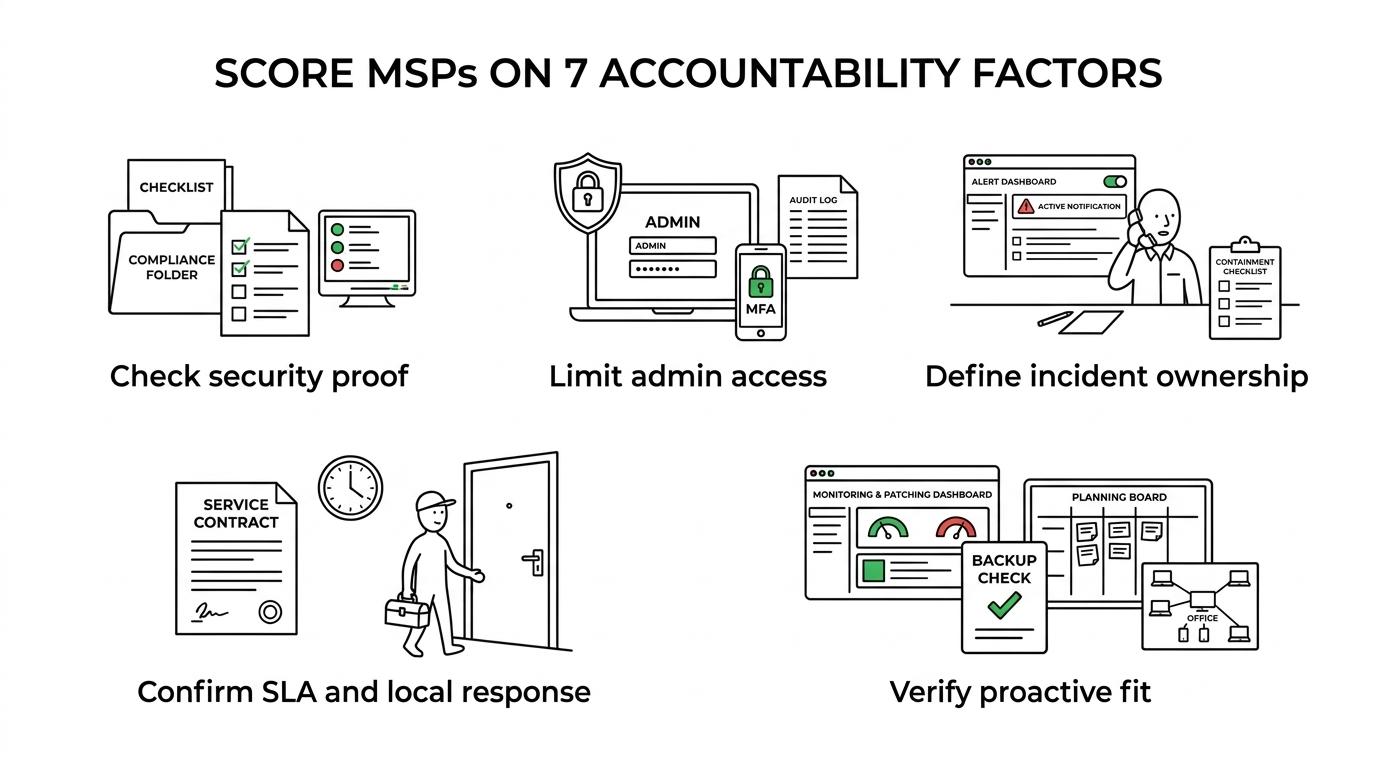
What 7 factors should you compare when choosing local managed service providers?
The best comparison framework is simple: measure the provider’s ability to reduce risk, respond fast, and stay accountable. Price belongs on the list, but it should not be the first filter.
Use these seven factors:
- Security documentation: Ask whether the provider can produce self-attestations, policy summaries, and evidence of continuous monitoring. CISA explicitly points buyers toward documented practices rather than verbal claims.
- Privileged access controls: Confirm how admin accounts are limited, approved, rotated, logged, and reviewed. Shared credentials are a serious red flag.
- Incident handling: Review who owns triage, communication, containment, recovery, and post-incident reporting. Ambiguous ownership turns a bad day into a longer outage.
- Contract and SLA language: Look for response commitments, exclusions, maintenance windows, warranty terms, and compensation for service outages where applicable.
- Local support capability: Verify onsite coverage area, dispatch process, spare equipment practices, and vendor coordination with ISPs, cabling teams, or hardware suppliers.
- Proactive operating model: Ask how the provider handles patching, monitoring, alert tuning, backup checks, and recurring review meetings. Reactive ticket work is not enough.
- Strategic fit: Match the provider’s strengths to your environment, whether that means HIPAA, FTC Safeguards, NIST alignment, hybrid work, multi-location networking, or cloud administration.
This method produces better decisions than comparing package names. Two providers can sell “managed IT” while delivering very different levels of evidence, response maturity, and security hygiene.
How do you verify an MSP’s security controls before signing?
Start with evidence, not reassurance. CISA recommends that MSP customers require self-attestations tied to industry standards and maintained by continuous monitoring processes and tools.
Step one is to ask the provider how it secures its own service delivery environment. That includes remote management tools, privileged access, patching of its management platforms, and how it separates customer environments. If the answer stays high level, ask for written controls and sample reporting.
Step two is to inspect access practices. You want to know who can log in, how access is approved, whether MFA is enforced, and how activity is logged and reviewed. If an MSP cannot explain how it limits and audits privileged access, stop the process there.
“When SRS Networks discusses proactive monitoring and tailored support, a prudent buyer should still ask for evidence of access controls, continuous monitoring, and software-security verification.”
Step three is to ask for an SBOM or similar verification of the security of software used to provide the services, which CISA highlights as part of contract readiness. Not every buyer asks this question, which is exactly why it creates information gain. A provider that can discuss its tool stack, software provenance, and update practices is usually operating with stronger discipline.
What should the contract and SLA say about incidents and outages?
The contract should spell out accountability during a cyber event or outage. CISA points buyers to incident-response responsibilities, warranty information, compensation for service outages, and a plan for continuous support during outages.
Read this section in order. First, identify who declares an incident and who communicates with your leadership. Second, check whether the provider commits to support continuity if its own tools or systems are impaired. Third, review what counts as an outage, what is excluded, and whether compensation or service credits apply.
A common misconception is that “one-hour response” means the issue will be fixed in one hour. It usually means the provider will acknowledge or begin triage within that period. Resolution time depends on severity, third-party dependencies, user availability, and hardware replacement needs. If that distinction is missing, ask for it in writing.
Then test the edge cases. If ransomware hits at 9:00 p.m., who joins the call? If Microsoft 365 is degraded, who coordinates with Microsoft? If the ISP fails, who owns the carrier escalation? Clear answers here separate a managed service from a lightly staffed support desk.
How is a local MSP different from a national provider?
A local MSP often wins on onsite response, regional vendor coordination, and familiarity with local business conditions. SRS Networks reflects that local model by emphasizing proactive support and a faster path to hands-on assistance when businesses need it.
National providers can offer scale, broader overnight coverage, and more standardized tooling across many locations. That can work well for companies with offices across several states or a large internal IT team that mainly needs a consistent co-managed partner. The trade-off is distance. When a switch fails, a new office opens, or a low-voltage issue blocks user connectivity, local logistics matter.
“SRS Networks says its local presence allows it to respond quickly to client needs, which matters most when a firewall, ISP circuit, or office network problem requires hands-on work.”
A useful way to compare the models is this: if your environment depends on frequent onsite work, local relationships, or regional compliance nuance, the local option may be stronger. If your environment is highly standardized, cloud-heavy, and spread across a wide geography, a national provider may fit better. Local is not automatically better. It is better when physical presence changes outcomes.
How can you test response time and local support capability before you commit?
You can test support maturity before signing by running a simple scenario exercise. Ask local providers, including firms such as SRS Networks, how they handle onsite dispatch, after-hours escalation, and vendor coordination when a third party causes the outage.
Start with a realistic scenario from your business. It might be a failed firewall, a Microsoft 365 account takeover, or a dead internet circuit at a branch office. Ask the provider to walk you through the first hour, the first four hours, and the first business day. Listen for named roles, decision points, and escalation paths.
Next, ask what is actually local. Does “local support” mean employees based nearby, or a remote help desk with occasional field contractors? What is the dispatch radius? Are onsite visits included, limited, or billed separately? If the provider uses after-hours answering services, ask when an engineer joins the call.
A second check is to request sample reporting and meeting cadence. Fast response matters, but durable service quality comes from recurring review of ticket trends, patching exceptions, backup status, and risk items. Local support without operational follow-through is only half a solution.
What warning signs suggest an MSP is too reactive or too opaque?
Several warning signs point to a weak MSP: vague security language, unclear ownership, and little evidence of prevention. If the provider cannot describe its operating rhythm, you may be buying response time without resilience.
One red flag is a heavy focus on tickets with very little discussion of monitoring, patch compliance, backup verification, or asset inventory. Another is unclear access management. If multiple technicians share admin credentials, or if offboarding of technician access is not documented, the risk is obvious.
Watch for contract fog as well. If the provider advertises unlimited support but excludes common tasks, that gap will show up as surprise charges or slow handling later. If after-hours coverage exists only for “critical issues,” ask who decides what is critical. If the answer is loose, the SLA will be loose when it matters.
There is also a softer signal: defensiveness around questions. Strong providers usually welcome structured due diligence because they already have documentation, standard processes, and a clear service model. Evasion often means the process is not ready for scrutiny.
Which provider model fits your business: fully outsourced, co-managed, or project-only?
The right model depends on your staffing depth, compliance pressure, and pace of change. Most small and mid-sized businesses should choose fully outsourced or co-managed support rather than relying on project-only help.
Project-only support can work for an office move, cabling upgrade, or cloud migration, but it rarely gives you the daily accountability needed for security and continuity. If your business depends on Microsoft 365, remote access, line-of-business applications, and regulated data, operations need steady ownership.
A practical way to choose is to match the model to your current team:
- Fully outsourced: best when you have no internal IT staff or only light administrative support
- Co-managed: best when you have an internal IT lead who needs backup, specialized security support, or deeper infrastructure coverage
- Project-only: best for one-time changes, not ongoing risk management or user support
If your internal team is strong with users but stretched on cybersecurity, co-managed support can be the most efficient path. If you have no one responsible for patching, backups, vendor management, and incident coordination, fully outsourced service usually creates the clearest accountability. The goal is not to buy the biggest package. It is to put every critical technology function under explicit ownership.