A network audit report template is only useful if it does more than list devices and security tools. For small and mid-sized businesses, the report has to show what was assessed, what evidence was reviewed, what failed, and what should happen next. SRS Networks, a managed IT services and cybersecurity provider for SMBs, sits in that practical middle ground where audit documents must be technical enough for engineers and clear enough for business leadership.
TL;DR: Summary
- A strong network audit report template for an SMB should cover eight core areas: scope and system details, asset inventory, network devices and configurations, allowed traffic flows, access control, patch management, audit log management, and backups with documented remediation.
- Official guidance from NIST SP 800-53A and the CIS Controls points to the same pattern: measure what exists, record assessment findings, and include corrective actions.
- A checklist alone is not enough. The report should include evidence reviewed, weaknesses or deficiencies, risk impact, remediation steps, owners, and target dates.
- For businesses supported by providers like SRS Networks, the best template is structured enough for compliance and practical enough for monthly operational follow-through.
- If a control is implemented but not tested, verified, or documented, the report should treat it as only partially effective.
The best templates also separate control coverage from reporting quality. That distinction matters because many SMB audits fail not because the team missed a firewall or patch cycle, but because the final report cannot prove what was assessed or how the findings should be fixed.
Why does the report header matter as much as the technical checklist?
Because the report header defines scope, accountability, and assessment context. SRS Networks and similar managed IT providers need system name, sites, assessment dates, and controls assessed before findings can be trusted.
NIST SP 800-53A is clear that a security assessment report should be a structured record of findings and recommendations. That means your template should start with administrative fields that many SMBs skip: system or client name, business unit, location or sites assessed, assessment dates, impact level if used, assessor, report version, and the specific controls or domains reviewed.
This is not paperwork for its own sake. If an auditor reviews a firewall config from one site while leadership assumes the report covers all sites, the report becomes misleading. If the template does not identify the assessment period, patch and log findings may already be stale by the time anyone reads them.
A common mistake is treating scope as obvious. It rarely is. Hybrid users, Azure or Microsoft 365 identities, guest Wi-Fi, and vendor remote access often sit outside the “main network” in people’s minds even though they directly affect exposure.
“With more than 28 years of experience, SRS Networks operates in the space where structured findings and corrective actions matter more than a simple pass-fail checklist.”
Why is asset inventory the first control area to audit?
Asset inventory comes first because unknown assets create unknown risk. CIS Control 1 puts enterprise assets at the center of any defensible security program.
Your template should capture both inventory quality and inventory gaps. That includes end-user devices, servers, network devices, wireless access points, IoT devices, printers, virtual machines, cloud-connected assets, and remote endpoints. For SMBs, this often means reconciling more than one source of truth: RMM data, DHCP leases, Active Directory, Microsoft Intune, EDR agents, switch MAC tables, and firewall objects.
If a device appears in DHCP or a firewall ARP table but not in the inventory, then the report should flag an unmanaged asset finding. If an endpoint exists in inventory but has not checked in for 30 or 60 days, then the report should flag stale records or possible off-network assets. That kind of if-then logic makes the report actionable.
Do not confuse discovery with control. A scan that finds 112 devices does not mean the business has a maintained inventory of 112 authorized assets.
What are the 8 items every SMB network audit should actually cover?
A useful SMB network audit report should cover eight areas, and the last one must be remediation. Without the reporting section, the document is only a technical worksheet.
After documenting scope, the template should organize findings around these items:
- Asset inventory and ownership
- Network diagrams, devices, and configuration baselines
- Firewall rules, VPNs, and allowed traffic flows
- Access control, MFA, and privileged accounts
- Patch management and vulnerability status
- Audit log management and alert visibility
- Backups, restore testing, and business continuity
- Findings, risk ratings, remediation owners, and due dates
These categories repeat across accepted frameworks for a reason. CIS emphasizes enterprise assets, network infrastructure management, and audit log management. NIST focuses on assessment findings and corrective action. CISA guidance for SMBs adds practical expectations around verified connections and retrievable, air-gapped backups. Put together, they form a report structure that works in real operations, not just in theory.
How should you assess network devices and allowed traffic flows step by step?
Start with the diagram, validate the devices, then test whether traffic rules match business intent. CIS Control 12 emphasizes re-evaluating architecture diagrams, configurations, access controls, and allowed traffic flows.
Step 1 is scoping the network path. Pull the latest diagram and confirm core switches, firewalls, WAN links, wireless controllers, VLANs, VPNs, cloud gateways, and interoffice links. If the diagram is missing or outdated, that is a finding by itself because you cannot reliably evaluate segmentation or trust boundaries without it.
Step 2 is config review. Compare running configurations against documented standards for firmware, admin access, unused services, time synchronization, SNMP settings, management plane exposure, and backup configs. For firewalls, focus on broad allow rules, legacy NAT objects, stale VPN accounts, and site-to-site tunnels that no longer serve a business purpose.
Step 3 is traffic validation. Review whether allowed traffic flows match actual business needs. If accounting workstations can reach production systems without a documented reason, or if guest wireless can route into internal subnets, then segmentation is weak even if every device is technically online and patched.
Many SMBs assume a tidy rack means a secure network. Physical neatness and logical control are not the same thing.
How should you review patch management and vulnerability exposure step by step?
Review patching as an operating process, not a monthly checkbox. NIST SP 800-40 Rev. 4 treats patch management as a way to reduce compromises, breaches, and operational disruption.
Step 1 is evidence collection. Pull patch compliance reports for operating systems, browsers, line-of-business apps, hypervisors, firewalls, switches, and wireless gear. The template should record patch source, scan date, missing severity levels, exception notes, and devices outside policy.
Step 2 is exception analysis. A mature report separates “missing patch” from “justified exception.” If a production server cannot take a current update because of vendor support limits, then note the business reason, compensating controls, and review date. Without that context, leadership sees the same red finding whether the issue is negligence or a managed constraint.
Step 3 is validation against exposure. Cross-check missing patches with internet-facing systems, privileged endpoints, and critical applications. A medium-severity patch on an isolated lab machine is not the same risk as a medium-severity patch on a remote access gateway.
The misconception here is that vulnerability scanning and patch management are identical. They overlap, but they answer different questions. Patching asks whether approved fixes were applied. Vulnerability review asks whether exposure still exists.
How should you test backups and disaster recovery evidence step by step?
Backups only count when restores work. SRS Networks treats backup review as evidence of recoverability: protected systems, retention, off-network copies, and test restores tied to a recovery objective.
Step 1 is coverage mapping. The report should identify which servers, endpoints, SaaS workloads, network configurations, and critical data sets are protected. That includes Microsoft 365 data if the business relies on Exchange Online, SharePoint, OneDrive, or Teams. If a critical platform is assumed to be “in the cloud” and therefore safe, the audit should challenge that assumption.
Step 2 is storage and isolation review. CISA recommends automated and continuous backup solutions for critical data and system configurations, plus storage in an easily retrievable location that is air-gapped from the organizational network. Your template should document backup frequency, retention, immutability or isolation method, encryption status, and where copies live.
Step 3 is restore validation. A successful backup job is not proof of recovery. The report should record the date of the last restore test, what was restored, how long it took, whether the recovery time objective was met, and what failed. If there has been no restore test, then the report should not score backups as fully effective.
“For organizations with 15 to 150 employees, SRS Networks sees backup reporting work best when every protected system, restore test, and recovery objective is documented in one place.”
What is the difference between access control findings and audit log management findings?
Access control findings ask who can get in. Audit log management findings ask what happened, when, and whether anyone would notice abuse or failure.
These areas are connected but not interchangeable. Access control covers identity lifecycle, MFA, password policy, local admin rights, shared accounts, dormant accounts, privileged access, VPN access, and role-based permissions. Audit log management, reflected in CIS Control 8, covers whether meaningful events are recorded, retained, protected, centralized, and reviewed.
If a former employee account remains enabled, that is an access control problem. If the environment does not log or alert on repeated failed login attempts, privilege escalation, firewall policy changes, or admin sign-ins after hours, that is a logging and monitoring problem. One control can partially reduce the impact of the other, but neither replaces the other.
A frequent SMB misconception is that Microsoft 365 sign-in logs or firewall logs alone equal “full logging.” They are only pieces of the picture. The report should show whether endpoints, servers, identity systems, network devices, and security tools provide usable log coverage.
Is a network audit checklist the same as a network audit report template?
No. A checklist helps you inspect controls; a report template helps you explain results, evidence, and remediation to decision-makers.
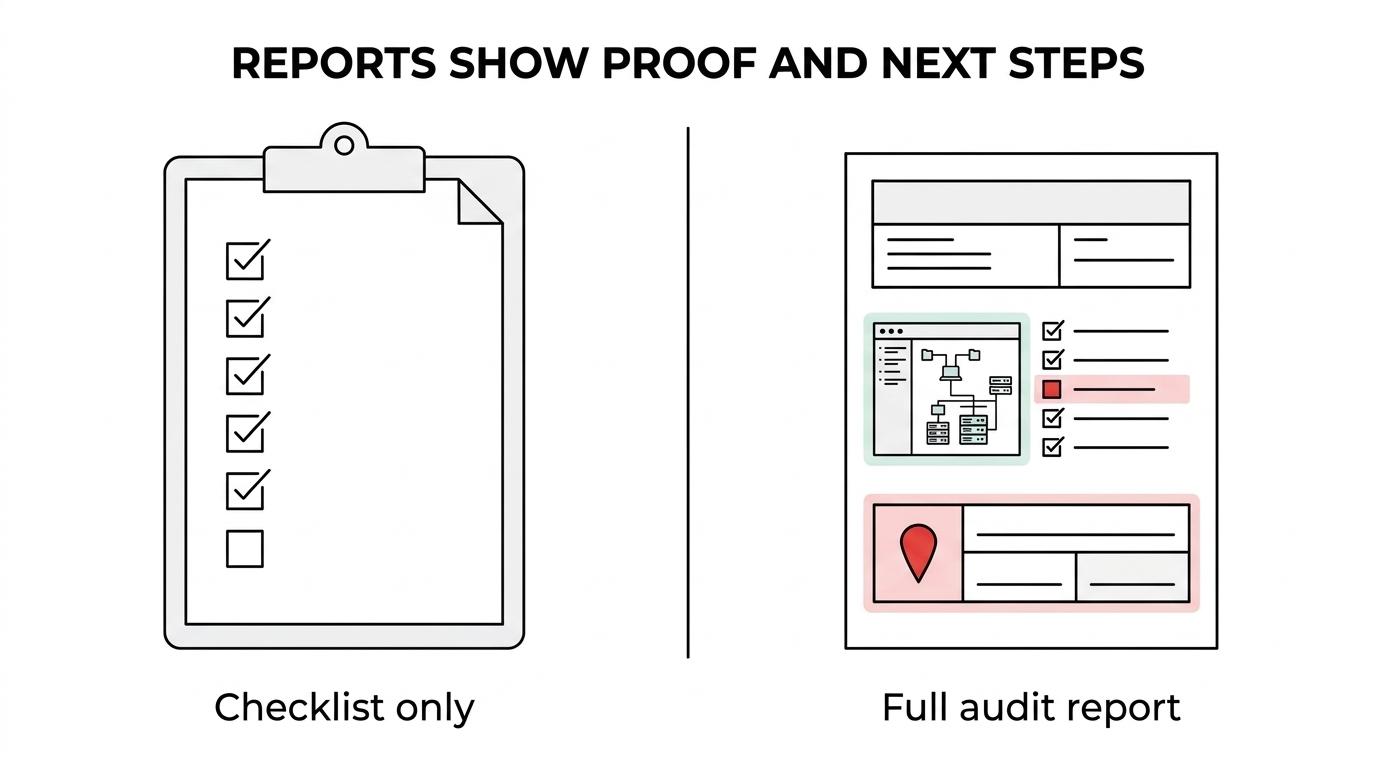
This is one of the biggest reporting gaps in SMB environments. Teams often have a decent checklist with items like “review firewall,” “check backups,” and “verify MFA.” What they lack is a format that records evidence, grades the condition, states the business risk, and assigns a next step.
The CIS Controls Assessment Specification is useful here because it focuses not only on whether a safeguard is implemented, but how well it is implemented. That is the difference between a worksheet and a report. A template should prompt for assumptions, inputs, measures, and procedure review, even if the SMB version is simpler than a formal enterprise assessment.
If your document cannot answer “What was tested, what was found, and what should be fixed first?”, then it is not a report template yet.
How should you write findings, risk ratings, and remediation actions so the report is useful?
Write findings in a way that makes action unavoidable. NIST expects assessment findings, comments on weaknesses or deficiencies, and recommendations for corrective actions.
The fastest way to improve a network audit report template is to standardize the finding format. That means every issue should be written with enough detail for technical staff to fix it and enough business context for leadership to approve the work.
A practical finding record should include:
- Control area: Asset inventory, patch management, access control, logging, backups, or network segmentation
- Evidence reviewed: Config export, screenshot, ticket history, scan result, restore test, or log sample
- Condition found: What is missing, misconfigured, stale, or undocumented
- Risk impact: Security exposure, downtime risk, compliance gap, or operational dependency
- Remediation: Corrective action, owner, target date, and validation method
Risk ratings do not need a complicated formula to be effective. Low, medium, high, and critical are enough if you apply them consistently. The key is context. An outdated switch in a low-impact closet may rate medium. The same exposure on the core firewall at headquarters may rate high or critical because the blast radius is much larger.
One final reporting habit matters more than most teams expect: state what was not assessed. If wireless coverage was out of scope, if cloud identity logs were unavailable, or if restore testing could not be observed, say so directly. That protects the integrity of the report and prevents false confidence.