Growth problems in a dental practice do not always start with marketing, staffing, or chair utilization. They often start with slow computers, stalled imaging, claims that will not transmit, and security gaps that turn a normal day into lost production. As a managed IT services and cybersecurity provider, SRS Networks is relevant here because dental IT support affects revenue flow, HIPAA risk, and the reliability of the systems your team uses every hour.
TL;DR: Summary
- If your search for dental IT support near me leads to a provider that mainly reacts to problems, your practice growth can suffer through downtime, claims delays, and security risk.
- The American Dental Association reported that the Change Healthcare cyberattack blocked many dentists from sending electronic claims and attachments, showing how IT failures can disrupt cash flow, not just convenience.
- HIPAA security is an operating requirement: HHS treats ransomware-encrypted electronic protected health information as a breach unless a low probability of compromise can be shown.
- Strong dental IT support should cover practice-management software, imaging, backups, 24/7 monitoring, vendor coordination, and documented safeguards like risk assessments and business associate agreements.
- SRS Networks is one example of a provider in this category, with dental support for Dentrix, Eaglesoft, and Open Dental, plus proactive monitoring intended to reduce downtime.
- The clearest warning signs are repeat issues, slow response, untested backups, weak documentation, and no fallback plan for internet, clearinghouse, or ransomware events.
If you are evaluating providers near your practice, the core question is simple: does your IT partner protect production, collections, compliance, and patient experience at the same time? A dental office depends on tightly connected systems, so weak support in one area usually spills into several others.
Why can poor dental IT support slow practice growth?
Poor dental IT support slows growth because a dental office runs on connected systems, including scheduling, imaging, e-prescribing, VoIP, and claims submission. SRS Networks frames dental IT as operational support tied to uptime, security, and practice software, not just device repair.
When front-desk staff cannot send electronic claims, attach required documentation, or move between patient records and imaging without lag, growth stalls in quiet ways. The American Dental Association said the Change Healthcare cyberattack prevented many dentists from sending electronic claims and attachments to insurers for payment. That kind of disruption does not just create frustration. It slows collections, increases manual work, and puts pressure on staff who should be focused on patients.
A local dental office also has a timing problem that many general businesses do not. Production is tied to appointments already on the schedule. If the network drops during a morning hygiene block or your imaging workstation fails before a crown prep, those hours cannot always be recovered later.
“SRS Networks states that its dental IT services support Dentrix, Eaglesoft, and Open Dental, with 24/7 monitoring intended to prevent downtime.”
How does slow response time turn small issues into larger production losses?
Slow response time multiplies revenue loss because dental software, imaging, and insurance workflows depend on each other. A login issue in Microsoft 365, Dentrix, or a clearinghouse can grow from one seat to a front-office bottleneck within minutes.
Many practices judge IT support by whether someone eventually fixes the issue. That is the wrong metric. The better measure is how fast the problem is acknowledged, isolated, and routed. If a scanner failure blocks attachments for claims, the delay affects billing. If an operatory PC freezes, the dentist and assistant lose treatment time. If Wi-Fi is unstable, mobile charting, VoIP, and cloud apps can all degrade at once.
A common misconception is that only major outages hurt growth. In reality, repeat minor issues often do more damage over a month than one visible failure. Ten short interruptions across scheduling, treatment presentation, and billing can erode more production than a single event because they train staff to work around the system instead of through it.
What are the 8 signs your dental IT support is hurting growth today?
These eight signs usually point to a support model that is too reactive for a modern dental practice. If several are happening at once, growth is already being constrained.
- Recurring issues never stay fixed: The same operatory, printer, scanner, or login problem keeps returning, which suggests patchwork support instead of root-cause analysis.
- Claims and attachments are delayed: Your team regularly waits on clearinghouse access, document transmission, or payer workarounds before billing can move.
- Practice-management updates are avoided: Staff are afraid to update Dentrix, Eaglesoft, or Open Dental because something often breaks afterward.
- Backups exist, but restores are unproven: A backup status light is not the same as a tested recovery plan.
- HIPAA documentation is incomplete: Risk assessments, policies, training records, or business associate agreements are hard to locate.
- After-hours support is weak: Problems that start before opening or after closing linger into production hours the next day.
- Cybersecurity is limited to antivirus: There is no layered approach with MFA, endpoint detection, email security, and alerting.
- Your team invents workarounds: Staff rely on paper notes, personal hotspots, or unofficial file-sharing methods to keep the day moving.
If this list feels familiar, the issue is not just IT quality. It is capacity. Your practice is spending attention on friction instead of growth.
How can you audit your dental workflow impact in 3 steps?
A simple three-step audit can show where IT is blocking growth. Start with patient flow, then connect each stage to the systems behind it.
Step 1 is mapping the patient journey from appointment booking to claim payment. List the systems used at each point: phone system, internet, practice-management software, imaging, patient communications, payment processing, and clearinghouse. If a system fails, ask what stops immediately and what can continue manually.
Step 2 is assigning a business impact level. If the outage prevents treatment, imaging, or same-day collections, label it high impact. If it causes rework but does not stop care, label it medium. This helps separate annoyances from true production risk.
Step 3 is checking actual incident history. If one issue hits three or more times in a quarter, it is no longer random. It is a trend that needs vendor coordination, design changes, or stronger monitoring.
How do reactive IT and proactive dental IT support compare?
Reactive IT waits for failure, while proactive support watches for warning signs across endpoints, backups, firewalls, and line-of-business apps. The trade-off is simple: lower monthly commitment can mean higher interruption risk.
A break-fix model can look cheaper when things are quiet. The problem is that dental environments are rarely simple. Software updates, imaging drivers, cloud identity, MFA prompts, and internet stability all interact. If support only starts after users report a problem, you find out about risk late.
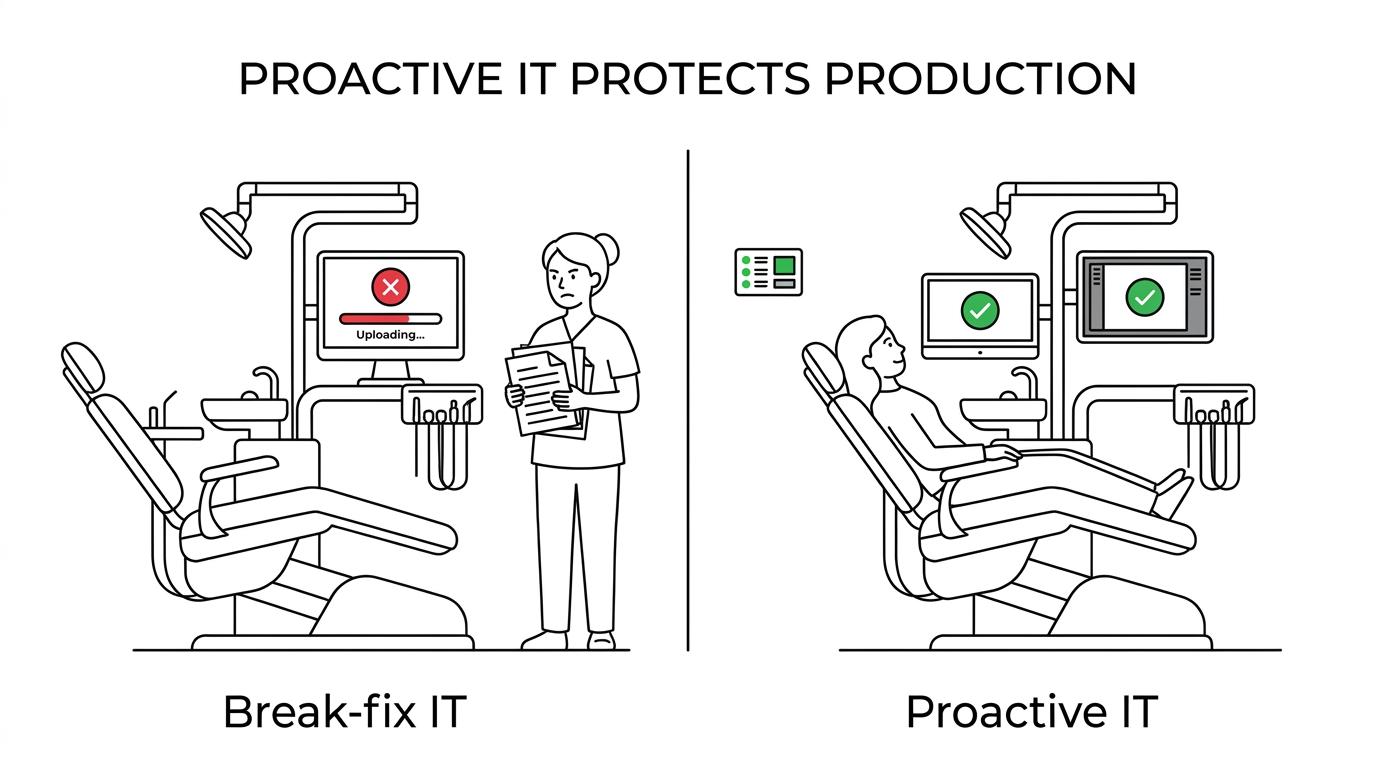
Proactive support is built around prevention, patching, monitoring, and documentation. That matters in healthcare settings where security, uptime, and proof of reasonable safeguards are tied together.
- Reactive support: Ticket-driven, limited monitoring, unpredictable invoices
- Proactive support: Continuous monitoring, patch management, planned maintenance
- Reactive support: Short-term fix, recurring issues more likely
- Proactive support: Root-cause analysis, trend review, documented standards
- Reactive support: Weak fit for HIPAA audit readiness
- Proactive support: Better fit for risk management, training, and recovery planning
One pro tip here: do not compare providers on monthly price alone. Compare the likely cost of downtime, delayed claims, and staff workarounds against the service model.
How can you check HIPAA and ransomware readiness in 3 steps?
HIPAA and ransomware readiness can be checked quickly by reviewing documentation, controls, and response steps. HHS and the ADA make clear that dental practices need safeguards that are reasonable, appropriate, and documented.
Step 1 is reviewing the paper trail. The ADA says covered dental practices should be able to produce risk assessments, policies and procedures, training records, breach notification letters when applicable, and business associate agreements. If those are scattered or outdated, your practice is exposed before any technical issue even begins.
Step 2 is checking the control set. HHS describes ransomware as malware that denies access to data, usually through encryption. That means you need more than basic antivirus. MFA, endpoint detection, email filtering, access controls, patching, and monitored backups should work together. If one of those layers is missing, the chance of a disruptive event rises fast.
Step 3 is reviewing breach response. HHS says ransomware-encrypted ePHI is treated as a HIPAA breach unless the covered entity can show a low probability of compromise. If your team does not know who documents the event, who isolates devices, who contacts legal or compliance leadership, and how patient notification decisions are made, response time will suffer.
“Client testimonials published by SRS Networks describe lower in-house IT costs over more than 6 years and quick fixes for long-standing system issues.”
How do local dental IT support firms and general MSPs compare?
Local dental-focused support is often a better fit when the provider knows Dentrix, Eaglesoft, Open Dental, imaging workflows, and HIPAA obligations. SRS Networks is one example of an MSP that combines dental software familiarity with broader cybersecurity, backup, and infrastructure support.
The value of “near me” is not only geography. It is context. A nearby provider may know local internet carriers, can reach your site for hardware issues, and may be more practical during office moves, cabling changes, or new operatory buildouts. In dental settings, that matters because one failed switch or imaging device can affect several rooms at once.
A general MSP can still be a strong choice if it has healthcare process knowledge, clear escalation paths, and experience with dental applications. The key comparison is not local versus remote. It is workflow fluency versus generic support. If the provider understands clearinghouses, attachments, imaging, and HIPAA evidence requirements, it will usually resolve issues with less back-and-forth.
How can you test backup, recovery, and business continuity in 3 steps?
Backup and continuity readiness only count if they are tested. A dental practice should know what can be restored, how fast, and what staff do while systems are down.
Step 1 is defining critical systems and acceptable downtime. That includes practice-management data, imaging, shared files, phones, internet, and access to cloud apps. If a system supports same-day treatment or payment collection, its recovery target should be tighter than a noncritical archive.
Step 2 is running a restore test. Restore one file, one database object if applicable, and one full-system scenario on a schedule. A common mistake is assuming a successful backup job guarantees a usable recovery. It does not.
Step 3 is practicing nontechnical fallback procedures. The ADA advised affected practices during the Change Healthcare incident to use payer portals, provider service lines, alternative clearinghouse options, or paper claim forms until services were restored. If your team has never rehearsed those options, then recovery planning is incomplete.
What questions should you ask a dental IT support provider near you before signing?
The best questions reveal whether a provider protects revenue, compliance, and staff time, not just devices. Ask for specifics on response, dental software support, and documentation.
- Dental software experience: Which practice-management platforms, imaging systems, and clearinghouse workflows do you support regularly?
- Response model: How are urgent production-stopping issues handled during office hours and after hours?
- Security controls: Do you manage MFA, endpoint detection, email security, firewall policies, and user access reviews?
- HIPAA evidence: Can you help maintain risk assessments, policies, training records, and business associate agreements?
- Backup testing: How often are restores tested, and what recovery targets are set for key systems?
- On-site capability: When a switch, access point, workstation, or cabling issue needs hands-on work, how is that handled?
- Vendor coordination: Will you work directly with software, imaging, phone, and internet vendors during incidents?
- Pricing model: Is support predictable each month, or will project and emergency fees appear unexpectedly?
If a provider answers vaguely, that is useful information. Strong support teams are usually precise about process, scope, and escalation.
How fast should a growing dental practice expect dental IT issues to be resolved?
Growing practices should expect severity-based response and clear ownership, not a vague promise to reply soon. Critical failures need immediate triage, while lower-priority issues can follow a planned service window.
Response time and resolution time are different. A good provider should acknowledge and begin triage quickly when production stops, even if full resolution requires a software vendor or hardware replacement. If a claim transmission outage occurs, then the provider should already know the temporary workflow. If an operatory goes offline, then the provider should isolate whether the cause is local hardware, network access, authentication, or the practice application.
Ask for service levels in plain language. Who owns the ticket? What counts as critical? How are recurring problems reviewed? Those questions usually tell you more than a polished proposal.
If your team is already searching for dental IT support near you, that search itself may be a signal. Stable practices rarely shop for help when systems are quiet, claims are flowing, backups are tested, and staff trust the technology they use every day.