For many small and midsize businesses, the desktop question no longer starts and ends with, “What laptop should we buy next?” Hybrid work changed that. Teams now move between offices, homes, client sites, and shared spaces, often on different devices, and the desktop model has to keep up without creating security gaps or support chaos.
That shift is visible in national data. The U.S. Bureau of Labor Statistics reported that in November 2023, 34.8% of workers in management, professional, and related occupations teleworked or worked at home for pay. Sales and office occupations were lower at 21.6%, while computer and mathematical occupations reached 64.9%. Those numbers point to a simple truth for SMBs: the right desktop model depends heavily on who is working remotely, how often they do it, and what they need access to.
Why hybrid SMB desktop decisions changed
A traditional office PC model assumed people worked in one place, on one machine, behind one network perimeter. That assumption is weaker now. Hybrid teams expect access to files, business apps, line-of-business systems, Microsoft 365, and internal resources from wherever work happens that day.
That does not mean every company should replace PCs with virtual desktops. It means the old default has become less reliable as a default. When telework is common, desktop access, identity controls, remote support, and data protection matter just as much as raw device performance.
Role patterns matter too. BLS data shows telework is not evenly spread across every occupation. A legal office, accounting firm, medical practice, or multi-location services business may have a large group of users who can work well in a remote-friendly desktop model. A warehouse team, imaging department, or production floor may not.
What a virtual desktop means for hybrid employees
A virtual desktop is a full Windows desktop that runs in a cloud or data center environment and is delivered to the user over the internet or a managed connection. The person still works in a familiar desktop session, but the computing environment is hosted centrally rather than living only on one physical PC.
That changes a lot.
Instead of tying productivity to a single office workstation, users can access the same desktop from different endpoint types. Microsoft documents that Azure Virtual Desktop can be reached through Windows App from Windows, macOS, iPhone and iPad, Android and Chrome OS, web browsers, and even Meta Quest devices. For many SMB teams, that means a user can move from a company laptop to a home Mac to a browser session without losing access to the same assigned desktop or applications.
Browser-based access is especially useful for temporary access scenarios, remote troubleshooting, and business continuity. Microsoft notes that browser-based access only requires internet connectivity and a user account assigned by an administrator. That can be a strong fit for distributed teams, seasonal staff, or users who occasionally need secure access without a full device build.
Virtual desktop vs traditional PC comparison for SMB teams
The desktop choice is less about which model is “better” in absolute terms and more about which model best matches work patterns, security needs, and support capacity.
| Decision Area | Virtual Desktop | Traditional PC-Centered Model |
|---|---|---|
| User access | Same desktop can be reached from many devices | Access is tied more closely to one primary device |
| Data location | Data can stay in the hosted environment | Data often spreads across local devices unless tightly controlled |
| Remote work support | Built for hybrid and remote access | Works well, but usually needs added remote access tools and policy controls |
| Security control | Centralized patching, app delivery, and session policy | Strong security is possible, though device-by-device management is heavier |
| Hardware lifecycle | Endpoint demands can be lower in some use cases | Performance depends more directly on each PC’s specs and age |
| Internet dependency | Reliable connectivity is essential | Users can keep working locally during internet disruptions for some tasks |
| Specialized peripherals | May require testing or added design work | Usually simpler for local printers, scanners, and niche hardware |
| Cost profile | Often more operational spending over time | Often more upfront capital spending with refresh cycles |
A good SMB design conversation usually includes both options, because many companies land on a mixed model rather than a single answer.
Virtual desktop security for remote and hybrid work
Security is where virtual desktops often gain real momentum. When the desktop session runs in a controlled environment, IT can standardize images, patch systems centrally, restrict local data storage, and apply access policies with more consistency. That is appealing for organizations dealing with client records, financial data, healthcare information, or regulated workflows.
CISA has advised organizations to use approved remote access solutions, including VPNs or virtual desktop interfaces, for authorized remote work. That guidance matters because hybrid access expands the number of ways attackers can target users and systems. A virtual desktop design can reduce the need to expose internal resources directly to unmanaged or lightly managed endpoints.
CISA also recommends phishing-resistant MFA for email, VPNs, and accounts with access to critical systems. That applies no matter which desktop model is chosen. A virtual desktop environment is not automatically safe, and a physical PC is not automatically risky. Identity security, conditional access, endpoint protection, logging, and session controls still need to be in place.
RDP deserves special attention. CISA recommends closing unused RDP ports, auditing systems that use RDP, and enforcing MFA and logging when RDP must remain enabled. For SMBs that have historically relied on direct RDP access to office PCs, that guidance should trigger a serious review. In many cases, a virtual desktop or properly secured remote access platform is easier to defend than a patchwork of exposed office machines.
When virtual desktop fits best for SMB roles
Virtual desktops tend to fit best when users need the same experience from multiple locations and multiple devices. They also fit well when the business wants tighter control over where data lives, how applications are delivered, and how quickly access can be granted or revoked.
The strongest candidates usually share a few common traits.
- work happens from home, office, and client locations
- staff use more than one device during the week
- onboarding and offboarding need to happen quickly
- Security priority: sensitive data should stay in a controlled environment instead of living on many endpoints
- Support model: IT wants one standard desktop image rather than many unique workstation builds
- Compliance pressure: the business needs cleaner access controls, better logging, and easier policy enforcement
That pattern aligns with how CBM Accounting describes digital accounting workflows, where cash control and daily operations depend on consistent access to shared systems and documents rather than a single office workstation.
This is why virtual desktop discussions often resonate with accounting firms, legal practices, professional services teams, healthcare administration staff, and other knowledge-worker groups. Their work tends to be application-driven and document-driven, with less need for workstation-bound hardware.
When physical PCs still make sense for SMB teams
Physical PCs are still the better fit for many users. If the role depends on local performance, specialized hardware, low-latency design work, or reliable offline capability, a PC-centered model may be the better answer.
Some teams also work in environments where internet quality is inconsistent, or where shared floor devices, production systems, imaging tools, or shop equipment are tied closely to the local machine. In those cases, a well-managed business PC remains practical and effective.
A PC-first approach often fits these conditions well:
- engineering or graphics workloads with heavy local processing
- on-site roles using specialty printers, scanners, or lab devices
- branches with weak or unstable internet circuits
- Application behavior: older software may not perform well in a hosted session without remediation
- Operational reality: some employees rarely telework and spend nearly all work hours at a fixed location
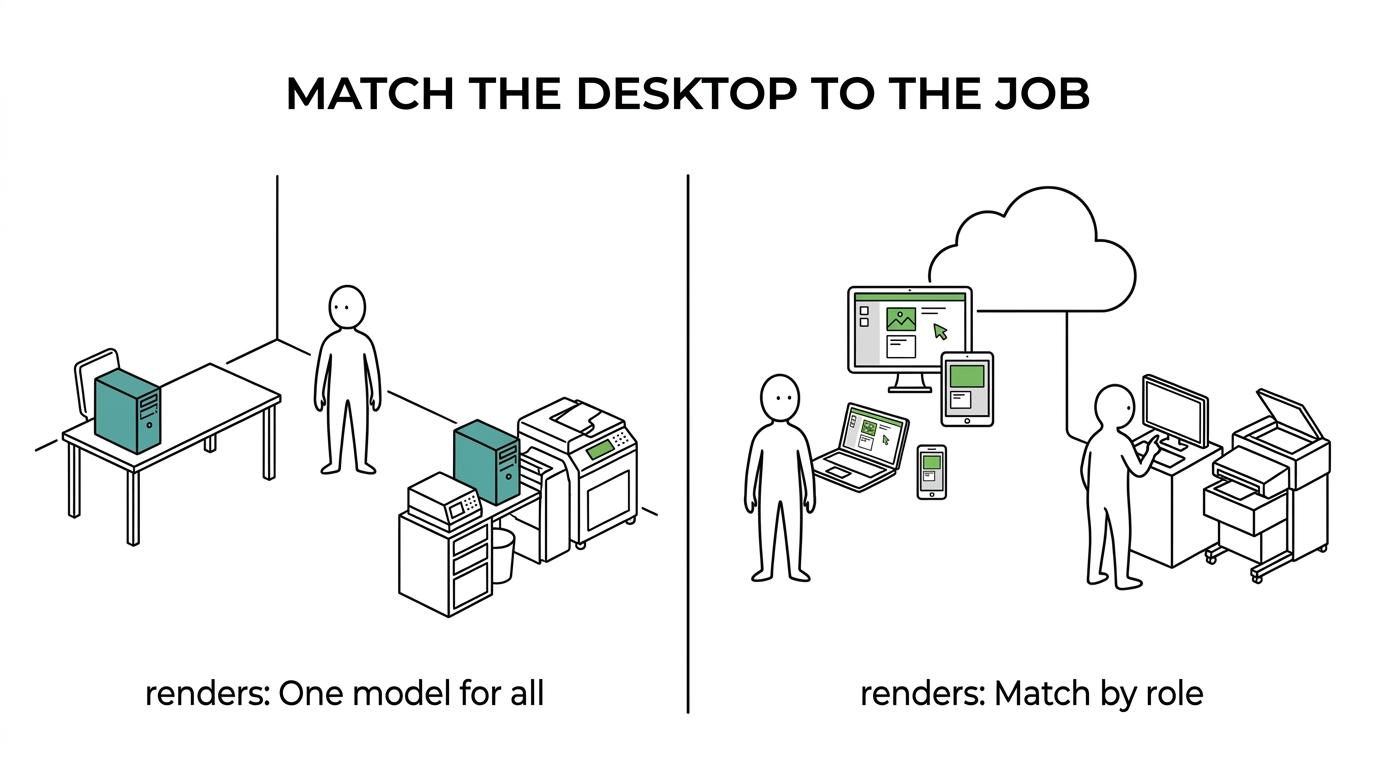
This is why many SMBs do not need an all-or-nothing answer. A controller, attorney, project manager, and HR lead may thrive on virtual desktops, while a CAD user, technician, or front-desk workstation may stay physical.
Virtual desktop cost and support planning for SMBs
Cost comparisons can get distorted when teams only compare monthly virtual desktop fees to the purchase price of a PC. The real picture is broader. You have to include device refresh cycles, endpoint security tools, support labor, remote access tools, backup strategy, downtime risk, and the cost of managing inconsistent desktops over time.
Virtual desktops can shift spending from large periodic hardware purchases toward recurring operating costs. That may be attractive for SMBs that want more predictable monthly budgeting. It can also extend the useful life of endpoint devices in some scenarios, because the local device no longer needs to carry the full compute load for every user.
Still, virtual desktop pricing needs careful planning. Licensing, storage, cloud compute use, profile management, bandwidth, and after-hours usage patterns all affect cost. A virtual desktop environment that is sized well for user behavior can be efficient. One that is oversized or poorly governed can become expensive quickly.
How SMBs can choose the right desktop model
A smart decision starts with user groups, not technology labels. Segment users by work pattern, application needs, remote access frequency, data sensitivity, and device mix. Once those groups are clear, desktop design becomes much easier.
A practical assessment often includes these questions:
- User profile: who needs full-time hybrid access, and who is mostly office-based?
- Application profile: which apps run well in a hosted session, and which require local performance?
- Security profile: where is sensitive data stored today, and how many endpoints can currently access it?
- Support profile: how much time is spent fixing device-specific issues versus managing a standard environment?
- Resilience profile: what happens if a laptop is lost, an office is inaccessible, or a site internet link fails?
For many SMBs, the best answer is a blended model: virtual desktops for hybrid knowledge workers, business PCs for location-bound and hardware-dependent roles, and a strong identity and security baseline across both. That gives the organization flexibility without forcing every user into the same mold.
A short pilot can settle the question faster than a long debate. Pick one user group, define success measures around performance, support effort, security control, and user experience, then test the model in real working conditions. With the right planning, the desktop choice becomes less about tradition and more about building a secure, reliable way for people to work wherever business happens.