

Virtual desktops are changing how we work and access information. More than 60 percent of organizations now use some form of virtual desktop infrastructure and that number keeps climbing every year. Most people think these setups are only about remote access but the real story is deeper. Virtual desktops are actually reshaping entire industries with their security, flexibility, and cost savings.
Table of Contents: Virtual Desktop Technology Guide
- Defining A Virtual Desktop: What It Is
- The Importance Of Virtual Desktops In Modern Workplaces
- How Virtual Desktops Function: The Technology Behind It
- Key Components Of Virtual Desktop Infrastructure
- Real-World Applications Of Virtual Desktops In Various Industries
Quick Summary
| Takeaway | Explanation |
|---|---|
| Virtual desktops enhance workplace flexibility. | Employees can access their complete work environment from any device, improving mobility and operational efficiency. |
| Centralized management improves security. | Virtual desktops allow for uniform security protocols and quick deployment of updates, minimizing vulnerabilities. |
| Cost savings through resource optimization. | By shifting resources to centralized servers, organizations reduce hardware costs and simplify IT management. |
| Real-time performance and user experience. | Sophisticated network protocols ensure users experience responsiveness akin to local computing, regardless of device or location. |
| Enhanced educational access and collaboration. | Virtual desktops provide consistent access to specialized software and resources for students and researchers, supporting hybrid learning models. |
Defining a Virtual Desktop: What It Is
A virtual desktop represents a sophisticated computing environment that transforms how businesses and individuals interact with technology. At its core, a virtual desktop is a software-based representation of a complete computer system that operates independently from the physical hardware, enabling users to access their entire computing workspace from virtually any device.
Understanding the Fundamental Concept
Unlike traditional desktop computing where software and operating systems are directly installed on a physical machine, a virtual desktop runs on a centralized server and is delivered to end users through a network connection. Research from Harvard School of Public Health confirms that this approach supports enhanced user mobility and provides robust remote access capabilities.
The virtual desktop infrastructure (VDI) allows users to experience a complete, personalized computing environment that looks and feels exactly like a traditional desktop. Key characteristics include:
- Consistent user interface across multiple devices
- Centralized management and deployment of software
- Enhanced security through controlled access
- Simplified software updates and maintenance
Technical Mechanics of Virtual Desktops
Virtual desktops function by creating a software-based abstraction layer that separates the user’s desktop environment from the physical computing hardware. This means that instead of running an operating system directly on a computer, the entire desktop experience is hosted on a remote server and transmitted to the user’s device in real time.
Users connect to their virtual desktop through a thin client, web browser, or specialized software, receiving a full desktop experience that can include all standard applications, personal settings, and data. The server handles all computational processing, rendering, and storage, while the local device simply acts as a display and input mechanism.
This approach offers significant advantages for organizations seeking flexible, secure, and cost-effective computing solutions. By centralizing desktop management, businesses can reduce hardware costs, improve security, and provide seamless access to computing resources from anywhere with an internet connection.
To clarify the distinctions between traditional desktops and virtual desktops, the following table compares their core characteristics, management approaches, security implications, and flexibility for users.
| Feature | Traditional Desktop | Virtual Desktop |
|---|---|---|
| Location of OS & Software | Installed on local hardware | Hosted on centralized server |
| Access Flexibility | Limited to one device/location | Available from any device/location |
| Management & Updates | Done individually on each PC | Centralized management & quick updates |
| Security Control | Varies by device, harder to enforce | Uniform, centralized security protocols |
| Hardware Costs | Higher (unique hardware per user) | Lower (shared server resources) |
| User Experience Consistency | May differ across devices | Consistent across all devices |
The Importance of Virtual Desktops in Modern Workplaces
Virtual desktops have emerged as a transformative technology for businesses navigating the complex landscape of modern work environments. By fundamentally reimagining how organizations approach computing resources, virtual desktops provide strategic solutions to numerous operational challenges facing today’s enterprises.
Enhancing Workplace Flexibility and Productivity
In an era of distributed workforce models, virtual desktops offer unprecedented flexibility for employees. Research from Gartner indicates that organizations implementing virtual desktop infrastructure can significantly improve workforce mobility and operational efficiency. These technologies enable employees to access their complete work environment from any device, breaking down traditional geographical and technological barriers.
Key productivity advantages include:
- Seamless access to work resources from multiple locations
- Consistent user experience across different devices
- Reduced time spent on technical troubleshooting
- Faster onboarding and technology provisioning
Security and Compliance Considerations
Virtual desktops represent a robust solution for organizations prioritizing data security and regulatory compliance. By centralizing data storage and computational processing, businesses can implement more stringent control mechanisms and reduce potential security vulnerabilities associated with traditional desktop computing.
The centralized nature of virtual desktop infrastructure allows organizations to:
- Implement uniform security protocols across all user endpoints
- Quickly deploy security updates and patches
- Monitor and control data access more effectively
- Minimize risks associated with lost or stolen devices
Cost-Effectiveness and Resource Optimization
Traditional desktop computing models require significant investment in individual hardware, software licensing, and ongoing maintenance. Virtual desktops fundamentally transform this economic model by shifting computational resources to centralized servers, enabling organizations to optimize their technology spending.
By adopting virtual desktop solutions, businesses can achieve substantial financial benefits, including reduced hardware procurement costs, lower energy consumption, and simplified IT management. The ability to extend the lifecycle of existing computing hardware while providing users with a modern, responsive work environment makes virtual desktops an increasingly attractive option for forward-thinking organizations seeking to balance technological innovation with fiscal responsibility.
How Virtual Desktops Function: The Technology Behind It
Virtual desktop technology represents a sophisticated approach to computing that leverages advanced server infrastructure and network technologies to deliver a comprehensive computing experience. By reimagining how computing resources are deployed and accessed, virtual desktops create a flexible and efficient technological ecosystem.
Architectural Framework and Core Components
Research from EDUCAUSE reveals that virtual desktop infrastructure relies on a complex yet elegant technological framework. At its foundation, this system uses virtualization software to create multiple independent virtual machines on a single physical server, each capable of running a complete operating system and application suite.
The primary architectural components include:
- Hypervisor technology for creating and managing virtual machines
- Centralized server infrastructure
- Network connectivity protocols
- Client access devices
- Specialized virtualization management software
Computational Processing and Resource Allocation
Unlike traditional computing models, virtual desktops distribute computational workloads across centralized server resources. When a user connects to their virtual desktop, the server dynamically allocates processing power, memory, and storage resources in real time. This approach allows for precise resource management and enables organizations to optimize their computing infrastructure more efficiently.
The computational process involves several critical steps:
- Authentication and secure user connection
- Dynamic resource provisioning
- Rendering of desktop environment
- Transmission of user interface and interaction data
- Continuous synchronization of user session
Network Protocols and User Experience
The seamless experience of a virtual desktop depends on sophisticated network protocols that transmit user interface, input, and computational data with minimal latency. Advanced compression techniques and intelligent data transmission algorithms ensure that users experience performance comparable to local computing, regardless of their physical location or device type.
These network protocols manage complex interactions, transforming raw computational processes into a smooth, responsive user experience. By abstracting the physical hardware and centralizing computational resources, virtual desktop technologies create a powerful, flexible computing environment that adapts to the evolving needs of modern organizations.
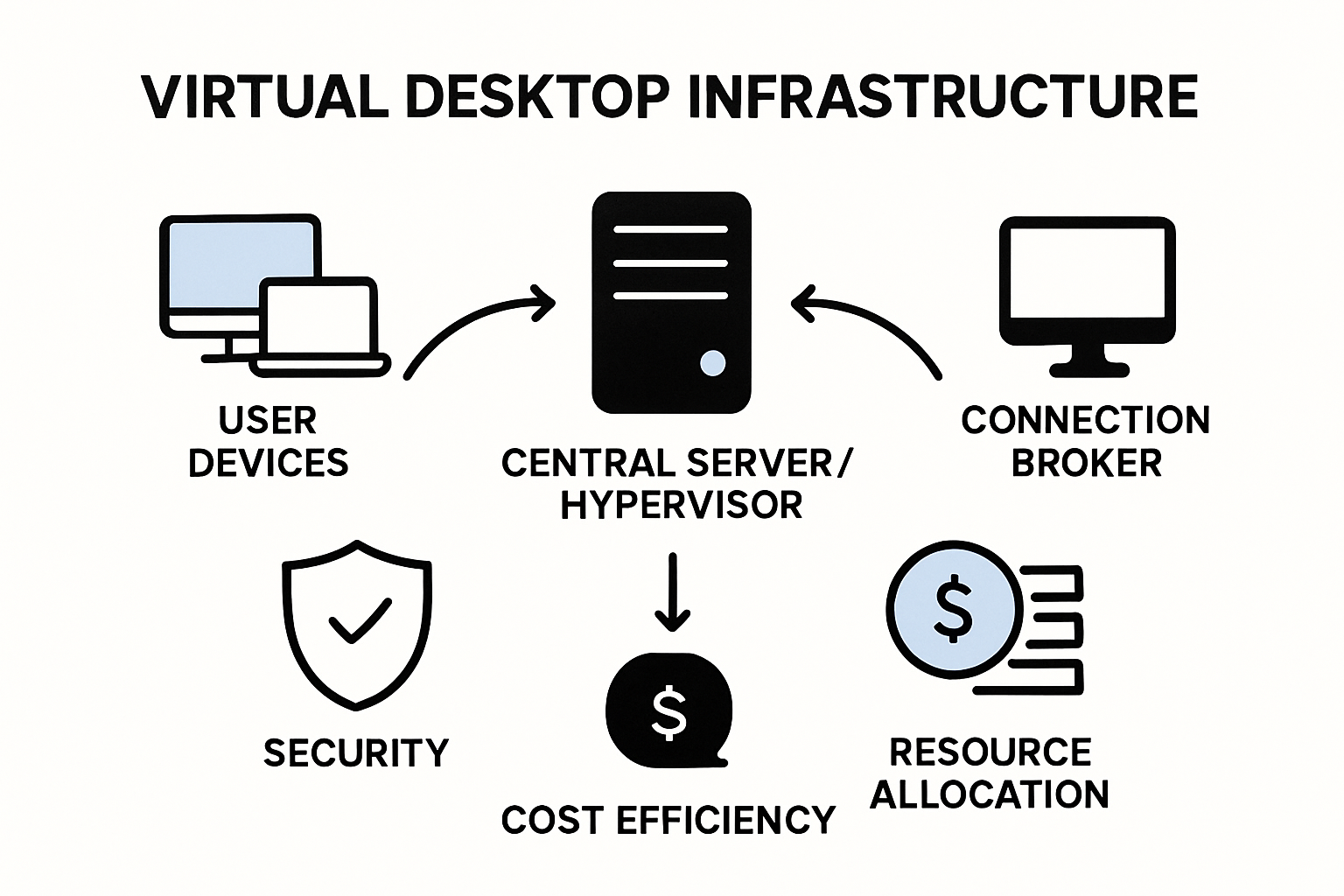
Key Components of Virtual Desktop Infrastructure
Virtual Desktop Infrastructure (VDI) represents a complex technological ecosystem composed of interconnected components that work seamlessly to deliver a comprehensive computing environment. Understanding these critical elements is essential for organizations considering implementation or optimization of their virtual desktop strategy.
Core Technological Elements
Research from the National Institute of Standards and Technology provides insights into the fundamental architectural components that comprise a robust virtual desktop infrastructure. These technological building blocks enable organizations to create scalable, secure, and efficient virtual computing environments.
The primary core components include:
- Virtualization hosts that manage computational resources
- Connection brokers for user authentication and desktop assignment
- Remote display protocols for transmitting user interfaces
- Centralized storage systems
- User profile management platforms
Connection and Authentication Mechanisms
The connection broker serves as the critical intermediary between users and virtual desktop resources. This sophisticated component manages user authentication, desktop provisioning, and session allocation with precision and security. By intelligently routing connection requests, the broker ensures that each user receives the appropriate virtual desktop based on their credentials, access permissions, and organizational role.
Key authentication and connection functionalities encompass:
- Secure user identity verification
- Dynamic desktop assignment
- Session persistence across devices
- Granular access control mechanisms
- Comprehensive logging and monitoring
Resource Management and Optimization
Successful virtual desktop infrastructure depends on intelligent resource allocation and management strategies. The underlying system must dynamically balance computational demands, ensuring optimal performance while maintaining cost efficiency. Advanced VDI solutions utilize sophisticated algorithms to distribute processing power, memory, and storage resources across multiple virtual machines.
This approach enables organizations to maximize their technological investments by creating a flexible, responsive computing environment that adapts to changing workforce requirements. By centralizing computational resources and implementing intelligent management protocols, virtual desktop infrastructure transforms traditional computing models, offering unprecedented levels of scalability, security, and operational efficiency.
Real-World Applications of Virtual Desktops in Various Industries
Virtual desktop technologies have transformed operational capabilities across diverse industry sectors, offering innovative solutions to complex technological challenges. By providing flexible, secure, and scalable computing environments, these technologies enable organizations to reimagine their technological infrastructure and workforce productivity.
Healthcare and Medical Research Applications
Research from the University of Massachusetts Chan Medical School demonstrates the profound impact of virtual desktop infrastructure in medical and research settings. These technologies create secure, centralized platforms that facilitate critical data access, collaboration, and compliance with stringent regulatory requirements.
Key advantages in healthcare include:
- Secure access to patient records across multiple locations
- Compliance with HIPAA data protection regulations
- Simplified management of specialized medical software
- Enhanced collaboration between research teams
- Rapid deployment of software updates
Education and Academic Research Environments
Academic institutions have increasingly adopted virtual desktop technologies to overcome traditional technological limitations. By creating flexible computing environments, universities can provide students and researchers with consistent access to specialized software and computational resources, regardless of physical location or device constraints.

Virtual desktop applications in education offer:
- Remote access to computer labs and specialized software
- Consistent learning environments across different devices
- Reduced hardware procurement and maintenance costs
- Enhanced support for hybrid and distance learning models
- Simplified software licensing and management
Enterprise and Corporate Technological Strategies
In corporate environments, virtual desktop infrastructure represents a strategic approach to managing technological resources. Organizations can centralize computational power, enhance security protocols, and provide employees with flexible, device-independent work environments that support modern workforce mobility.
By implementing virtual desktop solutions, businesses achieve significant operational benefits such as reduced hardware expenses, improved security controls, and the ability to rapidly scale technological resources in response to changing organizational needs. This approach transforms traditional computing models, enabling companies to create more agile, responsive, and cost-effective technological ecosystems that adapt to the dynamic demands of contemporary business landscapes.
For readers interested in how virtual desktops address modern workplace challenges, here is a table summarizing the key benefits of adopting virtual desktop infrastructure across different operational areas.
| Operational Area | Virtual Desktop Benefit |
|---|---|
| Flexibility | Enables employees to work from any location or device |
| Productivity | Provides seamless access and reduces technical downtime |
| Security | Facilitates centralized data control and rapid deployment of updates |
| Cost Management | Reduces need for frequent hardware upgrades and cuts energy costs |
| Resource Optimization | Dynamically allocates computing power based on real-time demand |
| Compliance | Simplifies meeting industry regulations through centralized oversight |
Ready to Unlock the Power of Virtual Desktops for Your Business?
Are you struggling with the rigid limits of traditional desktop setups and facing challenges like costly upgrades, security concerns, or managing remote workers? The article on virtual desktops explained how a secure, flexible, and centrally managed system can solve these pain points. Imagine your team having consistent access to their digital workspace from anywhere, while your business reduces risks and IT costs.
At SRS Networks, we bring these benefits directly to businesses across Salinas, Monterey, and all of Central California. As your local IT partner, we offer tailored cloud computing solutions that enable seamless remote work, secure data access, and simplified network management. Your business deserves a future-proof IT approach that supports both growth and security. Visit our main site and let us show you how a virtual desktop environment can transform your operations. Start your journey today with an expert consultation—don’t let outdated systems hold you back from the flexibility and protection your organization needs now.
Frequently Asked Questions
What is a virtual desktop?
A virtual desktop is a software-based computing environment hosted on a centralized server, allowing users to access their complete desktop experience from any device with an internet connection.
What are the benefits of using virtual desktops in a workplace?
Virtual desktops enhance workplace flexibility, improve security, enable cost-effective resource management, and streamline software updates, making them ideal for modern business environments.
How do virtual desktops enhance security compared to traditional desktops?
Virtual desktops centralize data storage and processing, enabling organizations to implement uniform security protocols, quickly deploy updates, and effectively monitor data access, thereby reducing security vulnerabilities.
What industries benefit the most from implementing virtual desktop technology?
Industries such as healthcare, education, and enterprise environments benefit significantly from virtual desktops, as they enhance data access, compliance, collaboration, and overall operational efficiency.






