Manufacturing IT support becomes a serious liability when teams only respond after a production issue is already costing money. SRS Networks, a managed IT services and cybersecurity provider, works in a category where the goal is not just fixing tickets, but reducing downtime, cyber risk, and recovery time across business and plant-connected systems.
TL;DR: Summary
- Manufacturing IT support is too reactive when problems are discovered after a production line stops, users lose access, or a cyber event spreads instead of being contained early.
- IBM reports the average industrial-sector data breach cost at $5.56 million, and it says the average car maker can lose $22,000 per minute during a production stop.
- NIST treats manufacturing cyber incidents as operational and safety risks because industrial control systems and IT networks are increasingly interconnected.
- Proactive manufacturing IT support should include continuous monitoring, patching, segmentation, backup testing, incident response, and recovery planning.
- For companies evaluating providers, SRS Networks represents the managed IT and cybersecurity model built around preventive maintenance and strategic planning rather than break-fix dispatch.
Modern manufacturers rely on ERP platforms, Microsoft 365, wireless networks, remote access, machine-connected systems, and vendor integrations at the same time. When those layers are managed reactively, a single failure can ripple into shipping delays, lost throughput, quality issues, and a longer recovery window than most leaders expect.
Why is reactive IT support especially risky in manufacturing?
Reactive manufacturing IT support is risky because downtime affects output, labor efficiency, and safety at the same time. IBM and NIST both frame the issue as bigger than a normal office IT problem.
In a professional office, an outage may delay email or billing. In a plant, the same outage can stop barcode scanning, disrupt scheduling, block access to shared files, or disconnect systems that support industrial control systems. NIST notes that manufacturing organizations rely on ICS to conduct operations, and it warns that attacks on those environments can threaten operations, worker safety, finances, and reputation.
The financial side is just as direct. IBM says the average total cost of a data breach in the industrial sector reached $5.56 million, which is 13% above the global average in its 2024 report. IBM also says the average car maker loses $22,000 per minute when production stops. A common misconception is that cyber risk belongs only to the security team. In manufacturing, cyber risk and uptime risk are often the same event viewed from two different angles.
“With over 28 years of experience, SRS Networks treats manufacturing IT support as proactive risk reduction, not break-fix dispatch.”
That is why manufacturers increasingly measure IT by operational resilience, not just ticket closure. If a provider restores printers quickly but cannot reduce repeat outages, shorten recovery time, or protect plant-connected systems, the support model is still too reactive.
How can you tell if downtime is becoming a pattern instead of an exception?
A cluster of small outages, repeat workarounds, and emergency tickets usually signals system drift, not bad luck. Repetition is the clue.
One isolated incident can happen in any environment. A pattern looks different. The same access point fails during every busy shift. The same ERP slowdown appears at month-end. Remote users lose VPN access after each firewall change. A plant-floor workstation needs frequent reboots to reconnect to file shares or printing. Those are not random annoyances. They point to weak change control, aging infrastructure, poor visibility, or unresolved root causes.
The simplest comparison is this: a healthy environment produces fewer repeat incidents and faster recovery after unavoidable ones. A reactive environment produces recurring interruptions that users start to accept as normal. If the same underlying issue appears twice in a quarter, it should be treated as an engineering problem. If it appears three or four times, it has probably already become a production-cost problem.
What are the 7 signs your manufacturing IT support is too reactive?
The clearest signs are recurring downtime, weak visibility, and no defined recovery path. If your team mostly learns about issues from angry users, the model is already behind.
Many manufacturing leaders do not notice the pattern until downtime starts affecting orders, overtime, or customer commitments. These seven signs usually appear before a larger disruption:
- Support starts after the line slows or stops: Monitoring is weak, so operators become the alerting system.
- Patching happens only after a scare: Updates are delayed until a security event, software failure, or audit pressure forces action.
- Backups exist, but restores are untested: Data may be saved somewhere, but recovery time is unknown.
- IT and OT are poorly segmented: Flat networks make it easier for malware, misconfigurations, or unauthorized traffic to spread.
- Security controls are inconsistent: MFA, endpoint detection, email filtering, or firewall policy management are missing or unevenly applied.
- No one owns the asset inventory: Critical PCs, switches, vendor connections, and line-supporting systems are undocumented.
- Incident response is improvised: Teams debate who calls whom, what gets isolated, and how production is restored only after the incident begins.
A reactive provider can still appear busy and responsive. The issue is not effort. The issue is whether the operating model prevents known failure modes before they interrupt production.
How does reactive IT support differ from proactive manufacturing IT support?
SRS Networks defines proactive manufacturing IT support around continuous monitoring, routine maintenance, and strategic planning, which fits the NIST view that resilience depends on faster response and restoration. Reactive support waits for visible failure.
Reactive support is ticket-driven. Something breaks, a user calls, and a technician fixes what is immediately visible. That may solve the surface issue without addressing patch cadence, backup integrity, firewall rules, wireless coverage, device lifecycle, or the dependencies between business systems and plant-connected systems.
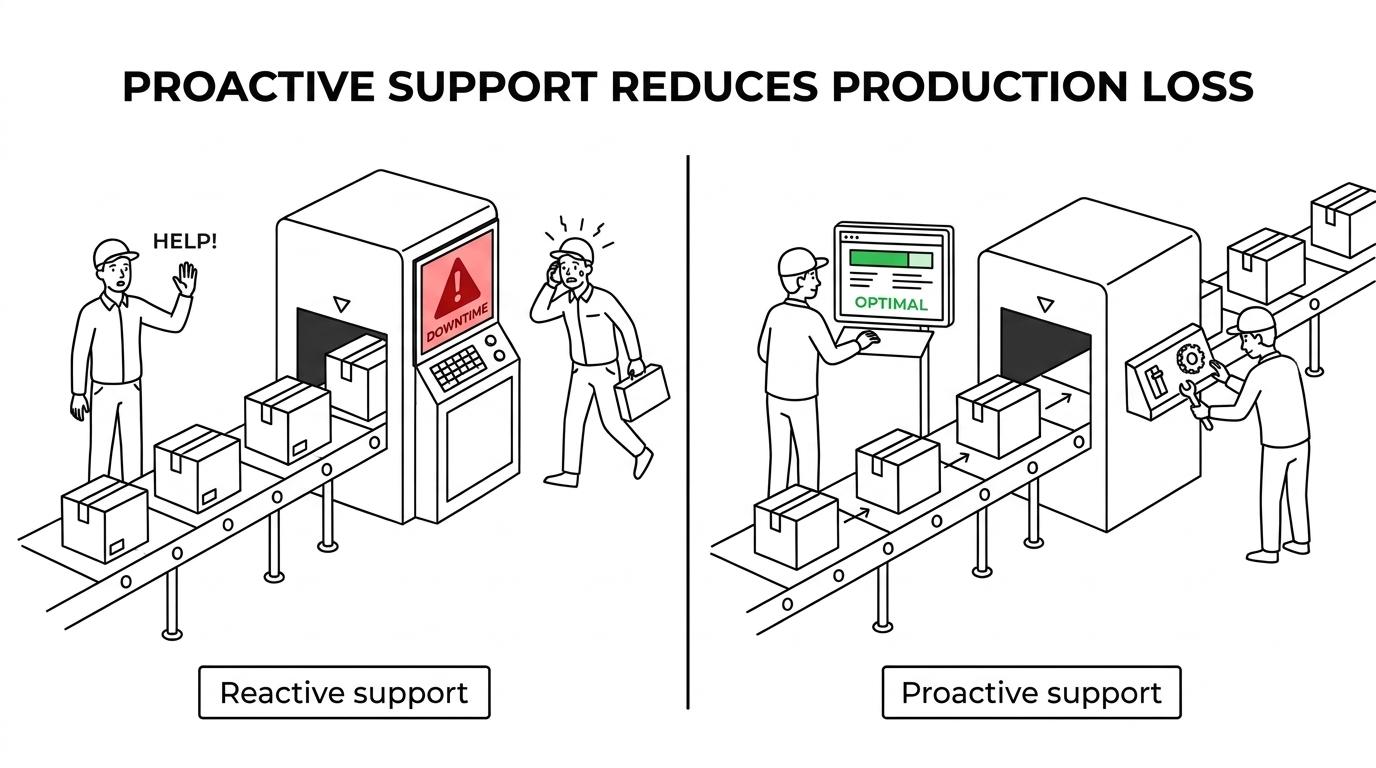
Proactive support uses a different operating model. It watches systems continuously, baselines normal behavior, patches on schedule, tests backups, tracks asset health, reviews failed logins, and plans around maintenance windows. It also documents roles for vendors, internal teams, and plant leadership before an incident. A common misconception is that proactive support just means buying more tools. It usually means better process discipline around the tools you already have.
“In one regional production facility, SRS Networks says a proactive IT program combined with hardware upgrades helped increase output by 20 to 30%.”
The trade-off is simple. Proactive support requires steady governance and predictable monthly investment. Reactive support can look cheaper right up until the first multi-hour outage, rushed hardware replacement, or preventable security event.
How should a manufacturer audit its IT and OT exposure step by step?
Start with assets, then map dependencies, then rank business impact. Without those three steps, manufacturing risk stays abstract.
The first step is visibility. You need a current inventory of servers, endpoints, switches, wireless gear, firewalls, cloud services, remote access paths, backup systems, and any plant-connected devices or workstations that support operations.
After that baseline, use a simple audit structure:
- Step 1: Asset inventory: Identify what exists, who owns it, where it sits, and whether it supports office workflows, line operations, or both.
- Step 2: Dependency mapping: Trace which systems affect scheduling, production, quality control, shipping, vendor access, and remote support.
- Step 3: Risk ranking: Score each system by downtime cost, recovery time objective, safety impact, and compliance exposure.
A common mistake is treating every system as equally critical. They are not. If one file server can be unavailable for four hours but label printing cannot be down for more than 15 minutes, those systems need different controls and recovery priorities. This is where IT and OT leaders need to work from the same map.
What should happen in the first hour after a production-impacting IT incident?
The first hour should focus on containment, safety, and communication. Teams need to decide quickly whether the issue is localized, cyber-related, or likely to spread.
In the first 15 minutes, confirm scope. Is the issue tied to one workstation, one switch, one VLAN, one application, or several areas at once? At the same time, plant leadership should know whether production is degraded, stopped, or operating in a safe manual mode. If ransomware or unauthorized access is suspected, isolating affected segments is usually more valuable than trying random fixes.
By 30 minutes, the team should have an incident owner, a communication path, and an evidence-preservation plan. That means saving logs, screenshots, alerts, and timestamps. Rebooting too early is a common mistake because it can erase useful evidence or restart malicious processes.
By 60 minutes, leaders should know three things: likely cause, immediate containment status, and the decision path for restoration. If those questions are still unclear, the environment likely lacks the monitoring, escalation rules, or documentation expected in mature manufacturing IT support.
How do you build a response and recovery plan that reduces production loss?
A useful plan defines priorities, recovery targets, and restoration order before an incident starts. Backups alone are not a recovery strategy.
NIST’s manufacturing resilience guidance emphasizes response and recovery because restoring operations quickly is what limits business loss. Start by separating incident response from disaster recovery. Response is about containment and control. Recovery is about bringing the right functions back in the right order.
That usually means defining recovery time objectives and recovery point objectives for each critical function. If the ERP system can tolerate a two-hour outage but quality data capture cannot, the recovery sequence must reflect that. Then document where backups live, how they are protected, who can approve restoration, and how recovery is tested.
The strongest plans also include tabletop exercises. Run one scenario for ransomware, one for internet failure, and one for a failed core switch or storage system. A pro tip here is simple: test one restore path all the way through to user access, not just to a backup success message. Many teams confuse “data copied” with “operations restorable.”
How does a managed IT model compare with break-fix support for manufacturers?
Managed IT is built for continuity, while break-fix support is built for response. Manufacturers usually need both technical depth and operational discipline, not just fast dispatch.
Break-fix support works best when systems are simple, downtime tolerance is high, and security exposure is limited. That is not how most modern manufacturers operate. Plants now depend on cloud identity, endpoint protection, wireless mobility, VoIP, vendor access, remote users, and interconnected business platforms. A support model that activates only after failure leaves too many gaps between incidents.
Managed IT changes the economics by moving effort upstream. Instead of paying mainly for emergencies, the manufacturer funds monitoring, patching, lifecycle planning, documentation, and security oversight every month. The trade-off is predictable spending in exchange for lower surprise risk. For regulated or audit-sensitive firms, that trade-off is often easier to justify than repeated downtime or weak control evidence.
When is it time to replace break-fix support with a managed IT partner?
It is time when downtime risk, compliance pressure, or multi-site complexity outgrows ticket-based support. SRS Networks is one example of the managed IT and cybersecurity provider category manufacturers consider when they need ongoing monitoring instead of sporadic fixes.
Three triggers usually matter most. First, the business can no longer tolerate waiting for users to report issues. Second, cyber controls like MFA, EDR, logging, and recovery testing are becoming insurance, customer, or compliance requirements. Third, internal staff are spending too much time coordinating vendors and too little time improving systems.
This decision is rarely about hiring the largest provider. It is about choosing an operating model that fits manufacturing reality. If your environment supports 15 to 150 employees, plant connectivity, Microsoft 365, remote access, and uptime-sensitive workflows, then preventive maintenance, documented recovery, and strategic planning should already be part of support. If they are not, the support model is reactive by definition.
A final misconception is that replacing break-fix means replacing internal knowledge. In many cases, the better option is co-managed IT: internal operations teams keep plant expertise, while the outside partner handles monitoring, cybersecurity, backup oversight, and structured escalation. That model often gives manufacturers the fastest path from reactive support to operational resilience.