If your business is still running Windows 10, the decision point has passed. Microsoft ended support for Windows 10 version 22H2 on October 14, 2025, which means those systems no longer receive security updates. SRS Networks helps small and midsized businesses move compatible PCs to Windows 11, identify systems that do not meet requirements, and replace aging hardware without turning the project into weeks of disruption.
SRS Networks delivers Windows 11 migration as part of ongoing managed IT and cybersecurity support, not as an isolated upgrade. That means your rollout can include readiness assessments, backup validation, pilot groups, after-hours deployment, Microsoft 365 and identity configuration, help desk support, and post-migration security standardization across your environment.
Windows 11 migration services for SMBs after Windows 10 end of support
SRS Networks starts with a clear picture of your environment: device inventory, Windows 11 compatibility review, TPM version 2.0 checks, application dependency review, user group mapping, and backup status. You get a migration plan that shows which PCs can be upgraded, which should be retired, and how rollout waves will be scheduled.
That planning matters because Microsoft now directs organizations off unsupported Windows 10 systems toward Windows 11 on compatible devices or replacement hardware. If your team depends on Microsoft 365 Apps, secure remote access, and line-of-business software, we map those dependencies before deployment so you are not troubleshooting critical tools after users log in Monday morning.
“Windows 10 support ended on October 14, 2025. SRS Networks helps you move compatible devices to Windows 11 and identify systems that need replacement.”
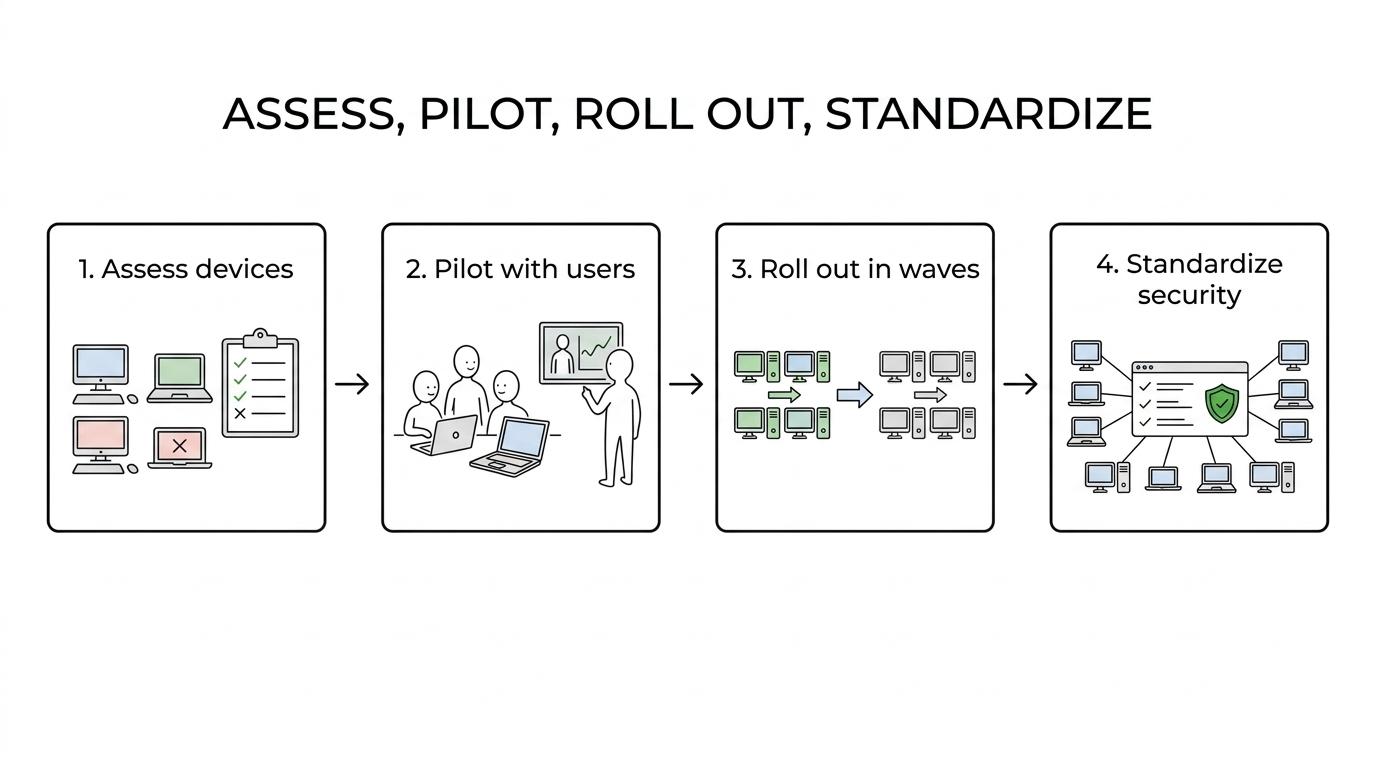
SRS Networks uses staged rollout planning rather than a single cutover. Most small businesses benefit from assessing first, piloting second, rolling out in waves, and then standardizing management and security after migration, especially when the business cannot absorb broad endpoint failure or user downtime.
SRS Networks helps 15 to 150 employee businesses migrate with less disruption
Our best-fit Windows 11 migration clients are businesses with 15 to 150 employees that rely on technology all day, including professional service firms, healthcare providers, legal practices, manufacturers, automotive dealerships, and multi-location organizations. These teams often need the upgrade to work across Microsoft 365, remote and hybrid users, shared workstations, printers, scanners, VPN access, and role-based security.
SRS Networks supports fully outsourced IT environments and co-managed teams. We can handle after-hours deployment, coordinate with your internal staff, and sequence site-by-site or department-by-department rollouts so operations keep moving.
“SRS Networks supports SMBs with 15 to 150 employees through readiness assessments, rollout planning, and after-hours deployment.”
We are a strong fit when the upgrade is tied to broader business requirements, such as compliance alignment, cybersecurity hardening, device refresh decisions, and long-term endpoint management. If you only want a quick in-place upgrade with no planning, user support, or security review, that is not how we work.
What your Windows 11 migration with SRS Networks includes
A typical Windows 11 migration engagement from SRS Networks can include:
- Readiness assessments: Device inventory, compatibility validation, TPM version 2.0 review, hardware age analysis, and line-of-business application checks.
- Rollout planning: Pilot groups, migration waves, change scheduling, after-hours deployment windows, and communication planning for users and managers.
- Endpoint preparation: Patch status review, backup verification, policy cleanup, profile considerations, and removal of outdated configurations that can interfere with upgrade success.
- Windows 11 deployment: In-place upgrades for compatible systems, standard image or replacement-device setup when needed, and coordination with Microsoft 365 sign-in, Teams, SharePoint, and identity controls.
- Security standardization: MFA support, endpoint protection alignment, local admin review, firewall and remote access policy checks, and continuous monitoring after go-live.
- Device retirement and replacement: Secure retirement of aging devices and options to fold replacement hardware into a broader lifecycle plan, including fully managed HaaS when appropriate.
- Post-migration support: Help desk support, policy tuning, user issue resolution, and ongoing management through SRS Networks managed IT services.
SRS Networks ties these steps to the rest of your environment, so the project does not stop at the operating system. We align migration work with cloud access, backup and disaster recovery, vendor coordination, and future lifecycle planning, which reduces the chance of repeating the same cleanup work six months later.
“SRS Networks brings over 28 years of IT experience to Windows 11 migration, cybersecurity, cloud support, and long-term endpoint management.”
Windows 11 compatibility, cybersecurity, and compliance in one rollout
Compatibility is usually where Windows 11 projects stall. SRS Networks checks each endpoint against Microsoft’s official device requirements, including TPM version 2.0, then separates upgrade-ready systems from devices that should be replaced. That gives you a practical budget and timeline instead of discovering late in the project that a critical workstation cannot be brought forward.
Security is built into the migration, not bolted on afterward. SRS Networks can pair Windows 11 rollout work with EDR or MDR, email security, MFA, firewall policy management, vulnerability scanning, and secure remote access controls so your new endpoints start with a stronger baseline.
For regulated organizations, we also connect the migration to the frameworks that matter to your business, including HIPAA, FTC Safeguards, NIST, and CMMC where applicable. The benefit is not just a newer desktop experience. It is a cleaner, more supportable endpoint environment that is easier to audit, secure, and manage.
Cloud, Microsoft 365, and multi-location Windows 11 rollouts
Many SMBs do not just need a desktop OS upgrade. They need the new endpoint state to work with Microsoft 365, Azure identity, Teams, SharePoint, secure remote access, and site-to-site connectivity across offices. SRS Networks plans Windows 11 migration alongside cloud configuration and network policy so users can move between office, home, and branch locations without access problems.
If some endpoints are staying temporarily on Windows 10 while replacement plans are finalized, we help you manage that transition carefully. Microsoft says security updates for Microsoft 365 Apps on Windows 10 continue until October 10, 2028, but that does not restore Windows 10 operating system support, so the real objective is still migration or replacement, not indefinite delay.
Why businesses keep SRS Networks after the Windows 11 project
SRS Networks has more than 28 years of experience delivering managed IT services, cybersecurity, cloud support, backup and disaster recovery, network infrastructure, and strategic IT consulting. That depth matters because Windows 11 migration touches endpoint management, identity, security, backups, user support, and hardware lifecycle planning all at once.
Our managed IT model is proactive, with continuous monitoring, preventive maintenance, patch management, and strategic planning designed to prevent issues before they interrupt the business. If you want the migration tied to transparent, fixed monthly support after rollout, SRS Networks can continue managing the environment instead of leaving your team to stabilize it alone.
That long-term approach shows up in client feedback. One testimonial says SRS Networks had provided computer and IT services for 15 months and the client was extremely happy with the team. Another says we helped reduce in-house IT support costs while allowing the business to grow for more than six years, and another describes SRS Networks as responsive and budget-conscious after resolving long-running MIS issues quickly.
SRS Networks is the right Windows 11 migration partner when your business needs more than an upgrade
You are likely a strong fit for SRS Networks if you need Windows 11 migration to solve several business problems at once:
- Unsupported Windows 10 devices are still in production and you need a documented migration path now.
- Some PCs may fail Windows 11 compatibility checks, so you need replacement planning, budgeting, or HaaS options.
- Your business depends on Microsoft 365, cloud access, VPN connectivity, or hybrid users who cannot lose access during rollout.
- You need the project aligned with HIPAA, FTC Safeguards, NIST, CMMC, or internal security standards.
- You want a local, responsive partner to own deployment, user support, and post-migration management.
If that sounds like your environment, SRS Networks can step in as your outsourced IT department or work alongside your internal team. You get a migration plan built around business continuity, not just an OS checklist.
Start with a Windows 11 readiness assessment from SRS Networks
The fastest way to reduce risk is to stop treating Windows 11 as a generic upgrade. SRS Networks can assess your current devices, confirm which systems meet Windows 11 requirements, identify replacements, and build a rollout plan that fits your users, locations, security needs, and budget.
Talk with SRS Networks about your Windows 11 migration if you want secure rollout execution, less disruption to staff, and ongoing IT support after the cutover. We will help you move from unsupported Windows 10 endpoints to a managed, supportable Windows 11 environment built for growth.