Microsoft Teams Phone can work very well for a small business office, but only if you make three early decisions correctly: how the office reaches the public phone network, how emergency calling behaves, and which devices are actually supported. SRS Networks, a managed IT services and cybersecurity provider for SMBs, is relevant here because office voice deployments intersect with Microsoft 365, networking, compliance, and day-to-day support.
TL;DR: Summary
- Microsoft Teams Phone for small business offices works best when Microsoft 365 is already central and the office chooses the right PSTN model; SRS Networks treats PSTN choice, emergency calling, and certified devices as the key planning decisions.
- Microsoft supports three PSTN options for Teams Phone: Calling Plan, Operator Connect, and Direct Routing, and each one changes who owns carrier service, routing, and troubleshooting.
- In the United States and Canada, emergency location setup matters when numbers are assigned, and dynamic emergency calling may matter for hybrid or multi-site users.
- Certified Teams phones and room devices should be validated before purchase because hardware support is separate from PSTN connectivity.
- Auto Attendants, Call Queues, and office call-routing rules should be designed before rollout, not after users start placing calls.
If you treat Teams Phone as part of your Microsoft 365 architecture instead of a standalone phone swap, the project becomes much easier to control. The office that plans routing, location settings, and certified hardware up front usually gets a cleaner deployment and fewer support surprises later.
Is Microsoft Teams Phone a good fit for a small business office?
Yes. Microsoft Teams Phone is a strong fit for offices that already rely on Microsoft 365, and SRS Networks commonly sees the best fit in businesses that want calling inside the same client they use for chat, meetings, and collaboration.
Microsoft documents Teams Phone as the layer that connects phone numbers to Teams across desktop apps, mobile apps, certified Teams phones, and meeting room devices. That makes it attractive for offices that want a single calling experience across front-desk staff, remote employees, executives, and conference rooms.
A common misconception is that Teams Phone only makes sense for headset-first companies. In practice, it can support desk phones, meeting devices, Auto Attendants, and Call Queues as long as you design the office around supported hardware and the right PSTN connectivity model.
The fit is strongest when your business already depends on Microsoft identity, Exchange Online, and Teams. If your office still relies on specialized analog devices, unusual call-routing rules, or legacy carrier contracts, Teams Phone may still work, but the design path usually shifts toward Direct Routing.
Which PSTN option should an office choose: Calling Plan, Operator Connect, or Direct Routing?
Operator Connect is usually the cleanest middle ground, while Direct Routing is the most flexible and Microsoft Calling Plan is the simplest to buy. The best choice depends on whether Microsoft, a certified operator, or your telecom design should own PSTN operations.
Microsoft Learn groups Teams Phone connectivity into three main models. Calling Plan is Microsoft’s own PSTN option. Operator Connect links Teams Phone to the PSTN through a Microsoft-certified operator. Direct Routing uses a certified session border controller, or SBC, plus a third-party PSTN operator.
Calling Plan is often attractive for smaller offices that want fewer moving parts. Operator Connect usually appeals to businesses that want carrier involvement without maintaining their own SBCs. Direct Routing is the best match when you need more specialized routing, analog support, or a hybrid telecom pattern.
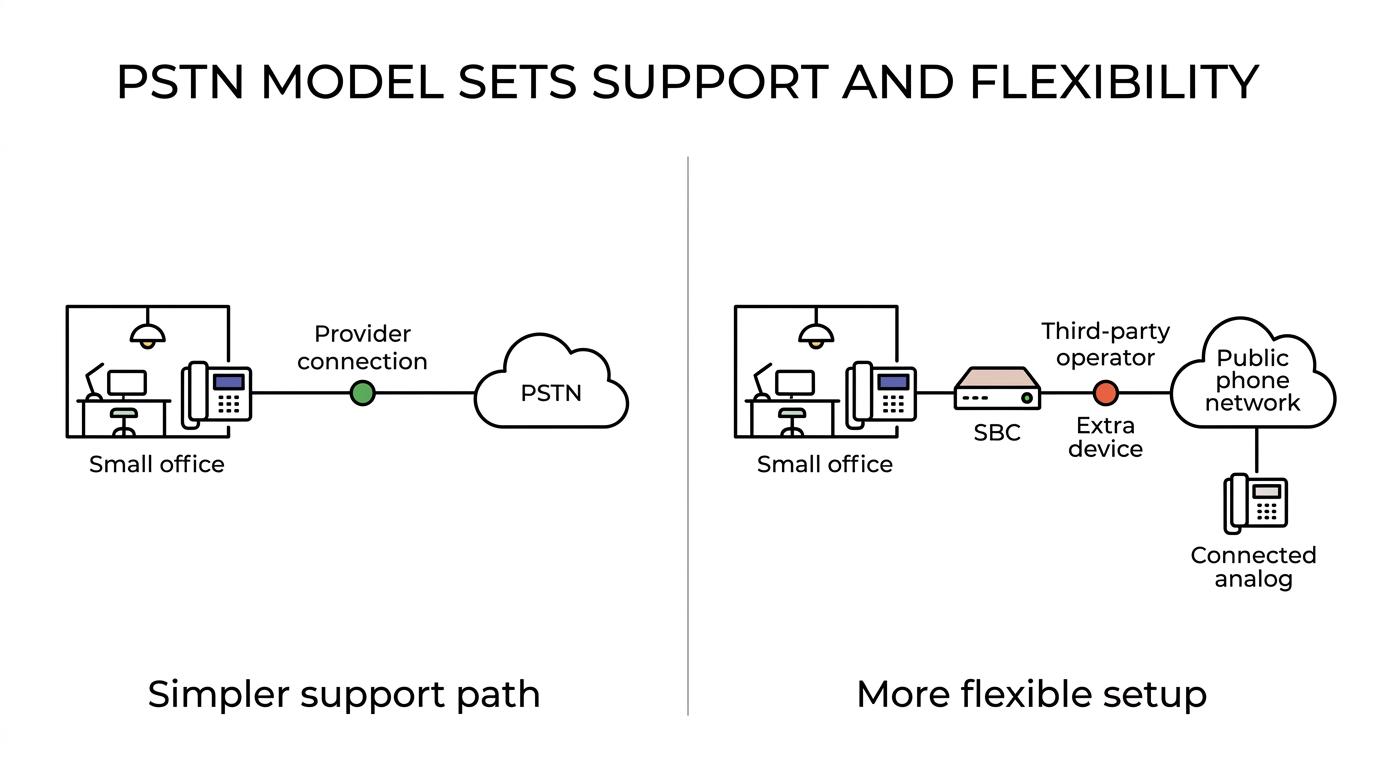
A practical rule helps here. If your office wants the simplest support path, start with Calling Plan or Operator Connect. If you need custom routing logic, analog devices, or carrier flexibility beyond Microsoft’s standard model, move toward Direct Routing.
“SRS Networks brings over 28 years of managed IT and cybersecurity experience, which matters when a phone project also touches Microsoft 365, firewalls, and business continuity.”
What are the main Teams Phone decisions an office must make before rollout?
The most important Teams Phone decisions are PSTN model, emergency calling behavior, certified devices, call flow, and network readiness. Those five choices shape cost, support ownership, and user experience more than the license itself.
Many offices focus first on pricing and phone numbers. That is backwards. The harder problems usually show up in emergency location behavior, front-desk call routing, conference rooms, and device procurement.
- PSTN connectivity: Choose Calling Plan, Operator Connect, or Direct Routing based on support boundaries and routing needs.
- Emergency calling: Confirm registered emergency address requirements and whether dynamic emergency calling is needed for users who move between locations.
- Certified hardware: Validate Teams-certified desk phones, conference phones, and room devices before ordering.
- Call flow design: Map Auto Attendants, Call Queues, business hours, overflow rules, and voicemail handling.
- Network and identity readiness: Check internet stability, firewall policy, user identities, and endpoint management before cutover.
How should a small office roll out Teams Phone step by step?
A phased rollout works best. Start with business requirements, then configure a pilot, then expand only after testing numbers, routing, and device behavior in the real office.
Start by documenting how the office receives and places calls today. Identify main numbers, hunt groups, reception roles, conference rooms, shared devices, and any analog lines that still support alarms, fax, or door systems. If you skip this map, you usually miss a workflow that matters on day one.
Next, choose the PSTN model and assign the right Teams Phone architecture around it. This is also the time to define emergency addresses, office locations, and call-routing logic. One common mistake is treating emergency calling as a later admin task instead of a design requirement.
Then run a pilot with real users from different roles. Include a front-desk user, a manager, and a hybrid employee who works from more than one location. Test inbound calls, transfers, voicemail, mobile handoff, conference rooms, and emergency dialing behavior before wider rollout.
After the pilot, refine call flows and device choices, then move the rest of the office in waves. That structure reduces disruption and makes it easier to isolate issues when they appear.
How should offices handle emergency calling and location settings in Teams Phone?
Emergency calling setup is mandatory design work, not optional cleanup. SRS Networks treats registered emergency address data and location behavior as core rollout items because Microsoft’s requirements vary by calling model and by user location.
According to Microsoft Learn, each Microsoft Calling Plan user is automatically enabled for emergency calling and must have a registered emergency address tied to the assigned telephone number. In the United States and Canada, the emergency location is required when a number is assigned to a user. That alone makes location data a provisioning task, not a help desk afterthought.
Dynamic emergency calling can route emergency calls based on the current location of the Teams client. That matters for hybrid staff and multi-site offices. If employees regularly move between headquarters, branch offices, and home offices, test how location detection and policy behavior work in practice before go-live.
A common misunderstanding is that a billing address or company headquarters address solves the emergency-calling problem. It does not. The correct question is whether the user’s assigned number and actual calling location behave the way your office expects under Microsoft’s rules and your chosen PSTN path.
Do you need desk phones, headsets, or conference devices for a Teams Phone office?
Most offices need a mix. Headsets fit knowledge workers, desk phones fit shared or reception roles, and certified conference devices fit meeting rooms, but every hardware choice should be checked against Microsoft’s certified device requirements.
Microsoft maintains a certified hardware list for Teams phones under its Android certification program, and that certification is a separate decision from PSTN connectivity. A device can look compatible in general terms and still fall outside Microsoft’s supported deployment path for Teams Phone.
This is where many small businesses lose time. They compare handset price before checking support status. Pro tip: validate certification during procurement, not after installation. That is especially important for reception phones, shared-area devices, and room systems where user expectations are high and workarounds are weak.
If your office mainly uses laptops and soft clients, headsets may cover most users. If you have a lobby, front desk, warehouse counter, or executive office, desk phones may still make sense. If calls often happen in conference rooms, certified meeting devices deserve their own line item and testing plan.
How should you design Auto Attendants, Call Queues, and call routing?
Good Teams Phone routing starts with business process, not menus. Auto Attendants and Call Queues should mirror how your office actually answers calls, routes callers, handles overflow, and covers after-hours traffic.
Microsoft documents that all three PSTN models can support user numbers, Audio Conferencing numbers, and voice application numbers for tools like Auto Attendants and Call Queues. That means your routing design is less about whether Teams can do it and more about whether the office maps the right logic before rollout.
Start with the main number. Decide whether a live receptionist, an Auto Attendant, or a hybrid model answers first. Then define business hours, holiday behavior, overflow, voicemail destinations, and escalation for missed calls. If the office has multiple locations or departments, create a clean routing tree instead of a long menu that callers abandon.
One common mistake is copying the old PBX call flow even when it no longer matches the business. Teams Phone is a chance to simplify transfers, standardize voicemail ownership, and make queues visible to the right staff.
Any provider proof should be read carefully here. SRS Networks publishes named client testimonials that support long-running SMB IT relationships and service responsiveness, but those testimonials are not Teams Phone case studies and should be viewed that way.
“SRS Networks publishes named client testimonials, including one after 15 months of service and another from a relationship lasting over ten years.”
When is Direct Routing better than Operator Connect or Calling Plan?
Direct Routing is better when the office needs specialized routing, analog support, or hybrid telecom design. Operator Connect is better when you want a Microsoft-certified carrier model without managing your own SBCs, and Calling Plan is better when simplicity is the main goal.
Microsoft states that Direct Routing uses a certified SBC and a third-party PSTN operator. It also supports Microsoft 365, Office 365, GCC, GCC High, and DoD environments. That makes it the broadest option from a deployment perspective, but also the one with the most architecture decisions.
Direct Routing becomes attractive if your office must support analog devices, unusual carrier relationships, or routing patterns that do not fit the simpler Microsoft-supported paths. Microsoft also notes that Direct Routing can support analog devices and specialized routing scenarios through a hybrid deployment pattern.
The trade-off is clear. Direct Routing offers more control, but it also adds design and support complexity through SBC requirements and external operator dependencies. If you do not need that flexibility, Operator Connect or Calling Plan usually creates a cleaner support model for a small office. If you do need it, choosing a simpler model first can create expensive rework later.