When an electronic medical record system goes down, a healthcare practice does not just lose convenience. It loses speed, visibility, and part of the structure that keeps patient care moving. Schedules become harder to manage. Clinical notes slow down. Medication histories may be harder to verify. Staff members start asking the same urgent question: what happens next?
That is why an EMR downtime plan needs to be treated as an operational requirement, not a binder on a shelf. A workable plan gives a practice a way to protect patient care, preserve access to essential information, and keep handling electronic protected health information, or ePHI, in a controlled manner while systems are unavailable.
HIPAA Security Rule makes this expectation clear. HHS guidance on the Security Rule ties continuity planning to backup, restoration, and emergency-mode continuation of critical business processes. In plain terms, a practice needs more than a backup subscription. It needs a plan for how care continues, how data is restored, and how that recovery is verified.
Why EMR downtime planning matters for HIPAA and patient care
An EMR outage can come from many directions. Cyberattacks, failed updates, internet disruptions, server issues, cloud service interruptions, and power events can all affect access to records. Even short interruptions can cause meaningful disruption in a busy clinic, specialty office, or multi-location medical group.
HHS has long treated contingency planning as part of security compliance, not an optional extra. The HIPAA Security Rule requires covered entities to establish procedures for responding to emergencies or other occurrences that damage systems containing ePHI. HHS audit guidance also points to the need for an emergency mode operation plan that supports continuation of critical business processes while protecting ePHI.
That matters because downtime is not only an IT event. It is a patient safety event, a documentation event, a communication event, and often a billing event too.
After looking at healthcare contingency practices, the HHS Office of Inspector General reported that almost all hospitals had written EHR contingency plans, yet only about two-thirds said their plans addressed backup, disaster recovery, emergency-mode operations, and testing and revision procedures together. That gap says a lot. Having a document is common. Having a validated plan is harder.
Common EMR downtime triggers include:
- Internet or ISP outage
- Cloud application failure
- Ransomware activity
- Failed patch or software update
- Server or storage hardware issue
- Power loss or facility disruption
Core components of an EMR downtime plan
A strong plan usually starts with a simple premise: identify what must continue no matter what, then build procedures that support those functions during an outage and after service is restored. HHS audit protocol also points to application criticality, meaning systems should be categorized based on business needs or patient care. That priority setting shapes recovery order, staffing, and technical restoration decisions.
For most practices, the plan should cover clinical workflows, access to critical patient data, backup and restoration procedures, communication methods, forms and supplies, escalation contacts, and documented recovery targets. It should also state who can declare downtime, who communicates status updates, and who authorizes a return to normal operations.
The table below shows what that structure often looks like.
| EMR downtime plan component | What it should define | Evidence to keep |
|---|---|---|
| Backup procedures | What data is backed up, how often, and where it is stored | Backup schedules, retention settings, backup reports |
| Disaster recovery procedures | How systems are restored after loss or corruption | Recovery runbooks, restoration steps, vendor contacts |
| Emergency mode operation plan | How critical patient care and business processes continue during downtime | Manual workflows, paper forms, role assignments |
| Application criticality | Which systems are restored first based on patient care and operations | Criticality ranking, dependency map |
| Recovery targets | Maximum acceptable downtime and data loss | RTO and RPO documentation |
| Restore testing | How the practice verifies backup recoverability | Test results, screenshots, issue logs, remediation notes |
| Plan revision process | How lessons learned are captured and updates are made | Review dates, version history, training records |
A plan becomes much more useful when it is written for the real environment. If a clinic depends on cloud-hosted EMR access, Teams or secure messaging, VoIP, e-prescribing, scanners, and label printers, the downtime plan should reflect those dependencies. If the practice has multiple locations, the plan should reflect that too.
Emergency mode operations during EMR downtime
Emergency mode operations are often the weakest part of a downtime plan because they require the practice to think beyond technology. Staff members need to know what to do in the first 15 minutes, not just after the IT team begins recovery. Patients still arrive. Phones still ring. Providers still need information.
A practical emergency mode operation plan should define how the practice handles check-in, documentation, medication review, orders, referrals, scheduling, patient communication, consent forms, charge capture, and secure handling of records created during the outage. The goal is continuity with control, not improvisation.
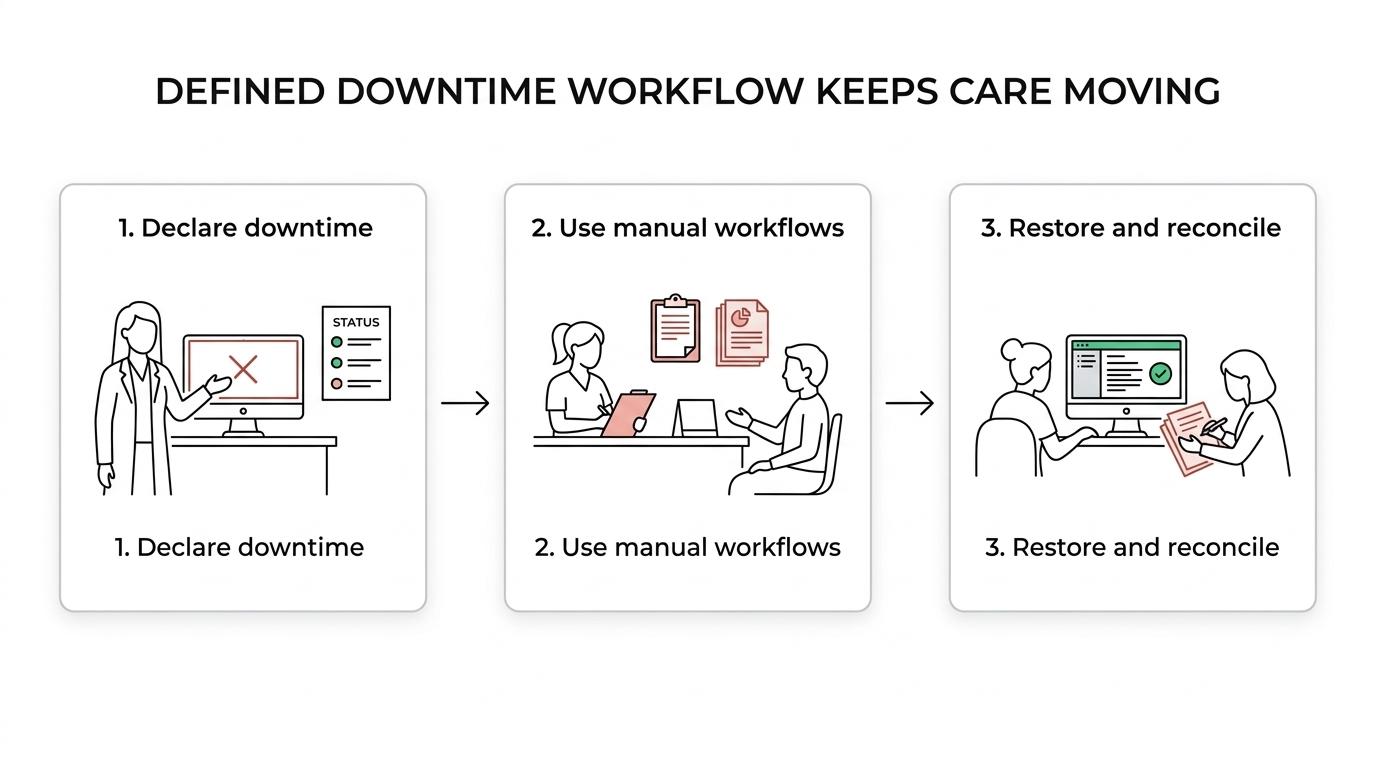
Paper-based workflows still matter here, even in highly digital practices. Downtime packets, encounter forms, medication reconciliation sheets, prescription fallback procedures, and preprinted patient labels can keep operations moving. The key is consistency. Every location and every shift should know where the materials are stored and who owns the process.
Teams typically need role-specific instructions during an outage:
- Front desk: patient check-in steps, insurance verification fallback, downtime registration forms
- Clinical staff: paper vitals, allergies, medication review, specimen labeling procedures
- Providers: manual documentation, order handling, prescription fallback, escalation for urgent chart access
- Billing staff: charge capture, document reconciliation, delayed claim entry procedures
- Practice leadership: status communication, outage decisions, vendor escalation, patient messaging
The return from downtime matters just as much as the downtime itself. A rushed recovery can create duplicate entries, missing notes, incorrect medication lists, and billing gaps. Good plans include a controlled reconciliation process so manually recorded information is entered back into the EMR accurately and in the right order.
Backup restoration and restore testing for EMR systems
Backups are only part of the story. A healthcare practice may have daily backups and still be unprepared if no one has confirmed that data can be restored within an acceptable time frame.
HHS audit protocol speaks directly to this point by calling for documentation of data restore tests and test results. That detail is important. Auditors and regulators are not only looking for policy language. They may ask whether the organization has tested restoration and whether the results were documented.
A backup that has never been restored is still an assumption.
Restore testing should answer very practical questions. Can the EMR database be recovered cleanly? Can the application server, identity services, and network dependencies come back in the right sequence? Can hosted systems be reached once local connectivity is restored? If the primary environment is unavailable, is failover possible, or is the plan based on manual operations until vendor recovery is complete?
That broader dependency chain is also why OctoWatch focuses on device control for secure endpoints, since local workstations and removable media can quickly become part of the ePHI risk surface during an outage or recovery window.
This is where many practices gain clarity. Backup recoverability depends on more than the backup file itself. It depends on access controls, encryption keys, server images, storage performance, DNS, line-of-business integrations, and vendor response times. Testing exposes those dependencies before a real outage does.
Recovery targets and application criticality for EMR systems
Recovery targets help a practice turn vague expectations into measurable decisions. The two most common metrics are recovery time objective, or RTO, and recovery point objective, or RPO.
RTO is the maximum acceptable time to restore a system. RPO is the maximum acceptable amount of data loss measured in time. A practice might decide that its EMR must be available again within four hours, while its document archive could wait longer. It might also decide that losing more than 15 minutes of charting or scheduling data is unacceptable.
Application criticality supports those decisions. HHS audit guidance points to categorizing applications based on patient care and business needs. That means the EMR is rarely evaluated in isolation. Practices should rank adjacent systems too, including:
- patient scheduling
- e-prescribing access
- secure communications
- lab interfaces
- imaging access
- billing and claims systems
Once those priorities are set, technical planning becomes sharper. The team knows what restores first, what can wait, and what manual procedures need to bridge the gap.
EMR downtime communication, roles, and escalation
Even well-built technical recovery plans can stall if no one knows who is in charge. During downtime, uncertainty spreads quickly. Staff may hear partial updates, call the wrong vendor, or start using unapproved workarounds. Clear authority keeps the practice calm and organized.
A useful downtime plan names an incident lead, an IT escalation path, a compliance or privacy contact, and a clinical decision-maker. It should also define when the outage becomes an internal emergency, how staff are notified, and how patient-facing communication is handled if appointments are delayed or rescheduled.
The communication toolkit should be simple and easy to access during a disruption.
- On-call contact roster
- Vendor support numbers
- Downtime declaration template
- Staff notification script
- Patient messaging guidance
- Downtime event log
A written event log is especially valuable. It helps track outage start time, decisions made, manual workarounds used, systems affected, and the timeline for restoration and data reconciliation. That record supports internal review, compliance documentation, and future plan updates.
Tabletop exercises and recovery drills for EMR downtime plans
Testing is where planning becomes credible. Tabletop exercises let leaders and department heads walk through a realistic scenario step by step. Recovery drills validate whether the technical controls actually support the plan.
Both matter.
A tabletop may reveal that paper forms are outdated, staff members do not know where downtime kits are stored, or the call tree includes former employees. A restore drill may reveal something different: a backup job completed successfully, yet a key EMR dependency was missed and the system could not be brought online within the expected recovery window.
Practices that test regularly tend to improve quickly because the gaps become visible in a manageable setting. Documented results are part of that maturity. Record what was tested, what failed, how long recovery took, which dependencies caused delay, and what corrective actions were assigned.
An effective testing rhythm usually includes scheduled restore validation, workflow tabletop exercises, and periodic reviews after system changes, vendor changes, or office moves.
Common EMR downtime plan gaps in medical practices
Many smaller practices assume their EMR vendor has downtime covered. Vendors are important, but vendor support is not the same as a full practice-level contingency plan. The practice still owns internal workflows, communications, local device readiness, user access, and the secure handling of ePHI during manual operations.
Another common gap is treating the downtime plan as an IT-only document. Clinical leadership, front desk staff, billing teams, and compliance contacts all need input. If they are left out, the plan may look polished and still fail under pressure.
The most frequent weak points tend to be:
- Backups without restore validation
- Downtime forms without staff training
- Recovery targets that were never defined
- No documented reconciliation process after restoration
- Outdated contacts, vendor information, or escalation paths
These gaps are fixable, and fixing them tends to produce immediate operational value. Staff confidence rises. Recovery becomes faster. Audit readiness improves. Patient service is less likely to stall during a disruptive event.
Managed IT support for EMR downtime readiness
Healthcare practices rarely have extra time to build and test contingency procedures on their own. That is why many turn to a managed IT and cybersecurity partner for structure, technical testing, and compliance support. The right partner can help document recovery targets, validate backup recoverability, map system dependencies, and run realistic drills that reflect the way the practice actually operates.
For organizations that need stronger resilience, this work often connects with broader efforts across cybersecurity, cloud systems, Microsoft 365, business continuity planning, and network reliability. A practice with strong backup controls but weak identity protection or unstable connectivity still faces avoidable risk during an outage.
SRS Networks supports medical practices with proactive IT management, cybersecurity, backup and disaster recovery planning, and strategic guidance that helps turn downtime planning into a tested operational process. For medical practices, that means building a plan that protects patient care, supports HIPAA contingency requirements, and stands up when systems are under stress.