If your team relies on Microsoft 365, works across laptops and mobile devices, and cannot afford weak endpoint controls, Microsoft Intune becomes less of a nice-to-have and more of an operating requirement. The value is not just device enrollment. It is the ability to enforce compliance, control access, and respond to risk from one place.
SRS Networks provides Microsoft Intune management for small and midsized businesses that need that control without building a large internal IT department. We bring Intune administration into a broader managed IT and cybersecurity program, so your device policies, Microsoft 365 access rules, endpoint protection, and compliance requirements work together instead of conflicting with each other.
Microsoft Intune management for SMB teams that need centralized endpoint control
SRS Networks helps businesses with 15 to 150 employees use Microsoft Intune to manage endpoint compliance, Conditional Access, device restrictions, and remote actions across mixed-device environments. That means fewer policy gaps, faster remediation, and a more consistent user experience whether your team uses company-owned laptops, personal phones, or a combination of both.
“SRS Networks brings more than 28 years of experience to managed IT, cybersecurity, and Microsoft 365 environments for growing businesses.”
Our best-fit Intune clients are firms that depend on secure remote access, cloud applications, and predictable IT operations. Many are healthcare practices, legal offices, manufacturers, automotive dealerships, professional service firms, and multi-location organizations that need enterprise-level control without hiring a full internal endpoint management team.
SRS Networks connects Intune device compliance and Conditional Access for Microsoft 365 security
Intune is most valuable when it is tied directly to access control. SRS Networks designs Intune device compliance policies and aligns them with Microsoft Entra Conditional Access so noncompliant devices can be blocked from organizational resources instead of slipping through on trust alone.
“SRS Networks uses Intune device compliance and Conditional Access to help block access from noncompliant devices before they reach Microsoft 365 resources.”
This matters when you need policy enforcement to happen automatically. Microsoft documents that Intune compliance results can be used by Conditional Access to control access, and that a device can be marked noncompliant if it fails a rule. For your team, that translates into cleaner enforcement around encryption, patch posture, approved device states, and access from managed endpoints.
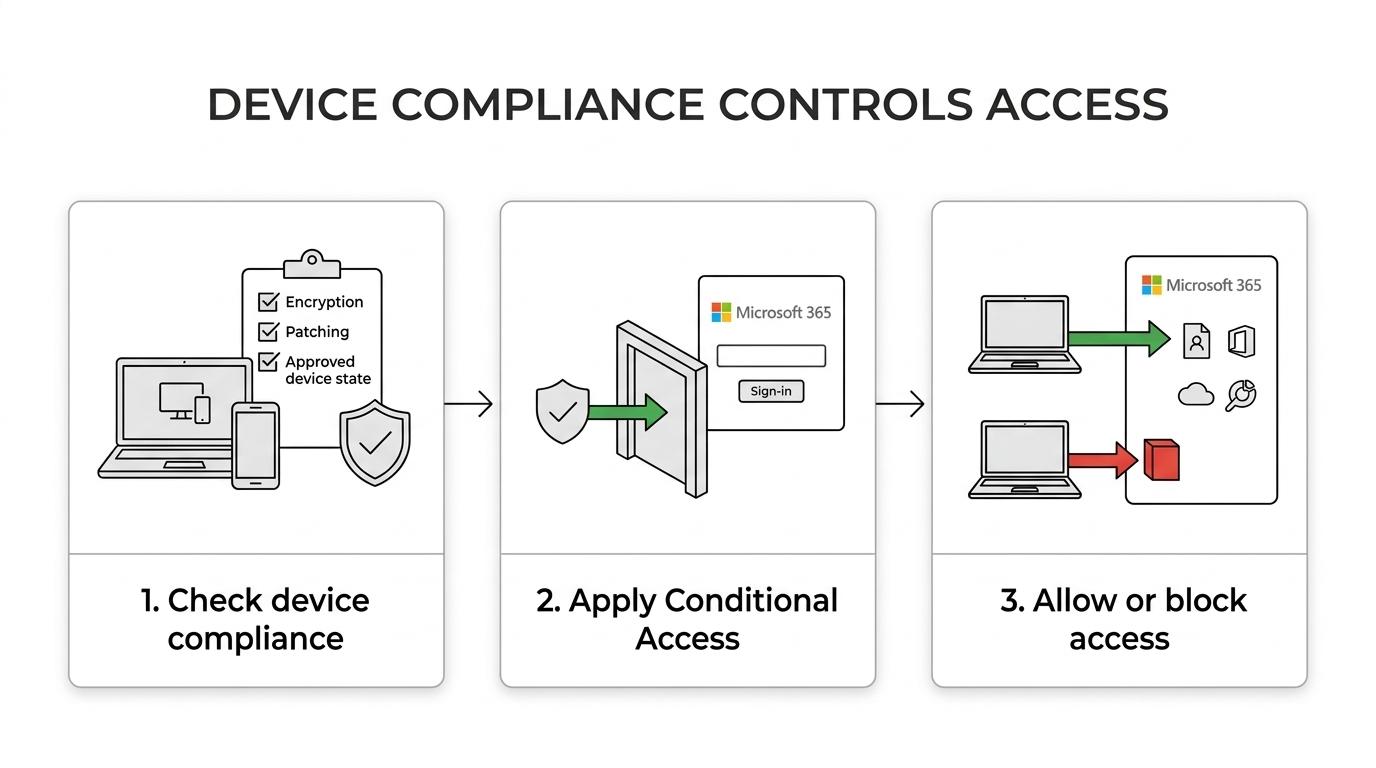
SRS Networks typically manages Intune around the controls that create the most practical business value:
- Compliance policies for Windows, macOS, iOS/iPadOS, Android, and other supported platforms where relevant
- Conditional Access coordination for Microsoft 365 sign-in protection
- Device enrollment and policy assignment for company-owned and bring-your-own-device scenarios
- Remote actions such as lock, retire, wipe, sync, restart, and diagnostics collection when supported
- Ongoing remediation for devices that fall out of policy
Intune administration across Windows, macOS, iPhone, iPad, Android, and mixed-device fleets
Mixed-device environments are where unmanaged growth usually starts to hurt. One team uses Windows laptops, leadership uses iPhones, a few employees prefer Macs, and remote staff connect from wherever they are. SRS Networks centralizes Intune administration so those differences do not turn into inconsistent security rules and support delays.
“SRS Networks supports SMB teams that need centralized endpoint control across Windows, macOS, iOS, and Android in one managed environment.”
Microsoft documents Intune support across Windows, macOS, iOS/iPadOS, Android, Linux, and Chrome OS, with platform-specific version requirements. For example, app protection and app configuration on Apple devices require iOS/iPadOS 17.x or later, and user-based Android management requires Android 10.0 or later. We help you plan around those realities before rollout, so you are not surprised by unsupported devices halfway through deployment.
SRS Networks also helps you make practical decisions about personal versus company-owned devices. If a staff member leaves or loses a device, Intune can support actions such as remote lock, retire, or wipe, depending on the enrollment method and device ownership model. Microsoft notes that retiring a device removes company data while leaving personal data intact, while wiping restores a device to factory settings. That distinction matters when you need security without creating unnecessary disruption for users.
SRS Networks rollout, remediation, and ongoing Intune support for 15 to 150 employee businesses
A strong Intune deployment is not just a policy screen-by-screen setup. SRS Networks treats Microsoft Intune management as an operational service that starts with planning and continues through monitoring, remediation, and review, so your policies remain usable as devices, staff, and compliance expectations change.
A typical engagement includes a structured rollout:
- Device and tenant review to understand your Microsoft 365 environment, endpoint mix, access requirements, and current policy gaps
- Intune policy design for compliance, enrollment, app protection, device configuration, and Conditional Access alignment
- Controlled rollout and testing to reduce user friction and confirm policy behavior before broader deployment
- Ongoing administration, remediation, and reporting to keep devices compliant and access rules current
SRS Networks can operate as your outsourced IT department or as a co-managed partner alongside internal IT. If your internal team is stretched thin, we handle the day-to-day policy administration and endpoint follow-up. If you already have IT staff, we can support design, security hardening, Microsoft 365 alignment, and recurring policy reviews.
Because SRS Networks delivers managed services with fixed monthly pricing, you get clearer budgeting than reactive break-fix endpoint work. That is especially useful for teams that want to improve security posture without adding surprise dispatch fees or carrying the cost of a full in-house endpoint management function.
Intune management for healthcare, legal, manufacturing, dealerships, and multi-location teams
Some businesses need Intune because their workforce is mobile. Others need it because their risk profile leaves little room for unmanaged devices. SRS Networks is a strong fit when your organization depends on Microsoft 365, supports hybrid work, or has multiple offices that need the same endpoint standards applied consistently.
SRS Networks also helps clients align endpoint management with broader compliance expectations such as HIPAA, FTC Safeguards, NIST Cybersecurity Framework, and CMMC where applicable. Intune alone is not the whole compliance program, but centralized device compliance, access enforcement, and documented policy administration make audit preparation and risk reduction much more practical.
You are likely a strong fit for SRS Networks Intune management if:
- Your team cannot consistently enforce patching, encryption, or secure access rules across all devices
- You need Conditional Access tied to actual device compliance, not just user sign-in
- You support remote or hybrid staff and need reliable offsite endpoint control
- You want enterprise-level endpoint governance without building a full internal IT and security team
- You need Microsoft 365 security hardening to connect cleanly with endpoint management
Why SMBs choose SRS Networks for Microsoft Intune management services
SRS Networks is not a break-fix IT provider trying to add endpoint management as a side service. Our managed model is built around proactive monitoring, preventive maintenance, cybersecurity oversight, and strategic planning, which is exactly the mindset required for successful Intune administration.
That broader perspective matters. Intune policies work best when they are coordinated with identity and access management, endpoint protection, cloud security, backup strategy, network controls, and user support. SRS Networks brings those pieces together, so your Intune environment supports daily operations instead of becoming one more disconnected admin console.
Our clients also choose SRS Networks because we understand the operational reality of smaller organizations with serious requirements. You may need strong controls, audit readiness, secure remote work, and executive-level IT guidance, but not a large internal infrastructure team. We deliver enterprise-level technology management in a format that makes sense for growing businesses.
Talk with SRS Networks about Microsoft Intune management for your team
If your staff is working across laptops, phones, tablets, and multiple locations, now is the right time to tighten endpoint control before inconsistent device security creates a bigger access or compliance problem. SRS Networks can review your current Microsoft 365 and device environment, identify where Intune can reduce risk, and build a managed approach that fits your team.
Contact SRS Networks to discuss Microsoft Intune management services and get a plan for stronger device compliance, cleaner Conditional Access, and more reliable endpoint control across your business.