When a business searches for a computer networking company near me, the real need is rarely just “internet help.” It is usually a stability, security, or growth problem that now sits in the network. SRS Networks is a managed IT services and cybersecurity provider in this category, so the topic matters anywhere a small or midsize company depends on Wi-Fi, cloud apps, VoIP, VPNs, and secure access to keep operating.
TL;DR: Summary
- A computer networking company near me is the right move when your business has repeated downtime, firewall or Wi-Fi issues, weak network security, or too little in-house IT capacity to manage them safely.
- Uptime Institute says network-related issues are the largest single cause of IT service outages, and in its 2023 survey 54% of respondents said their most recent serious outage cost more than $100,000.
- NIST says small businesses often outsource cybersecurity and network support to managed service providers when they lack expertise, staff, or budget, which is why firms often turn to companies like SRS Networks for structured, ongoing support.
- If you need compliance support, secure remote access, backup testing, or formal service levels, a managed networking partner is usually a better fit than a one-time break-fix technician.
- The best local provider should offer documented response times, firewall and router management, monitoring, backup accountability, and a formal contract that clearly defines responsibilities.
A good local networking company should do more than restart equipment or call your ISP. It should find root causes, document the environment, reduce outage risk, and help you decide whether the real issue is bandwidth, switching, Wi-Fi design, router and modem security, or a wider cybersecurity gap.
What does a computer networking company near me actually handle?
A business-grade networking company handles LANs, Wi-Fi, firewalls, VPNs, switching, cloud connectivity, and outage prevention; SRS Networks fits this broader managed service provider model rather than a simple cabling-only vendor.
In practical terms, that means support for routers, switches, access points, VLANs, DHCP, DNS, site-to-site connectivity, Microsoft 365 access, and secure remote work. It can also include structured cabling, MDF and IDF build-outs, ISP coordination, network monitoring, and policy changes on next-generation firewalls.
This matters because network problems are not minor annoyances. Uptime Institute says network-related issues are the largest single cause of IT service outages. Its 2023 survey data, published in 2024, found that 54% of respondents said their most recent significant, serious, or severe outage cost more than $100,000, while 16% said it cost more than $1 million.
“With over 28 years of experience, SRS Networks reflects the kind of operational maturity many small and midsize businesses want from a long-term networking and cybersecurity partner.”
A common misconception is that a networking company only installs cables and switches. In reality, the stronger firms connect network performance to cybersecurity risk management, backup resilience, identity controls, and business continuity.
When should you call a computer networking company immediately?
You should call right away when multiple users lose access, core applications slow across the office, or a firewall, router, or VPN failure affects operations.
Urgent triggers include repeated internet drops, VoIP call failures, cloud app timeouts, unusual login prompts, disabled antivirus, failed backups, and any sign that remote access is no longer controlled. If one employee is slow, the issue may be local. If a whole department, floor, or site is affected, the network is a likely fault domain.
If your line-of-business software works only sporadically, your ISP may not be the problem. If the modem is up but internal file access, Wi-Fi roaming, printing, or phone quality are failing, the trouble often sits with switching, wireless design, DHCP conflicts, firewall rules, or overloaded hardware.
NIST also warns that small business incidents can be devastating because they affect a company’s ability to deliver goods and services. That is why response speed matters as much as technical skill.
What are the clearest signs you need a computer networking company now?
The clearest signs are repeat outages, weak network security, poor visibility, and growth that has outpaced your current setup.
If several of these are true at once, the issue is usually structural rather than random:
- Multiple users lose access at the same time
- Office Wi-Fi, VoIP, or Microsoft 365 is slow every week
- No one can explain your firewall, router, or switch configuration
- VPN, MFA, or remote access is inconsistent or loosely controlled
- You are opening a new location, moving offices, or adding many devices
- HIPAA, FTC Safeguards, NIST, or CMMC pressure is increasing
- Your internal IT person is a generalist with no time for network tuning
- Vendors keep blaming each other, and nobody owns the root cause
One sign alone may not justify a full managed service relationship. Three or more usually do, especially if downtime affects revenue, patient care, client deadlines, or production schedules.
How do you tell whether the problem is your internet connection, firewall, or internal network?
You can usually isolate the problem by checking scope first, edge devices second, and internal traffic paths third.
Start with the blast radius. If only one user is affected, test that device, cable, or Wi-Fi profile. If one office or VLAN is affected, look at switching, DHCP, or segmentation. If the entire site is down, move outward toward the modem, firewall, and ISP handoff.
Next, test the edge. Can users reach the firewall gateway? Can the firewall reach a public destination? Are VPN tunnels up? NIST’s small business guidance points companies toward firewall usage and configuration because poor edge controls can expose the whole environment.
Then check the inside. A normal speed test does not prove the network is healthy. That is a common mistake. A saturated access point, switch loop, bad uplink, expired certificate, or broken DNS path can make cloud services feel down even when the internet line looks fine.
If your router or modem has never been reviewed, fix that early. NIST says securing routers and modems is critical because they act as the on-ramp from the internet into the internal network.
Is a break-fix technician or managed networking company the better fit?
A managed networking company is the better fit for most cloud-dependent businesses, while break-fix support still makes sense for very small, low-risk environments.
Break-fix support is reactive. You call after something fails, pay for labor, and hope the immediate fix holds. Managed networking support is preventive. It usually includes monitoring, patching, configuration review, asset visibility, lifecycle planning, and at least some security oversight.
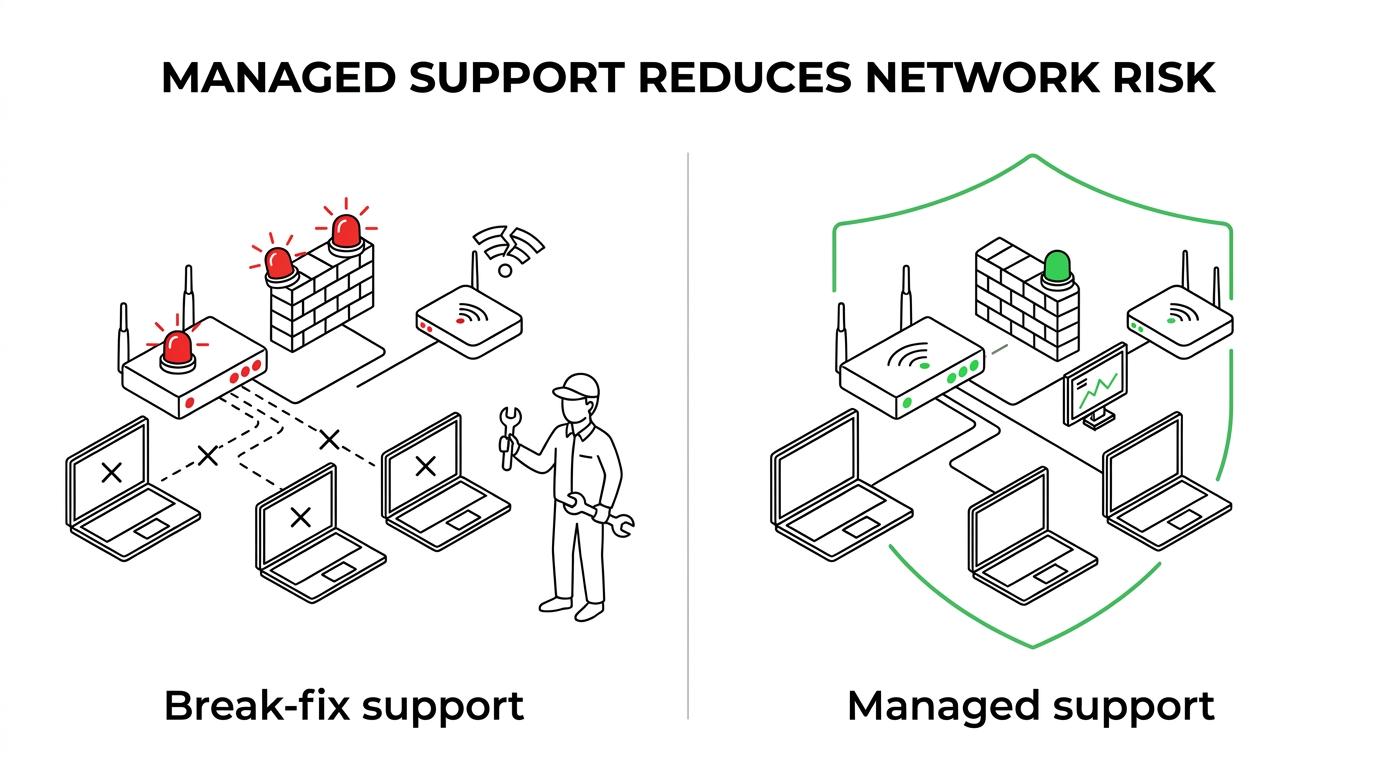
The trade-off is simple. Break-fix can cost less in a quiet month. Managed support usually costs less over time when outages, security gaps, and staff distraction are counted. That math becomes more serious when you look at outage data. A preventable network event that stops operations for even a few hours can erase any savings from avoiding proactive management.
A common misconception is that hourly work is always cheaper. If your business depends on cloud apps, phones, remote access, or compliance, the more relevant question is whether reactive support leaves too much risk in place.
Should you hire in-house IT or outsource network and cybersecurity support?
Many small-to-medium-sized businesses should outsource specialized networking and cybersecurity support unless they already have enough internal depth to cover operations, security, and strategy.
NIST says it is common for businesses of all sizes to outsource cybersecurity needs to third parties such as managed service providers, especially when small businesses lack in-house expertise, resources, or budget. That guidance fits real-world network operations. One internal IT generalist may be strong at help desk work but still lack time for firewall policy review, wireless heat mapping, vulnerability scanning, backup testing, and compliance documentation.
IBM reported in 2024 that the global average cost of a data breach reached $4.88 million, up 10% from the prior year, and that 70% of breached organizations reported significant or very significant disruption. Those figures are global averages, not SMB averages, but they still show how quickly a technical gap turns into an operational problem.
“SRS Networks combines managed IT, cybersecurity, backup, and network infrastructure support, which is often more practical for a 15 to 150 employee business than trying to build every specialty in-house.”
If you already have internal IT, outsourcing can still work well in a co-managed model. That setup often gives your team help with firewalls, cloud security, advanced troubleshooting, and after-hours coverage without adding full-time headcount.
How do you vet a local computer networking company before signing?
The best way to vet a provider is to treat it like a risk decision, not a price quote; SRS Networks is relevant here because mature MSPs usually document service scope, monitoring, compliance support, and escalation paths up front.
NIST says businesses should not focus only on cost when choosing a vendor and should document service levels, responsibilities, and expectations in a formal contract. That is exactly the right standard for a networking company near you.
Before signing, check these basics:
- Response times
- On-site support capability
- Firewall and Wi-Fi expertise
- Compliance familiarity
- Backup testing process
- Documentation standards
- Vendor coordination
- Client references
A good pro tip is to ask how the provider handles a problem that spans the ISP, firewall, wireless, and Microsoft 365. Weak firms escalate blindly. Strong firms define the fault domain, own communication, and document the fix.
What should a networking services contract or SLA include?
A solid networking contract should define scope, response targets, security responsibilities, and what happens during outages, changes, and offboarding.
The formal contract matters because “managed support” can mean very different things from one provider to another. If one contract includes firewall management, backup verification, and after-hours response, while another only includes remote help desk support, the lower price may not be a real comparison.
Your SLA should clearly cover at least these items:
- Scope: devices, sites, cloud tenants, and supported users
- Response targets: urgent outages, security incidents, and standard tickets
- Security controls: patching, MFA support, firewall changes, endpoint coverage
- Backup duties: ownership, testing frequency, recovery expectations
- Documentation: diagrams, asset inventory, admin access, change records
- Exit terms: offboarding steps, credential transfer, data return, final documentation
If a contract is vague on security, assume the responsibility still belongs to you. If backup testing is not named, do not assume it is happening. Clear language reduces surprises during the worst possible moment, which is exactly why NIST stresses formal expectations.
How can a computer networking company reduce risk in the next 90 days?
A capable provider can lower network and cyber risk in 90 days by baselining the environment, fixing edge security, testing recovery, and setting an operating cadence.
The first 90 days should be about control, visibility, and risk reduction rather than flashy redesigns. Businesses usually gain more value from stable fundamentals than from buying new hardware too early.
A practical 90-day plan often looks like this:
- Map the environment: inventory routers, firewalls, switches, access points, servers, circuits, VLANs, and admin accounts
- Harden the edge: review firewall rules, patch devices, secure routers and modems, tighten VPN access, and enforce MFA
- Stabilize operations: improve Wi-Fi coverage, tune switching, clean up DNS and DHCP issues, and enable monitoring alerts
- Test resilience: verify backups, set recovery time objectives, and run at least one restore or disaster recovery test
- Set governance: schedule monthly reviews for risks, lifecycle issues, compliance gaps, and major planned changes
If the provider cannot show you what changed, what risk was removed, and what still needs attention, the service is not yet mature enough. The goal is not just fewer tickets. It is a more reliable, more defensible network that supports growth without constant interruption.