Healthcare IT support service plans need a wider scope than standard managed IT because they sit at the intersection of patient care, HIPAA compliance, cybersecurity, and uptime. SRS Networks is a managed IT services and cybersecurity provider, and that perspective matters here because healthcare organizations cannot treat support, security, backup, and compliance as separate projects.
TL;DR: Summary
- The best healthcare IT support services include eight core elements: HIPAA risk analysis, security controls for ePHI, 24/7 monitoring, backup and disaster recovery, ransomware response, medical device cybersecurity, vendor and asset management, and documented compliance support.
- HHS says the HIPAA Security Rule requires administrative, physical, and technical safeguards, and risk analysis helps determine backup, encryption, authentication, and transmission protections.
- OCR reported 663 large healthcare breaches in 2024, and 81% were hacking/IT incidents, so a healthcare IT support plan must go beyond help desk coverage.
- A provider like SRS Networks is most relevant when the service plan combines managed IT, Microsoft 365 security, business continuity, and compliance alignment in one operating model.
- If a plan cannot show how it handles ePHI, restore testing, incident response, and connected medical devices, it is missing core healthcare requirements.
That is the practical standard. A strong plan should answer how your organization protects electronic protected health information, how it restores operations after ransomware, who monitors alerts, and what gets documented for audits, risk reviews, and leadership decisions.
Why is healthcare IT support different from general managed IT services?
Healthcare IT support is a compliance and patient-safety function, not just a help desk. HHS and NIST both frame protection of electronic protected health information as an operational requirement tied to confidentiality, integrity, and availability.
A typical office IT plan focuses on tickets, workstation issues, and internet uptime. A healthcare plan must also account for HIPAA Security Rule safeguards, identity controls, encryption decisions, secure transmission, audit trails, and downtime risk across EHR systems, imaging platforms, and connected devices. If an IT provider treats healthcare like any other vertical, gaps usually appear in documentation, response procedures, or access control.
HHS is clear that the Security Rule is the national standard for protecting ePHI held by covered entities and business associates. NIST SP 800-66r2 gives practical implementation guidance, which is useful because healthcare organizations of all sizes need a defensible way to translate legal requirements into daily IT operations. A common mistake is assuming compliance lives in policy binders while security lives in tools. In practice, they are linked.
“SRS Networks brings more than 28 years of managed IT and cybersecurity experience, a useful signal when a healthcare practice needs long-term HIPAA and uptime discipline.”
That means your service plan should connect people, process, and technology. If it only promises remote support and patching, it is not yet a healthcare IT support plan.
What should a healthcare IT support service plan actually cover?
A healthcare IT plan from a provider like SRS Networks should cover HIPAA risk management, Microsoft 365 security, backup, and continuous monitoring, not only ticket response.
The core question is whether the plan protects care delivery and ePHI at the same time. HHS says risk analysis is an express requirement under the HIPAA Security Rule, and that analysis should help determine what data to back up, whether and how to use encryption, and how to protect transmissions. That single point reshapes the whole service plan.
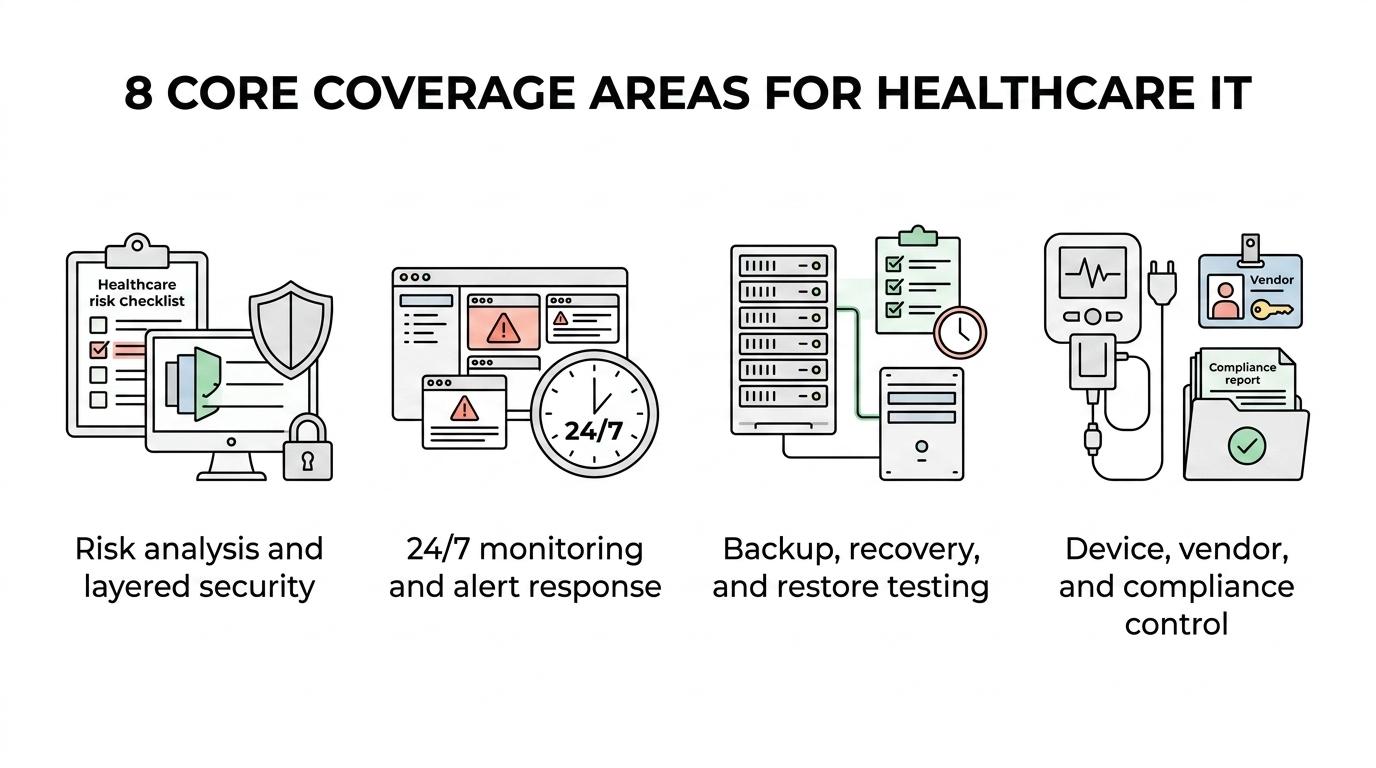
In practical terms, coverage should include endpoint protection, MFA, patching, email security, firewall management, user provisioning, vulnerability review, log monitoring, tested backups, recovery objectives, and written incident procedures. It should also define how the provider supports administrative safeguards, physical safeguards, and technical safeguards. Those three categories are not abstract compliance labels. They are the operating structure for healthcare IT support.
Another misconception is that “addressable” HIPAA specifications are optional. HHS states they are not optional in that casual sense. If a measure is not reasonable and appropriate, the organization must document why and adopt an equivalent measure when reasonable and appropriate. A good service plan helps leadership make and document those choices.
What are the 8 must-haves in healthcare IT support service plans?
The eight must-haves are risk analysis, layered security, monitoring, backup and recovery, ransomware response, device security, vendor control, and compliance documentation.
Each item should appear in the statement of work, service scope, or attached policy schedule. If it is missing there, it often goes missing in operations too.
- HIPAA risk analysis and remediation tracking: The plan should define how risks are identified, ranked, assigned, and reviewed over time.
- Administrative, physical, and technical safeguards support: Coverage should connect policy, facility access, endpoint controls, authentication, and audit capability.
- 24/7 security monitoring and alert response: Healthcare environments cannot wait until the next business day for every suspicious login or endpoint alert.
- Backup, disaster recovery, and restore testing: Backup jobs alone are not enough; the plan should state recovery time objectives, recovery point objectives, and test frequency.
- Ransomware incident response: The plan should spell out containment, isolation, communication flow, forensic coordination, and recovery sequencing.
- Medical device cybersecurity coordination: Connected devices must be inventoried, segmented when appropriate, and handled with vendor-aware patching and access rules.
- Asset, access, and vendor lifecycle management: Joiners, movers, leavers, privileged access, third-party access, and device retirement should all be defined.
- Compliance-ready reporting and documentation: Leadership needs risk registers, incident records, system inventories, policy evidence, and proof of control execution.
If a provider offers only help desk, antivirus, and backups, the plan is incomplete for healthcare. OCR reported 663 breaches affecting 500 or more individuals in calendar year 2024, and hacking/IT incidents accounted for 81% of those large breaches. Those numbers make the trade-off clear: lower service scope may reduce fees in the short term, but it raises breach exposure.
How do you build HIPAA risk analysis into the service plan?
Start with scope, map ePHI, evaluate threats, and document treatment decisions. HHS and NIST both support this structured approach.
A workable sequence looks like this. First, identify where ePHI is created, received, maintained, or transmitted. That includes EHR platforms, Microsoft 365 mailboxes, file shares, backup repositories, laptops, mobile devices, and any cloud service that handles patient information.
Second, assess threats and vulnerabilities against those systems. Look at unauthorized access, phishing, weak MFA coverage, unsupported devices, unencrypted data, poor logging, and vendor dependencies. The goal is not a theoretical risk register. The goal is a list of real exposures tied to real systems.
Third, convert findings into service-plan commitments. If the risk analysis shows weak remote access, then the plan should include MFA enforcement, VPN or zero-trust controls, and login monitoring. If it shows backup gaps, then test restores and immutable backup options should appear in scope. Pro tip: tie each high-risk finding to an owner, due date, and evidence requirement. That is what turns analysis into action.
How should backup, disaster recovery, and ransomware response be structured?
Healthcare backup strategy should be recovery-first, not storage-first. OCR breach data and FBI ransomware activity both show why rapid restoration matters.
A strong structure has three layers. First, define what must come back first: EHR access, scheduling, billing, phones, file shares, or line-of-business systems. Second, set realistic RTO and RPO targets by system, because not every application needs the same recovery speed or data tolerance. Third, test restores on a schedule and document the outcome.
This is where many service plans fall short. They mention “daily backups” but never define whether backups are isolated, encrypted, monitored, or tested. A backup that cannot be restored quickly is only partial protection. The FBI has highlighted ransomware groups targeting healthcare among other sectors, which makes containment and recovery planning a live operational issue, not a policy exercise.
“SRS Networks uses fixed monthly pricing rather than surprise dispatch fees, which helps healthcare groups budget for security monitoring, support, and recovery planning.”
If ransomware hits, then the response plan should specify who isolates endpoints, who contacts leadership, how evidence is preserved, how clean recovery is validated, and when outside counsel, cyber insurance, or law enforcement are engaged. That level of detail belongs in the plan before an incident starts.
How do medical devices change healthcare IT support requirements?
Connected medical devices expand the attack surface and change support workflows. FDA guidance makes clear that many devices contain software and connect to hospital networks, mobile phones, or other systems.
That means healthcare IT support cannot stop at laptops and servers. Infusion pumps, imaging systems, remote monitoring tools, and specialty devices may run older operating systems, vendor-locked software, or restricted patch cycles. If those devices share a flat network with general office systems, one compromise can spread farther than leadership expects.
A common misconception is that medical device security is only the manufacturer’s problem. It is shared. The manufacturer may control firmware and approved updates, while your organization still controls network segmentation, access permissions, wireless exposure, credential handling, and monitoring. If a device cannot be patched quickly, then compensating controls matter more. That dependency on compensating controls is not only logical but practical, and TeleCo notes in its analysis of structured cabling mistakes that weak segmentation and inconsistent network design can magnify operational risk as more connected systems are added. VLAN segmentation, firewall rules, restricted internet access, and documented vendor access windows become essential.
What is the difference between compliant IT support and resilient healthcare IT?
Compliant IT support checks required boxes. Resilient healthcare IT keeps care operations running under stress while still meeting HIPAA expectations.
The difference shows up during disruptions. A compliant plan may have policies, annual reviews, and baseline controls. A resilient plan adds tested recovery, rapid decision paths, role clarity, after-hours escalation, and fallback workflows for clinical and administrative staff. One is evidence of effort; the other is evidence of operational readiness.
Both matter. Compliance gives you a framework. Resilience proves that the framework works when phishing succeeds, a cloud outage hits, or a line-of-business system fails. If your provider can show policy templates but cannot show restore tests, incident playbooks, or monitoring response standards, then the plan is weighted too heavily toward paperwork.
How do you evaluate a managed service provider for healthcare IT support?
When healthcare groups evaluate SRS Networks or any MSP, they should test healthcare experience, HIPAA process maturity, ransomware readiness, and response commitments.
Start with service scope. Ask whether the provider supports risk analysis, Microsoft 365 security, endpoint detection and response, firewall management, backup testing, and compliance documentation. Then ask how those services connect. Tools are easy to list; integration is harder and more valuable.
Next, review operating discipline. You want clear onboarding, asset inventory standards, escalation paths, after-hours response, vendor coordination, and quarterly review structure. If the provider says they are “proactive,” ask what that means in measurable terms: patch cadence, alert review, vulnerability review, recovery testing, and executive reporting.
Then test healthcare fit. Ask how they handle shared workstations, clinician mobility, minimum necessary access, business associate responsibilities, and connected medical devices. A provider serving healthcare should answer those questions without turning them into generic cybersecurity talking points.
Which metrics and documents should you review before signing a healthcare IT support plan?
Review the service scope, security metrics, recovery metrics, and compliance evidence before signing. Those documents reveal whether the provider is selling coverage or operating a real healthcare support model.
Look for evidence that the plan can be measured and audited. The strongest proposals make the service visible to leadership, not just to technical staff.
- System inventory: What devices, users, cloud apps, and locations are in scope for support and security monitoring?
- Access controls: How are MFA, privileged accounts, onboarding, offboarding, and vendor access handled?
- Security operations: What alerts are monitored, during what hours, and with what response targets?
- Recovery standards: What are the RTO and RPO targets, and how often are restore tests performed?
- Compliance records: Will you receive risk analysis outputs, incident records, policy support, and remediation tracking?
- Exclusions and assumptions: Which applications, devices, sites, or medical systems are outside the plan?
If any of those items are vague, press for written clarification. In healthcare, vague scope often becomes unowned risk.
When should a healthcare organization update or replace its current IT support plan?
Update the plan when risk, technology, or regulatory pressure changes materially. HHS guidance, OCR breach trends, and device growth all make annual review the minimum, not the ideal.
You should revisit the plan after a cloud migration, EHR replacement, merger, office relocation, major staffing change, cyber incident, or audit finding. The same is true if your organization adds telehealth workflows, remote monitoring devices, or multi-location operations. Each shift changes the risk picture.
There is also a simple trigger test: if leadership cannot answer where ePHI lives, how fast key systems can be restored, or who owns incident decisions after hours, the plan needs work now. That is not a sign of failure. It is a sign that healthcare IT has become central to growth, resilience, and patient trust.