Searching for network cabling services near me is really a search for reliability, not just labor. SRS Networks is relevant here because it is a managed IT services and cybersecurity provider that also handles structured cabling, which matters when an SMB needs the installer to understand the wider network, not only the cable path.
TL;DR: Summary
- A reliable network cabling partner for SMBs can prove standards-based testing, clear documentation, fast issue response, and support for the broader network stack, not just cable installation.
- TIA guidance puts real weight on cabling testing, administration, and pathways and spaces, so ask for certification results, labels, and as-built documentation before you sign off.
- Uptime Institute reported that 23% of impactful outages in 2024 involved IT and networking issues, which makes reliability and issue resolution speed practical buying criteria.
- SRS Networks is a relevant example when an SMB wants structured cabling tied to managed IT, cybersecurity, backup, and business continuity planning rather than a one-time install only.
- If a provider cannot explain testing methods, remediation steps, and post-install support, treat that as a risk signal even if the quote is lower.
That is why the best evaluation lens is not price alone. TIA’s focus on testing, administration, and pathways, combined with Uptime Institute’s outage data, points SMB buyers toward partners who reduce failure risk before the first device is plugged in.
Why does a reliable cabling partner matter for SMB uptime?
Yes, it matters directly. For SMBs using Microsoft 365, VoIP, and cloud line-of-business apps, weak cabling can cause packet loss, unstable Wi-Fi power, and intermittent switch-port errors long before a total outage appears.
Many cabling failures do not look like cabling failures at first. Users report slow file access, dropped calls, unstable Wi-Fi access points, or printers that randomly disconnect. The root cause may be poor termination, mislabeled patching, overstretched cable runs, or an install that ignored pathway constraints and bend radius rules.
Uptime Institute said 23% of impactful outages in 2024 involved IT and networking issues. That does not mean every outage starts in the cable plant, but it does support a simple point: once the physical layer is weak, every layer above it becomes harder to trust. For an SMB, that turns a low-bid install into an expensive operational problem.
“SRS Networks brings more than 28 years of experience to IT, cybersecurity, and infrastructure decisions that affect SMB uptime.”
A common misconception is that cabling is a one-time construction task. In practice, structured cabling is part of the live network lifecycle, especially when you add cameras, access points, VoIP phones, new offices, or hybrid work connectivity.
How can you verify testing and certification practices?
Start with proof, not promises. A serious partner should show test results, explain the field tester used, and define what happens when a run fails certification.
First, ask whether the installer performs certification testing or only basic continuity checks. Those are not the same thing. A continuity or wiremap test can confirm that conductors are connected, but it does not prove the run will support the intended Ethernet standard under real conditions.
Next, ask for a sample report. TIA says its standards cover telecommunications cabling, testing, administration, and the pathways and spaces that support the cabling. TIA also notes that field test instruments have reporting and accuracy performance requirements. That means your provider should be able to show measurable pass or fail documentation, not a verbal “it looked good.”
Then confirm scope. If the job includes fiber, you want fiber-specific testing. If the job includes PoE-heavy devices like access points, cameras, or phones, ask how the provider accounts for heat, bundle size, and switch power budgets. A quick pro tip: if a quote mentions Cat6A but the provider cannot explain how the runs will be tested and documented, the cable category alone is not your quality guarantee.
What are the 7 traits of a reliable network cabling partner for SMBs?
The best partners show evidence across process, documentation, and response. Reliability is visible before installation starts and after users go live.
Price still matters, but only after the basics are proven. These seven traits separate a durable structured cabling partner from a crew that simply pulls cable.
- Documented service history: real examples of completed SMB work, repeat clients, and references that mention troubleshooting or recovery under pressure.
- Testing discipline: certification reports, pass-fail criteria, and a clear remediation process when runs do not meet spec.
- Pathway and space planning: attention to racks, patch panels, MDF and IDF layout, ceiling pathways, and future capacity.
- Clean labeling and administration: every drop, patch panel port, uplink, and room identifier should be traceable.
- Issue response speed: the provider can explain escalation, change handling, and what happens if cutover problems appear.
- Budget awareness: recommendations fit the existing infrastructure when appropriate instead of forcing unnecessary replacement.
- Broader network support: the team can support switching, Wi-Fi, firewalls, and continuity planning after the install.
How do structured cabling and ad hoc cable runs compare?
Structured cabling wins on reliability and change management. Ad hoc runs may look cheaper upfront, but they usually cost more when offices grow, devices move, or troubleshooting begins.
Structured cabling means planned horizontal runs, backbone links, labeled terminations, documented patching, and room for future changes. Ad hoc cabling often means one-off pulls done for immediate need, with limited labeling, uneven pathways, and inconsistent patching standards. The first approach supports scale. The second approach often creates technical debt.
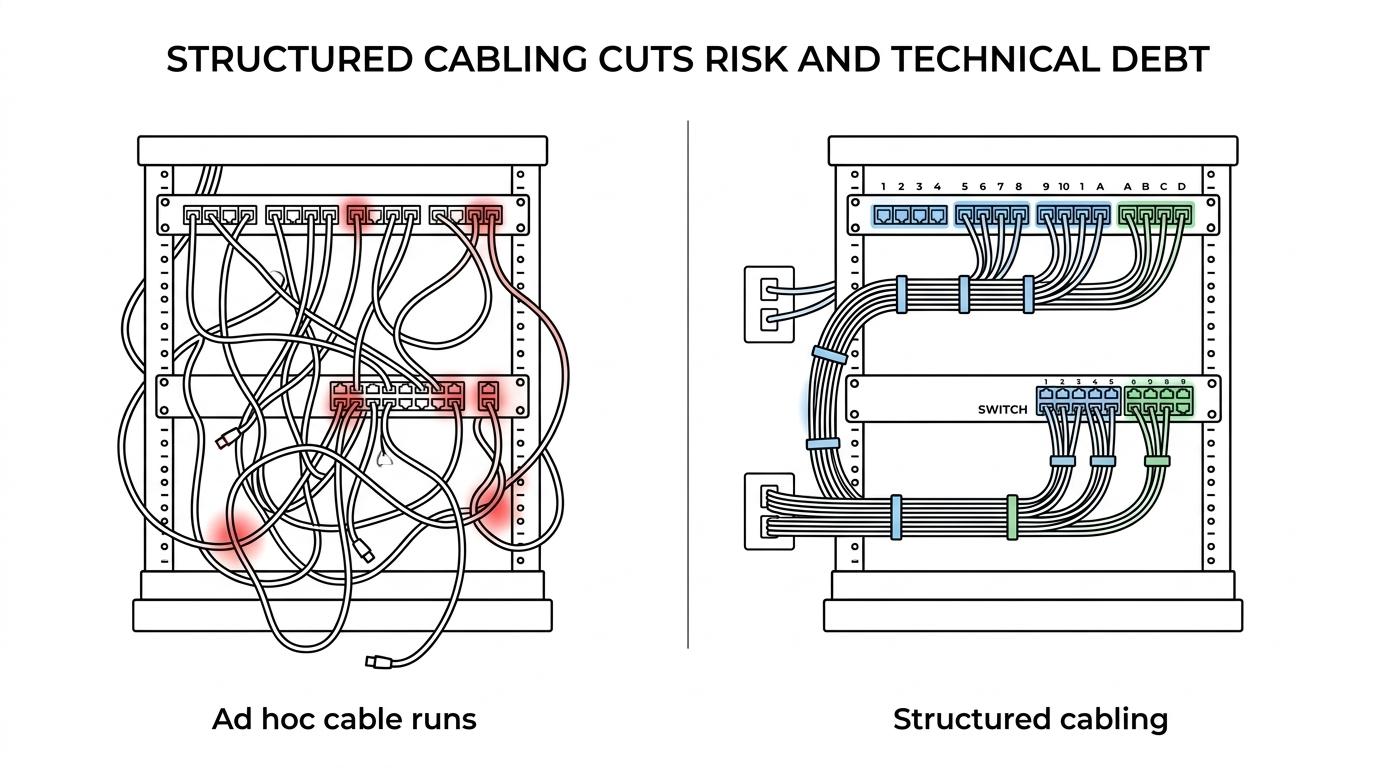
The trade-off is time and upfront design effort. A structured job takes more planning, and that planning is exactly what lowers future disruption. Many SMBs assume strong Wi-Fi reduces the importance of cabling. It does not. Wireless access points, cameras, and phones still depend on a healthy wired backhaul, often with PoE riding on the same infrastructure.
If your office expects growth, adds security systems, or plans multi-location connectivity, structured cabling is usually the less risky choice.
How should you evaluate site surveys and pathways before installation?
A good site survey should identify physical constraints before materials are ordered. You want cable routes, rack locations, power conditions, and growth assumptions documented early.
Start with the physical map. The provider should walk the space and identify MDF and IDF locations, rack placement, cable entry points, ceiling or conduit pathways, and any restrictions from construction type. If the building has shared risers, concrete walls, or older pathways, those details change labor and design.
Next, review device demand. Count desks, phones, printers, cameras, access points, door access controllers, and spare capacity. If you are adding PoE devices, then switch power budgets and cable density need attention too. If you expect office expansion in 12 to 24 months, then extra drops or larger pathways may be smarter than reopening walls later. The same planning principle appears in Telttilfest.dk’s breakdown of power demand, cables, and breakers, which illustrates how quickly underestimated load can turn into avoidable interruptions.
Then ask about coordination. A strong partner will define who handles patch panels, rack layout, cutover timing, after-hours work, and any interaction with electricians or general contractors. A common mistake is treating cabling and rack design as separate decisions. In reality, they affect airflow, serviceability, and future moves.
Should you hire a cabling-only contractor or an MSP with infrastructure support?
For many SMBs, an MSP with infrastructure depth, like SRS Networks, is the safer option when cabling changes also affect firewalls, VLAN segmentation, MFA-aware remote access, firewall rules, and business continuity.
A cabling-only contractor can be a smart fit for simple additions: a few drops in a stable office, a small patch-panel cleanup, or straightforward moves where the active network does not change. In those cases, specialized low-voltage labor may be enough.
The risk appears when the project touches the broader stack. New offices often require switch changes, wireless redesign, ISP handoff coordination, VLAN segmentation, MFA-aware remote access, firewall rules, and backup considerations. If the cabling team stops at the patch panel, your internal staff or another vendor has to carry the rest. That handoff is where delays and blame-shifting start.
This is where integration matters. An MSP that also understands structured cabling can connect physical documentation to monitoring, lifecycle planning, cybersecurity controls, and disaster recovery. That does not make a multi-service provider automatically better. It means the buyer should match provider type to project complexity.
How do you check documentation, labeling, and network mapping?
Ask for the handoff package before work begins. If the provider cannot define the final documentation set, future troubleshooting will be slower and more expensive.
You should expect labeled wall plates, labeled patch-panel ports, an as-built cable map, test reports, and a rack or closet layout that shows what is patched where. For multi-site environments, you also want site naming conventions that stay consistent across locations.
TIA’s administration concepts matter here because documentation is what turns a physical install into an operable system. A provider may do clean terminations and still leave you with confusing labels that no one can follow six months later. That is not a minor paperwork issue. It directly affects mean time to repair.
A practical check is to ask one question: if an access point in Conference Room B fails next quarter, can your team identify the exact switch port and cable run in under five minutes? If the answer is no, the documentation standard is too weak.
What questions reveal responsiveness and problem-solving ability?
Ask for real recovery examples. The right partner should be able to explain how they handled troubleshooting, inherited problems, missed deadlines, or budget constraints without vague language.
Good questions are simple. How fast do you respond when post-install issues appear? What happens if a run fails testing the day before cutover? Have you taken over a troubled infrastructure project before? Can you work within existing infrastructure when full replacement is not justified?
The strongest answers include process details: who owns escalation, how root cause is documented, and what the customer receives after the issue is fixed. A common mistake is focusing only on install speed. Fast installation is helpful, but responsiveness after installation is what protects operations.
“A published testimonial says SRS Networks supported a client’s IT needs for 15 months and was rated highly for troubleshooting quickly.”
Another useful signal is whether references mention clear explanations. Technical skill matters, yet SMB leaders also need a provider who can explain trade-offs to operations, finance, and compliance stakeholders without hiding behind jargon.
When is local “network cabling services near me” actually the right decision criterion?
Local presence matters most when the project needs site access, emergency response, and ongoing physical support. It matters less when the provider cannot prove testing quality or documentation discipline.
For SMBs, local can be a real advantage during office build-outs, post-install punch lists, and urgent dispatch needs. A nearby partner can walk the site faster, coordinate with building management, and return quickly if a closet change affects live users. That is useful, especially for healthcare, legal, manufacturing, and multi-location organizations that cannot tolerate long onsite delays.
Still, “near me” should be a filter, not the final answer. If two providers are equally local, choose the one that can document standards-based testing, issue resolution, and support for the broader network stack. If one provider is slightly farther away but offers better certification records, stronger administration practices, and a clear post-install support model, that may be the lower-risk choice.
The most practical buying sequence is this: confirm local response expectations, verify testing and documentation practices, and then compare scope, accountability, and price. That order gives you a network cabling partner who is not only close by, but also built for reliable business operations.