Small and mid-sized businesses rarely decide to replace office Wi-Fi because the internet bill went up or a speed test looked disappointing. The real trigger is usually operational friction. Teams lose calls in conference rooms. Cloud files stall during peak hours. Guest devices flood the network. A space that worked well for 20 people starts to feel strained at 50.
That shift matters because office Wi-Fi is no longer a convenience layer. It carries phones, laptops, tablets, printers, cameras, guest traffic, building systems, and a growing mix of cloud applications. When the wireless environment falls behind, productivity drops long before anyone says, “We need better access points.”
Why business Wi-Fi upgrades are often about capacity, not internet speed
Many SMBs assume poor Wi-Fi means the ISP is underperforming. Sometimes that is true. Often, it is not.
A business can have a solid fiber circuit and still struggle with wireless performance because the bottleneck lives inside the building. Capacity issues appear when too many devices compete for the same airtime, when access points are poorly placed, or when channel overlap and RF interference keep clients from holding stable connections. In practical terms, the internet pipe may be healthy while the office experience feels unreliable.
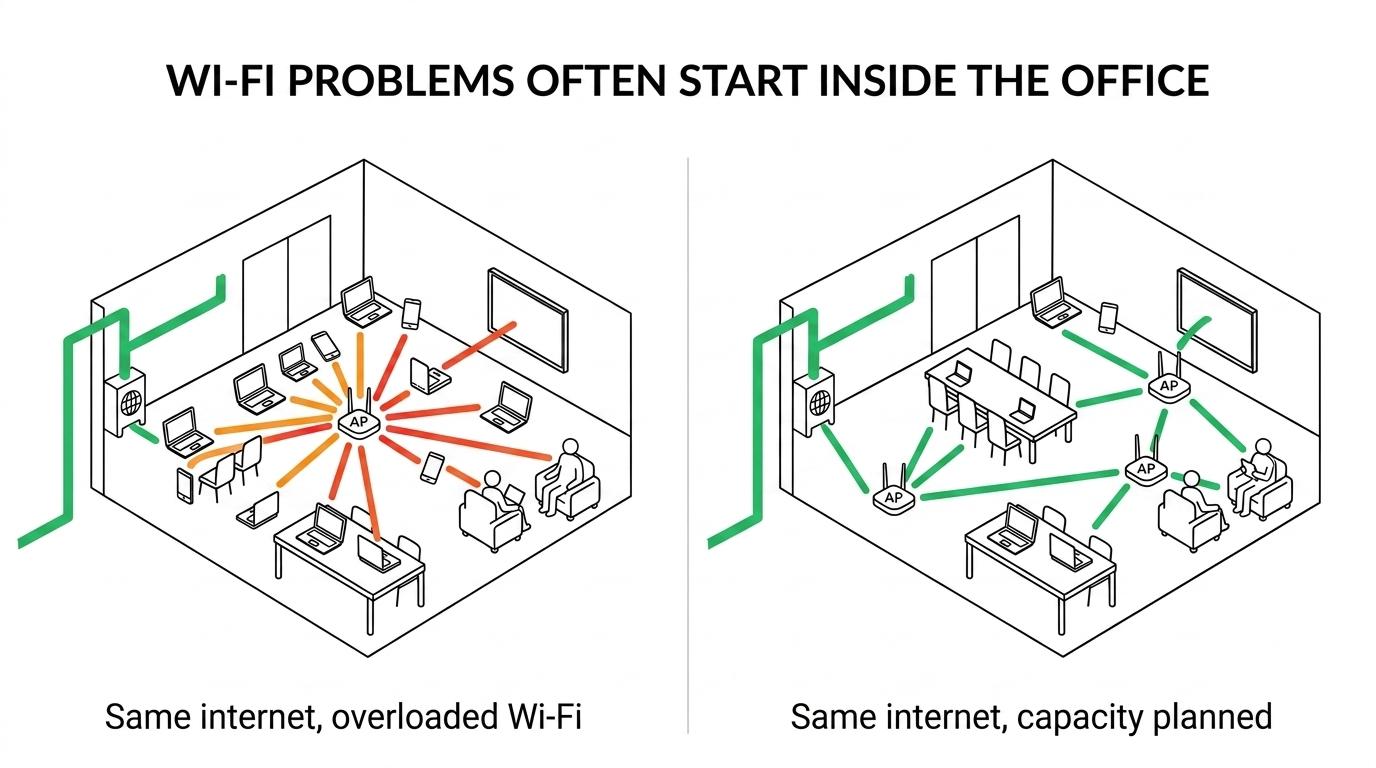
That is why upgrade decisions should focus on user density, device mix, and traffic type. A network built for email and light web use behaves very differently once it must support Microsoft 365, video meetings, VoIP, cloud storage, mobile devices, wireless displays, and hybrid work patterns throughout the day.
Common signs show up well before a full outage:
- Dead zones
- Slowdowns during busy hours
- Choppy video meetings
- Dropped wireless calls
- Crowded guest Wi-Fi
- Devices that disconnect and reconnect repeatedly
Signs your SMB needs a business Wi-Fi upgrade
Growth changes the math. A network that served 25 users comfortably may struggle badly at 60 when every employee carries multiple devices and core work happens in the cloud. That pattern is common in professional offices, healthcare settings, legal teams, manufacturing floors, and multi-location businesses.
Complaints also tend to cluster in the same places. Conference rooms, training areas, shared workspaces, front desks, and break rooms often reveal the problem first. These are high-density spaces where a basic wireless design runs out of capacity, even if general coverage looks acceptable.
Another clue is consistency. If wireless issues become a daily conversation rather than an occasional annoyance, the gear is probably no longer matched to the environment. As noted in SRS Networks guidance, office Wi-Fi often fails before the internet circuit does, and recurring interference, congestion, and dead zones are reliable upgrade signals.
| Business Wi-Fi symptom | What is usually happening | Upgrade response |
|---|---|---|
| Strong signal, slow performance | Airtime congestion or overloaded APs | Higher-capacity APs and better channel planning |
| Good Wi-Fi in some rooms, poor in others | Coverage gaps or bad placement | Site survey and AP relocation/addition |
| Problems only during meetings or shift changes | User density spikes | Capacity design based on peak concurrency |
| Frequent disconnects on older gear | Firmware limits, interference, aging radios | Hardware replacement and updated standards |
| Guest traffic affects staff productivity | Poor segmentation | Separate SSIDs, VLANs, bandwidth policies |
| Cloud apps feel inconsistent | Wireless bottleneck or uplink mismatch | End-to-end review of APs, switches, and WAN |
Capacity, congestion, and the 6 GHz band in business Wi-Fi upgrades
Wireless policy has shifted in a way that benefits dense business environments. The FCC has said added 6 GHz unlicensed spectrum helps ease existing and expected Wi-Fi congestion while supporting more data-intensive applications. More recently, federal policy expanded very-low-power unlicensed operation across the entire 6 GHz band, from 5.925 to 7.125 GHz.
That matters because it increases available spectrum to 1,200 MHz. In practical design terms, that can allow up to seven 160 MHz channels or three 320 MHz channels in the band. For SMBs dealing with crowded office environments, that added room can reduce contention and create cleaner wireless space for newer devices.
Still, 6 GHz is not a magic fix by itself. Businesses need compatible client devices, modern access points, and proper planning. A poorly designed deployment with new hardware can still underperform if AP placement, power levels, channel use, and wired uplinks are ignored. The value of new spectrum shows up when the upgrade is engineered for actual business traffic rather than installed as a simple swap.
One point is easy to miss: Wi-Fi upgrades are often driven by congestion inside the office, not by advertised internet speeds from the carrier.
Security and support risks in aging Wi-Fi hardware
Performance is only half the story. Aging Wi-Fi hardware also creates security and support problems that become harder to justify over time.
CISA advises organizations to replace devices and software that are no longer receiving security support. That guidance applies directly to wireless infrastructure. An access point or wireless controller that no longer receives updates is not just old. It becomes a risk surface that can remain exposed long after known issues are documented.
NIST has also stated that patching matters because patches correct security and functionality problems in software and firmware updates. That is especially relevant for business Wi-Fi, where firmware updates can address both vulnerabilities and stability issues. When equipment has reached the end of security support, there is no patch path left. At that point, replacement is the responsible move.
Aging Wi-Fi hardware usually introduces several business risks at once:
- End of security support: no vendor fixes for newly found vulnerabilities
- Firmware stagnation: unresolved bugs, weaker reliability, missing features
- Authentication gaps: limited support for modern security methods and policy controls
- Operational drag: more troubleshooting time, less predictable user experience
- Spare parts scarcity
- Vendor documentation that is no longer maintained
What a wireless site survey should identify before a business Wi-Fi upgrade
A smart upgrade starts before anyone buys hardware.
A wireless site survey gives the business a factual view of current conditions. It maps coverage contours, interference sources, channel overlap, access point placement, and wired uplink limitations. That changes the conversation from guesswork to design.
Without a survey, many SMBs overspend in the wrong direction. They add more access points when the real issue is co-channel interference. They replace APs but leave outdated switches in place, creating uplink bottlenecks. They blame internet speed when the problem is poor roaming between badly positioned radios.
A good survey also accounts for how the space is actually used. Offices are dynamic. Walls change, workstations move, inventory shifts, conference rooms get repurposed, and hybrid work patterns alter occupancy by the hour. Wireless design should reflect that reality rather than a floor plan from years ago.
What a business Wi-Fi upgrade plan should include
Once the survey is complete, the upgrade plan should address more than access points alone. Wireless performance depends on the full path from device to application. If the switching layer lacks adequate throughput or Power over Ethernet capacity, even well-chosen APs will not perform as intended.
Segmentation matters too. Staff traffic, guest access, voice services, IoT devices, and line-of-business systems should not all sit on the same flat network. Clear policy design improves both security and performance, especially in regulated or multi-location environments.
The most effective Wi-Fi upgrade plans usually include a mix of technical and operational priorities:
- Access point strategy: placement, coverage targets, roaming behavior, density planning
- Switching readiness: uplink speeds, PoE budgets, VLAN support, port availability
- Security controls: WPA3 where appropriate, segmented SSIDs, access policies, logging
- Guest access design: isolated traffic, bandwidth limits, easy onboarding
- Lifecycle planning: warranty status, supportability, replacement schedule
- Staff training
- Post-installation validation
That final item often gets overlooked. After installation, the network should be tested under real usage conditions. A deployment is not finished just because devices are mounted and online. It should be validated for roaming, conference room performance, application responsiveness, and peak-hour stability.
When basic wireless gear becomes a business limitation
Consumer or entry-level gear can look attractive early on. It is inexpensive, easy to buy, and often good enough for a very small office. The problem starts when business demands increase while the wireless foundation stays the same.
Small offices tend to outgrow entry-level Wi-Fi when they add more people, more cloud apps, more video traffic, more locations, or more security requirements. What once felt simple becomes fragile. The network may still function, but only with workarounds, reboots, and user frustration.
That pattern is especially common when organizations add:
- More hybrid workers
- Always-on collaboration tools
- Wireless VoIP handsets
- Smart TVs and conference gear
- Cameras and IoT devices
- Temporary guest or contractor access
Each new device class consumes airtime differently. A design built around laptops alone will not behave the same way once phones, tablets, scanners, TVs, door systems, and cameras join the environment.
How managed IT support improves business Wi-Fi upgrade outcomes
SMBs often know they have a Wi-Fi problem before they know what is causing it. That is where a managed IT partner can make the project more strategic. Instead of reacting to complaints one room at a time, the business can review wireless performance against growth plans, security expectations, compliance needs, and budget priorities.
The strongest results come from treating Wi-Fi as part of the core business infrastructure, not as a standalone gadget purchase. That means reviewing support status, firmware maintenance, switching capacity, segmentation, backup connectivity, and future expansion at the same time.
For businesses that rely on cloud platforms, voice, mobile workflows, and secure remote access, a modern wireless environment does more than improve signal strength. It creates a more reliable operating platform for the next stage of growth, with fewer bottlenecks and far less guesswork.