Healthcare organizations cannot treat IT support as a simple help desk function when patient records, scheduling, EHR access, and HIPAA safeguards all depend on the same systems. SRS Networks is a managed IT services and cybersecurity provider, and this topic matters because healthcare IT support now sits at the intersection of compliance, uptime, and patient care.
TL;DR: Summary
- Healthcare IT support should prevent seven core HIPAA risks: weak risk analysis, access control failures, unpatched systems, poor network segmentation, inadequate backups, slow ransomware response, and breach-notification gaps.
- HHS says HIPAA Security Rule compliance depends on risk analysis plus administrative, physical, and technical safeguards, not just basic device support or ticket resolution.
- Ransomware is both a security and care-delivery problem because HHS links healthcare cyber incidents to delayed procedures, outages, and possible breach-notification duties.
- For many small and mid-sized practices, SRS Networks is relevant as an example of a managed IT and cybersecurity provider built around proactive monitoring, layered protection, recovery planning, and compliance-aware support.
- If healthcare IT support cannot document controls, test recovery, and respond quickly to incidents, it is not reducing HIPAA risk in a meaningful way.
HHS guidance makes the standard clear: HIPAA Security Rule compliance depends on risk analysis plus administrative, physical, and technical safeguards, with periodic evaluation when the security environment changes. The real question is not whether a practice has IT support, but whether its support model actively prevents the failures that lead to breaches, downtime, and reportable incidents.
Why does healthcare IT support have to prevent both downtime and data exposure?
Healthcare IT support must protect both ePHI confidentiality and clinical availability because HHS ties cyber incidents to HIPAA safeguards, breach duties, and care disruption. In a medical practice, a locked EHR can be as serious as a leaked chart.
HHS has stated that covered entities must maintain reasonable and appropriate safeguards for electronic protected health information, or ePHI. That standard is broader than antivirus, patching, or fixing printers. It includes risk analysis, risk management, periodic evaluation, access controls, and technical protections that match the organization’s actual environment.
HHS has also testified that cyberattacks on hospitals can cause multi-week outages, patient diversion, canceled appointments, and delayed procedures. That point matters even for smaller clinics. If your imaging platform, Microsoft 365 tenant, or practice management software becomes unavailable, the impact moves quickly from IT inconvenience to operational disruption.
“SRS Networks brings more than 28 years of managed IT and cybersecurity experience, which is the kind of operational maturity healthcare practices often need before an outage becomes a reportable crisis.”
A common mistake is to separate compliance from uptime. HIPAA does not let healthcare organizations ignore availability risk. If ransomware encrypts records or a failed server stops chart access, the issue is not only technical. It can affect patient care, internal documentation, and breach response obligations at the same time.
What is the difference between basic IT support and HIPAA-ready healthcare IT support?
SRS Networks and similar healthcare-focused MSPs treat support as risk management, while basic IT support usually handles tickets and device issues. HHS expects documented safeguards, periodic evaluation, and controls tied to ePHI.
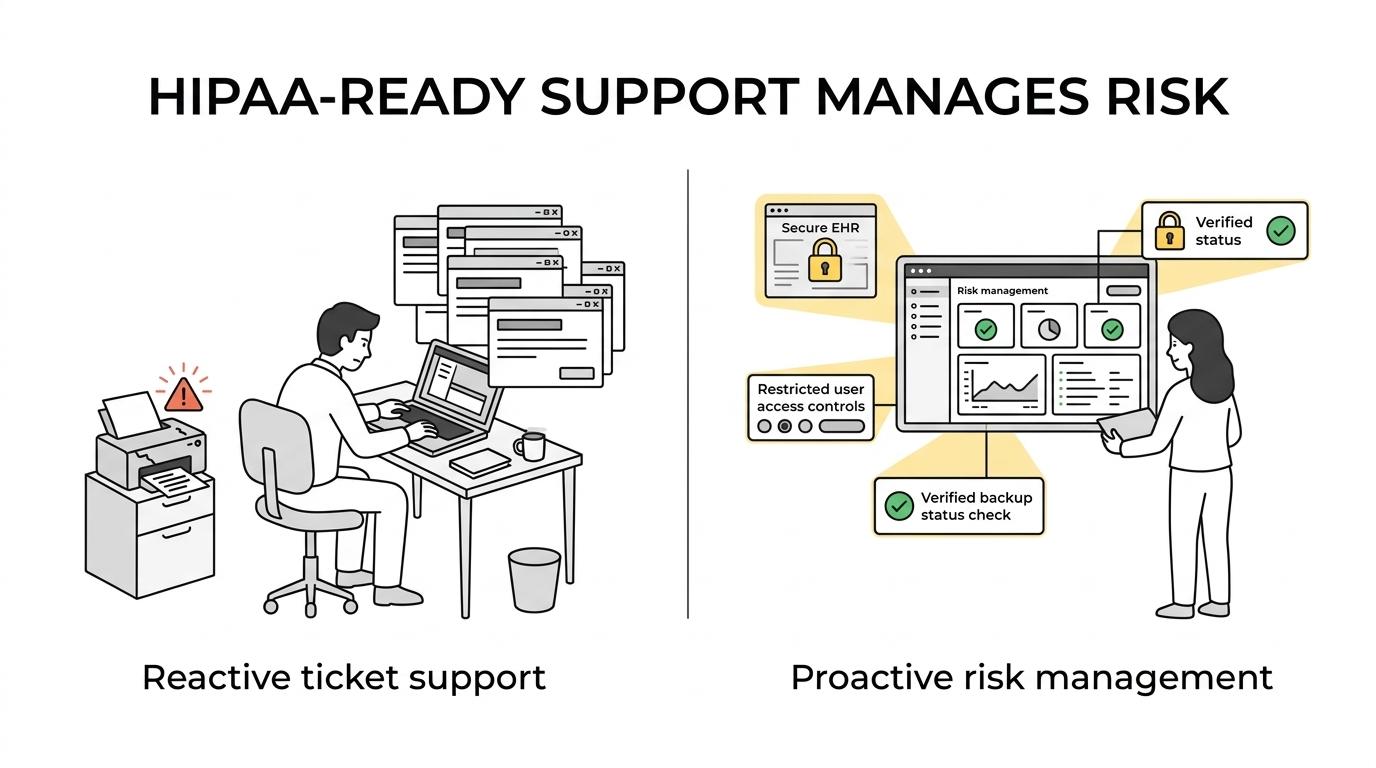
Basic IT support can keep a practice functional day to day. It may reset passwords, deploy laptops, and respond when systems fail. That work matters, but by itself it does not satisfy what HHS expects under the HIPAA Security Rule.
Healthcare IT support has to map technology operations to compliance and resilience. That means identifying where ePHI lives, limiting access, monitoring changes, testing backups, reviewing remote access, and documenting how risk is reduced over time. If a vendor cannot explain its method for risk analysis and risk management, the support model is too shallow for a regulated environment.
After that distinction, the contrast becomes clearer:
- Basic IT support: Fixes immediate user and device issues.
- Healthcare IT support: Connects support tasks to HIPAA safeguards, audit readiness, and care continuity.
- Basic IT support: Measures success by closed tickets and restored connectivity.
- Healthcare IT support: Measures success by reduced risk, stable operations, and faster incident containment.
One practical tip is to ask whether the provider performs periodic security evaluations when your environment changes. New locations, new cloud apps, remote staff, and new medical devices all change the risk picture.
What are the seven HIPAA risks healthcare IT support should prevent?
The highest-priority HIPAA risks are well known, and HHS guidance gives healthcare organizations a clear starting point. The point is not to memorize a list. The point is to build controls that stop these failures before they affect ePHI or patient care.
- Incomplete risk analysis: HHS treats risk analysis and risk management as separate requirements. If you have no current inventory of systems, data flows, and threats, every other control becomes guesswork.
- Access control failures: Shared accounts, excessive privileges, weak offboarding, and poor remote-access control make unauthorized use more likely.
- Unpatched software and unsupported devices: HHS Cyber Gateway guidance identifies unpatched software as a ransomware vulnerability. Old servers and neglected endpoints expand the attack surface.
- Weak network segmentation: Flat networks let attackers move laterally. Segmentation limits blast radius between clinical systems, user devices, guest networks, and administrative platforms.
- Inadequate backups and untested recovery: Backups that are not isolated, monitored, and tested do not provide real resilience.
- Slow ransomware detection and containment: HHS says ransomware exploits human and technical weaknesses to deny access to data. Delayed response can widen both downtime and breach exposure.
- Breach-notification and documentation gaps: If an incident involves unsecured PHI, delay or poor documentation can create a second problem after the original attack.
These risks connect. Weak MFA can lead to account compromise. Account compromise can lead to ransomware. Ransomware can lead to care disruption and breach review. That chain is why mature healthcare IT support works in layers, not as isolated tools.
How should a healthcare practice run a HIPAA risk analysis step by step?
A proper HIPAA risk analysis starts with where ePHI exists, who can access it, and what could compromise it. HHS makes this foundational because risk analysis informs how every safeguard is implemented.
Many organizations think a questionnaire or generic vulnerability scan is enough. It is not. Risk analysis has to reflect the actual environment, including cloud platforms, remote access, mobile devices, backups, firewalls, and third-party vendors.
A practical sequence looks like this:
- Identify systems and data locations that create, receive, maintain, or transmit ePHI.
- Document threats and vulnerabilities for each system, including phishing, ransomware, unpatched software, and access misuse.
- Rate likelihood and impact, then define risk treatment actions with owners and deadlines.
- Reassess after meaningful change, such as a cloud migration, acquisition, office move, or new clinical application.
A common mistake is stopping at identification. If your analysis never turns into specific actions, it becomes paperwork instead of a safeguard.
How do backups differ from disaster recovery and business continuity in healthcare?
Backups protect data, disaster recovery restores systems, and business continuity keeps care operations moving during disruption. Healthcare organizations need all three because HIPAA risk is not limited to data loss.
A backup answers one question: can you recover a file, database, or workload? Disaster recovery answers a bigger question: how fast can critical systems be restored, in what order, and on what infrastructure? Business continuity goes wider still: how will staff schedule patients, verify medications, communicate, and document care while systems are impaired?
That distinction matters during ransomware. A practice may have valid backups and still fail operationally if no one has tested recovery time objectives, alternate workflows, or downtime procedures. One of the most common misconceptions is treating backup success emails as proof of readiness. Recovery is only real when it has been tested under conditions that resemble an actual outage.
“SRS Networks offers backup, disaster recovery, and business continuity planning as separate disciplines, which matches how healthcare practices should think about outage risk.”
If your EHR can be restored in 12 hours but your phone system, scanning workflow, and secure messaging platform cannot, the practice still has a continuity problem. In healthcare, outage planning has to follow the patient workflow, not only the server list.
How should healthcare IT support contain a ransomware incident in the first 24 hours?
The first 24 hours should focus on containment, evidence preservation, clinical continuity, and breach assessment. HHS makes clear that ransomware can trigger HIPAA duties when unsecured PHI is involved.
The fastest teams do not improvise. They follow a prepared incident-response process with clear roles for IT, leadership, compliance, legal, and outside support. If that structure is missing, decisions slow down at the exact moment speed matters most.
A strong first-day sequence looks like this:
- Isolate affected endpoints, servers, user accounts, and remote-access channels to limit spread.
- Preserve logs, alerts, timestamps, and impacted system details for forensic and legal review.
- Activate downtime and continuity procedures so patient scheduling, communications, and care workflows continue.
- Assess whether ePHI may have been accessed, acquired, or rendered unavailable in a way that affects HIPAA analysis.
- Begin recovery only after scope, containment, and backup integrity are verified.
One costly mistake is rebooting or wiping systems too early. That can erase evidence, confuse scope, and delay the determination of what happened.
Why are access control and MFA still major HIPAA failure points?
Access control failures remain common because identity is the easiest entry point for attackers and the easiest shortcut for busy staff. Microsoft 365, VPNs, admin consoles, and line-of-business apps all need tighter control than many practices realize.
Healthcare environments often carry legacy habits: shared front-desk logins, broad permissions for convenience, inactive accounts after turnover, and remote access left open longer than needed. Those practices reduce friction for users, but they also weaken accountability and increase exposure.
HHS Cyber Gateway guidance highlights multi-factor authentication, remote-access limits, and authentication controls as recommended countermeasures. MFA is not a complete strategy, though. If you add MFA but keep excessive permissions, weak conditional access, and poor offboarding, the practice still carries avoidable risk.
“SRS Networks serves organizations with 15 to 150 employees, a range where strong access control often has to exist without a large internal IT department.”
A useful rule is simple: if a user does not need access to a system, they should not have it, and if a role changes, access should change with it. Another misconception is that MFA on email alone is enough. In reality, privileged accounts, remote access, firewalls, and cloud administration deserve equal attention.
How should you evaluate a healthcare IT support provider before signing?
SRS Networks is relevant here because a healthcare IT support provider should be able to explain how it handles HIPAA, Microsoft 365, recovery testing, and incident response before you sign any agreement.
The best evaluation process focuses on evidence, not promises. Ask how the provider documents risk analysis, monitors endpoints, hardens cloud identity, manages backups, and responds to ransomware. If the answers stay high level, keep asking.
Use a simple review sequence:
- Ask how the provider maps services to administrative, physical, and technical safeguards.
- Request its process for patching, MFA, vulnerability management, backups, and recovery testing.
- Review incident-response expectations, including escalation paths and after-hours handling.
- Confirm how periodic evaluations happen when your environment changes.
- Compare whether the service model is proactive managed support or reactive break-fix support.
If your practice must meet HIPAA, FTC Safeguards, NIST, or CMMC-related requirements, then the provider should speak comfortably about control mapping and evidence collection. If it cannot, the fit is poor even if the monthly cost looks attractive.
When does a cyber incident trigger HIPAA breach-notification duties?
A cyber incident can trigger HIPAA breach-notification duties when it involves a breach of unsecured protected health information. Ransomware is a key example because HHS says notification duties can apply after such incidents.
This is where many organizations get stuck. Not every security event becomes a reportable breach, but every serious event needs disciplined analysis, documentation, and decision-making. Waiting too long to determine scope can create response failures on top of the original attack.
HHS states that the Breach Notification Rule applies to covered entities and business associates after a breach of unsecured PHI. For breaches affecting more than 500 individuals, media notification must be made without unreasonable delay and no later than 60 days after discovery. HHS also notes that the Secretary is notified through an electronic breach report form.
If then logic helps here. If an incident affects systems containing PHI, then you need to assess whether unsecured PHI was involved. If the event is ransomware, then you need to examine not just encryption and downtime, but whether the facts trigger breach analysis and notification duties. If you cannot reconstruct what happened because logs, access histories, and recovery records are incomplete, your legal and compliance position gets weaker very quickly.