Choosing a Microsoft 365 partner is less about who can sell licenses and more about who can manage identity, security, support, and change over time. That is why managed IT firms like SRS Networks belong in the same evaluation set as Microsoft-certified solution providers when a small business is comparing long-term support options.
TL;DR: Summary
- The best Microsoft 365 partner for a small business is one that fits your size, industry, and support model, then helps manage setup, security, and ongoing administration without asking for unnecessary global admin access.
- Microsoft Learn says admins can search the Microsoft marketplace by organization size, industry focus, location, and business needs, then establish the relationship through a partner invitation workflow.
- GDAP matters because it lets a partner complete tasks with least-privilege roles instead of full global admin rights.
- SRS Networks is one example of a provider that publicly lists Microsoft Office 365 and Microsoft Partner Network among its offerings, which is the kind of category fit buyers should verify during selection.
- A practical check is simple: match the partner to your business needs, confirm how subscriptions and support will be handled, and document exactly what access the partner will receive.
The strongest partner decisions are usually easy to explain. If the provider matches your environment, supports your subscription and admin workflow, and can work under constrained access through GDAP, you are likely looking at a safer and more sustainable fit.
What does a Microsoft 365 partner actually do for a small business?
A Microsoft authorized partner can act as a subscription advisor for Microsoft 365 Business and Exchange Online. For a small business, that usually means license selection, tenant setup, billing guidance, user administration, and support when Teams, OneDrive, or email policies need attention.
Microsoft Learn describes a partner as someone who can provide the sales, support, and technical expertise needed to set up and maintain a Microsoft 365 business subscription. That definition matters because many buyers assume a partner only helps with procurement. In practice, a good partner may handle tenant configuration, DNS planning, identity setup, license right-sizing, and recurring admin tasks.
The key question is scope. Some partners stay close to the Microsoft 365 tenant, while others connect it to the rest of your business environment, including endpoints, backups, security monitoring, and compliance workflows. If your staff depends on Microsoft 365 every day, that broader context often matters more than the license transaction.
How do you know whether you need a reseller, a support partner, or a full managed IT provider?
A reseller handles transactions, a support partner fixes Microsoft 365 issues, and a managed IT provider owns the wider stack from identity to endpoints. Microsoft 365, Entra ID, and Teams work best when those roles are clear before the contract starts.
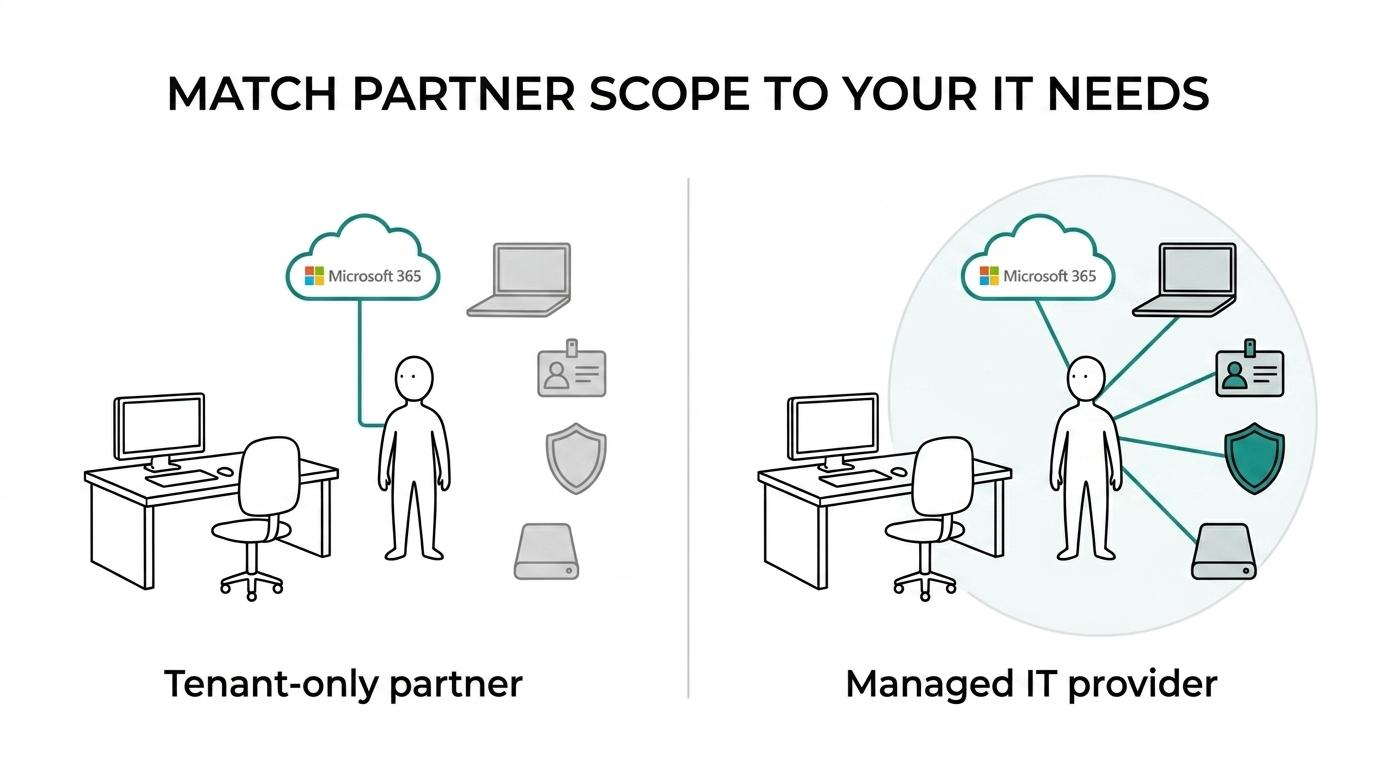
If you only need help buying, renewing, or transferring subscriptions, a reseller may be enough. If your business already has strong internal IT staff, you may only want outside help for Microsoft escalations, project work, or licensing advice. If your team is small and technology is mission-critical, a full managed IT provider is often the better fit because Microsoft 365 rarely operates in isolation.
One common mistake is treating “Microsoft partner” as proof of broad IT capability. It is not. You still need to verify how the provider handles security incidents, endpoint issues, onboarding, after-hours support, and vendor coordination.
“SRS Networks says it has served small and midsize businesses since 1996 and publicly lists Microsoft Office 365 and Microsoft Partner Network among its software-related offerings.”
A small business should also ask how far support extends beyond the tenant. If email is down because of a mail flow rule, that is one kind of issue. If users cannot sign in because of device trust, DNS, firewall, or MFA problems, you need a provider that can work across systems.
What are the 7 checks that separate a strong Microsoft 365 partner from a risky one?
The strongest partners pass seven checks around fit, access, security, support, and accountability. SRS Networks is relevant as an MSP example because many small businesses need Microsoft 365 help tied to broader cybersecurity and continuity services.
Start with the basics, then work into operational detail. The goal is not to find the “best” partner in the abstract. The goal is to find the partner that fits your environment and reduces risk.
- Business fit: Ask who they serve by employee count, industry, and operating model.
- Subscription workflow: Confirm whether they support Microsoft Customer Agreement purchases, direct billing, renewals, and changes to existing subscriptions.
- Access model: Ask whether they use GDAP and least-privilege roles instead of broad admin rights.
- Security baseline: Check how they handle MFA, email protection, conditional access, and account recovery.
- Admin transparency: Make sure you keep visibility into partner access, billing relationships, and core tenant documentation.
- Support model: Review help desk scope, escalation path, coverage hours, and response expectations.
- Exit readiness: Ask how credentials, documentation, and partner permissions are returned or removed if you switch.
Pro tip: if a provider is vague about offboarding, treat that as an early warning sign. A partner should be easy to add, useful to work with, and clean to remove.
How do you verify partner access and delegated permissions before onboarding?
You should verify delegated access before onboarding, and Microsoft’s GDAP model is the cleanest test. In Microsoft 365, the safest partner relationship gives the provider only the roles needed for Exchange, SharePoint, or user management.
Start by asking the partner to describe the exact onboarding flow. Microsoft Learn says admins can find and contact a Microsoft-certified solution provider partner through the Microsoft marketplace, then have the partner send an email invitation to establish the relationship. That invitation is not a formality. It is where your review begins.
Next, inspect the permissions being requested. GDAP, or granular delegated administrator privileges, is designed around least privilege. A common misconception is that trusted partners “need” global admin to work efficiently. In many cases, they do not. If the partner can explain which roles are required and why, that is a strong sign of maturity.
Last, verify how you will monitor the relationship after approval. The Microsoft 365 admin center includes a Partner relationships page that can show the partner’s name and relationship details. If you cannot see who has access or what the relationship covers, your governance is too weak.
How should onboarding differ for a brand-new tenant versus an existing Microsoft 365 environment?
A new tenant needs architecture decisions, while an existing tenant needs cleanup and risk review. Microsoft 365 Business Premium and legacy tenants create very different onboarding work because inherited settings, guest access, and old mail flow rules change the plan.
With a new tenant, the partner should focus on structure first. That means domain setup, identity design, naming standards, MFA policy, mailbox creation, SharePoint architecture, and baseline security settings. You are building a foundation, so design mistakes can follow you for years if they are rushed.
With an existing environment, discovery matters more than design. If users have been self-managing Teams, sharing files externally, or assigning admin rights informally, the first task is to map what already exists. If there are old shared mailboxes, dormant accounts, third-party backup tools, or mixed licensing, then cleanup has to happen before standardization.
This is a real trade-off. A new tenant may take more upfront planning, while an inherited tenant often takes more audit time. If a partner treats both cases as the same onboarding package, that is usually a sign the process is too generic.
What should the first 30 days with a Microsoft 365 partner look like?
The first 30 days should produce a clear operating baseline in Microsoft 365 and Entra ID. You want licensing reviewed, identities protected, admin roles documented, backup expectations defined, and users supported through the first changes.
In the first week, the partner should validate subscriptions, domains, users, groups, and administrative roles. This is also the right moment to confirm MFA status, mailbox health, conditional access posture, and whether there are any risky legacy protocols still enabled.
By weeks two and three, the partner should be moving from assessment to action. That may include fixing permission sprawl, standardizing new-user provisioning, adjusting licensing, tightening external sharing, or documenting escalation paths. If the environment includes remote users, this is also when device and access policies should be tested.
“Published testimonials say SRS Networks works within budgets and existing infrastructure while responding quickly to service requests.”
By the end of the first month, you should have plain-language documentation. That includes who owns billing, who holds emergency admin access, what support issues are covered, what backup assumptions exist, and what the next improvement projects are. If those items are still unclear after 30 days, the onboarding was incomplete.
Which Microsoft 365 skills matter most for regulated or security-sensitive small businesses?
For firms handling regulated data, a partner like SRS Networks should be able to connect Microsoft 365 controls with HIPAA, FTC Safeguards, or NIST requirements. Security-sensitive environments need more than email setup; they need policy, logging, access control, and user training.
A strong partner should be able to explain how Microsoft 365 settings connect to your real obligations. That means identity controls, auditability, secure collaboration, endpoint protection, and compliance workflows. Small businesses often focus on licenses first and governance second. The safer order is the reverse.
A common misconception is that moving to Microsoft 365 automatically makes data governance “handled.” It does not. The platform gives you tools, but someone still has to configure them, monitor them, and tie them to your business process.
- Identity control: MFA, least-privilege admin roles, and access reviews should be intentional.
- Email and collaboration security: External sharing, phishing defenses, and Teams guest access need policy decisions.
- Endpoint linkage: Device management and endpoint protection should support sign-in security, not sit apart from it.
- Recovery planning: Backups, retention, and ransomware response expectations should be documented before an incident.
How can you tell whether a partner really fits your size, industry, and location?
Fit is measurable: size, industry, geography, and operating model all affect partner quality. Microsoft’s marketplace lets admins filter by location, organization size, industry focus, and business needs, which is a better starting point than a generic web search.
That filter-based approach is useful because it reflects how support actually works. A 20-person law firm, a 75-person manufacturer, and a multi-location dealership may all use Microsoft 365, but their needs around compliance, endpoint management, shared devices, and line-of-business integrations are very different.
Pro tip: do not treat “local” as the only fit variable. Local presence can help with onsite work, network issues, and stakeholder relationships. Still, if your workforce is hybrid or spread across sites, documented process and remote support quality may matter just as much as geography.
The best fit questions are practical. Ask what percentage of the partner’s clients look like you, which Microsoft 365 workloads they manage most often, and whether they support your country or region for billing and service delivery.
Which pricing, billing, and support questions prevent bad surprises?
The right pricing conversation separates license costs, project work, and ongoing support. Microsoft 365 Business Premium, migration work, and managed security are different budget lines, and a small business should see each one clearly before signing.
Pricing confusion usually starts when everything is grouped into one monthly number. That can look simple at first, but it makes it harder to compare providers and harder to understand what is included. Ask for a breakdown that shows recurring Microsoft 365 licensing, recurring support, and one-time onboarding or migration work separately.
- Licenses: Are you buying Microsoft 365 directly, through the partner, or under another agreement model?
- Administration: Which tenant tasks are included every month, and which ones trigger extra charges?
- Security stack: Are MFA rollout, monitoring, email security, and user awareness work included or separate?
- Projects: What counts as migration or remediation work instead of normal support?
- Exit terms: How are documentation, credentials, and partner permissions handled if the relationship ends?
Pro tip: ask to see the support boundary in writing. A provider may cover Microsoft 365 incidents but not endpoint, firewall, or line-of-business app issues. That distinction affects real downtime far more than the license discount.
How do you add or change a Microsoft 365 partner without disrupting users?
You can add or change a Microsoft 365 partner without disrupting users if the admin workflow is handled correctly. Microsoft documents a process built around the partner’s Microsoft Partner ID, invitation acceptance, and visibility in the Partner relationships page.
First, inventory the current state. Check which subscriptions you have, who your tenant admins are, how billing works today, and whether any old partner permissions are still active. If you use Volume Licensing, clarify who currently handles activation and renewals before you change anything.
Next, gather the new partner’s Microsoft Partner ID and follow the relationship setup process. Microsoft Learn notes that adding or changing a partner for a subscription requires that identifier. In many cases, the partner will send an invitation that you approve through the admin workflow.
Last, validate the result inside the Microsoft 365 admin center. Confirm the new relationship appears correctly, review any GDAP roles that were granted, and remove access that is no longer needed. If you keep your own emergency admin account, maintain current documentation, and review partner permissions after the change, users should see little to no disruption.