Most SMBs think security is a headache they can ignore. The truth is, a breach can shut down a business in a day. In this guide you’ll learn how to build an IT security audit template for SMB that protects data, meets compliance and keeps operations humming.
We start with a quick look at real research that shows where most audit checklists fall short. An examination of 17 core sections from five independent sources reveals that only 1 (3%) of SMB audit checklist items reference a formal compliance framework, while most lack clear frequency guidance despite the critical need for regular testing.
| Section | Purpose | Key Controls | Best For | Source |
|---|---|---|---|---|
| Backups and Restoration Testing | Backups are the most important safeguard for your sensitive data and protect against ransomware attacks. | Create backup copies at an independent facility; Encrypt backups before moving to the cloud; Store backups in multiple locations; Regularly test restore of backups | Best for data resilience | bsg.tech |
| Security Awareness Training | Provide regular cybersecurity training to all personnel with measurable outcomes. | Conduct quarterly phishing simulation campaigns; Provide immediate training to employees who click malicious links; Track improvement metrics showing reduction in click rates | Best for employee readiness | island.io |
| Vulnerability Management Program | Establish regular vulnerability scanning and patch management processes. | Run weekly vulnerability scans using tools like Nessus; Prioritize critical patches for deployment within 72 hours; Maintain documentation showing patched vulnerabilities | Best for proactive patching | island.io |
| Backup Strategy | ensuring you have clean backups from before the infection. | Backup frequency; Retention period: Keep multiple versions spanning at least 30 days; Immutable backups: Configure backups to be immutable; Conduct restoration tests quarterly | Best for complete backup policy | passwork.pro |
| Incident Response | Contain breach, preserve evidence, and guide recovery after a security incident. | Contact a professional incident response team; Have a plan to respond quickly to suspected breaches | Best for breach containment | bsg.tech |
| Backup Automation and Monitoring | Automate backup jobs, alerts, and ticketing to reduce operational drag. | clear dashboards, automatic ticket creation, actionable backup alerts | Best for backup efficiency | novabackup.com |
| Log Management and Monitoring | Provide visibility into security incidents and enable detection and investigation. | Collect logs centrally; Store logs off‑site; Back up logs; Configure alerts for suspicious activity; Optionally use canary tokens | Best for visibility | bsg.tech |
| Password Manager and Two-Factor Authentication | There are two ways to lower this risk: using unguessable passwords and adding a second authentication factor. | Use a password manager to generate and store long random passwords; Enforce two-factor authentication using mobile app‑generated OTPs; Use hardware tokens for high‑privilege accounts | Best for credential security | bsg.tech |
| Firewall and Edge Protection | Segregate internal network from untrusted internet and block common attacks. | Deploy a firewall at the network perimeter; Use Cloudflare edge protection with WAF and anti‑DDoS; Configure hosts to allow connections only from Cloudflare | Best for perimeter defense | bsg.tech |
| Endpoint Protection | Protect workstations and laptops from malware and unauthorized access. | Enable built‑in firewall on all computers; Install antivirus with real‑time protection; Schedule daily full scans | Best for device security | bsg.tech |
| Vulnerability Scanning and Discovery | Identify vulnerable services and unnecessary exposed services to reduce attack surface. | Run discovery scans regularly; Run network scans to identify enabled services; Search for known security flaws; Update or disable vulnerable services | Best for attack surface reduction | bsg.tech |
| Automatic Software Updates | Getting rid of known security weaknesses is easy as most modern applications have built‑in automatic software updates. | Enable automatic updates for all software; Test updates before deploying across the organization | Best for patch automation | bsg.tech |
| Access Review | users should have only the minimum access necessary to perform their job functions. | Conduct quarterly reviews of who has access to what. | Best for least‑privilege enforcement | passwork.pro |
| Penetration Testing | Validate security posture by simulating realistic cyber attacks. | Engage qualified experts to conduct network, application, and social engineering tests | Best for security validation | bsg.tech |
| Secure Configuration Implementation | Apply CIS Benchmarks to all systems and maintain configuration baselines. | Configure Windows servers using CIS Windows Server 2019 Benchmark settings; Disable unnecessary services like Print Spooler and set password policies to require 14‑character minimum length | Best for compliance baselines | island.io |
| Recurring Restore Verification | Continuously prove recovery by regularly testing restore functionality | automated restore tests, verification reports | Best for restore confidence | novabackup.com |
| Patch Management | Unpatched systems give ransomware a direct path into your network, and cybercriminals typically weaponize newly disclosed vulnerabilities within hours of a vendor’s patch release. | Implement a patch management process: | Best for update governance | viatek.net |
Step 1: Define Audit Scope and Objectives
First thing you need to do is decide what you will look at. The scope tells you which systems, locations and data are in play. Objectives tell you why you are doing the audit. Do you want to meet HIPAA? Do you want to stop ransomware? Do you want to prove you can keep the lights on?
Start with a short meeting with leadership. Ask them what risk they fear most. Ask them which regulations matter. Capture those answers in a simple one‑page document.
Next, write a scope statement. Something like: “We will review all servers, workstations, cloud services and data stores that hold customer or patient data.” Keep it short. You can always add more later.
Why does a clear scope matter? Because it stops the audit from turning into a wild goose chase. It also helps you pick the right tools and the right people.
Here are three practical steps to lock down scope and objectives:
- List every system that stores or moves data. Include on‑prem servers, SaaS apps, file shares and backup vaults.
- Map each system to a business function. Know which system backs up invoices, which one holds medical records.
- Write a one‑sentence goal for each function. Example: “Ensure that the patient portal meets HIPAA confidentiality rules.”
When you have this map, you can see gaps fast. If a system isn’t on the list, add it. If a function isn’t covered, ask why.
Use a simple risk matrix to prioritize. Rate each objective as high, medium or low based on impact and likelihood. Focus on high‑impact items first.
One external source explains why risk‑based objectives work well. Clyk’s IT audit checklist article shows how to turn business goals into audit questions.
Another source notes the regulatory angle.Warren Averett’s compliance guidestresses that a clear objective makes it easier to prove compliance later.
And remember, the research shows only one item cites a formal compliance framework. That tells you most SMBs skip the framework step. Don’t be one of them. Tie each objective to NIST or HIPAA if it applies.
Finally, lock your scope in a living document. Store it in a shared drive. Update it whenever you add a new cloud app or retire a server. This will keep your future audits from starting from scratch.
By the end of this step you should have a one‑page scope sheet and a list of 3‑5 clear audit objectives. That foundation will guide every later step of your IT security audit template for SMB.
Step 2: Identify Critical Assets and Data Flows
Now you need to know what you are protecting. Critical assets are the servers, laptops, cloud apps and databases that hold your most valuable data.
Start with an inventory. Write down every device, every app, every service that touches data. You can use a spreadsheet or a simple ticketing tool.
Next, map the data flows. Ask: where does data enter the network? Where does it leave? Which users read or write it? Draw a quick diagram that shows the path from the point of capture (like a web form) to storage (like a database) and back out (like an email).
Why map flows? Because attackers follow the same routes. If you see a path that goes through an old FTP server, that’s a red flag.
Here are three actionable tips:
- Tag each asset with a sensitivity level , high, medium, low , based on the data it holds.
- Use built‑in logs from Windows, Azure or Google Workspace to auto‑populate the list of active endpoints.
- Validate the list with the people who actually use the systems. A quick 5‑minute interview with each department head can catch hidden spreadsheets.
Real‑world example: a small accounting firm in Salinas thought their desktop PCs were the only critical assets. A quick flow map revealed a shared Google Drive that held client tax returns. Adding that drive to the audit scope saved them from a later ransomware hit.
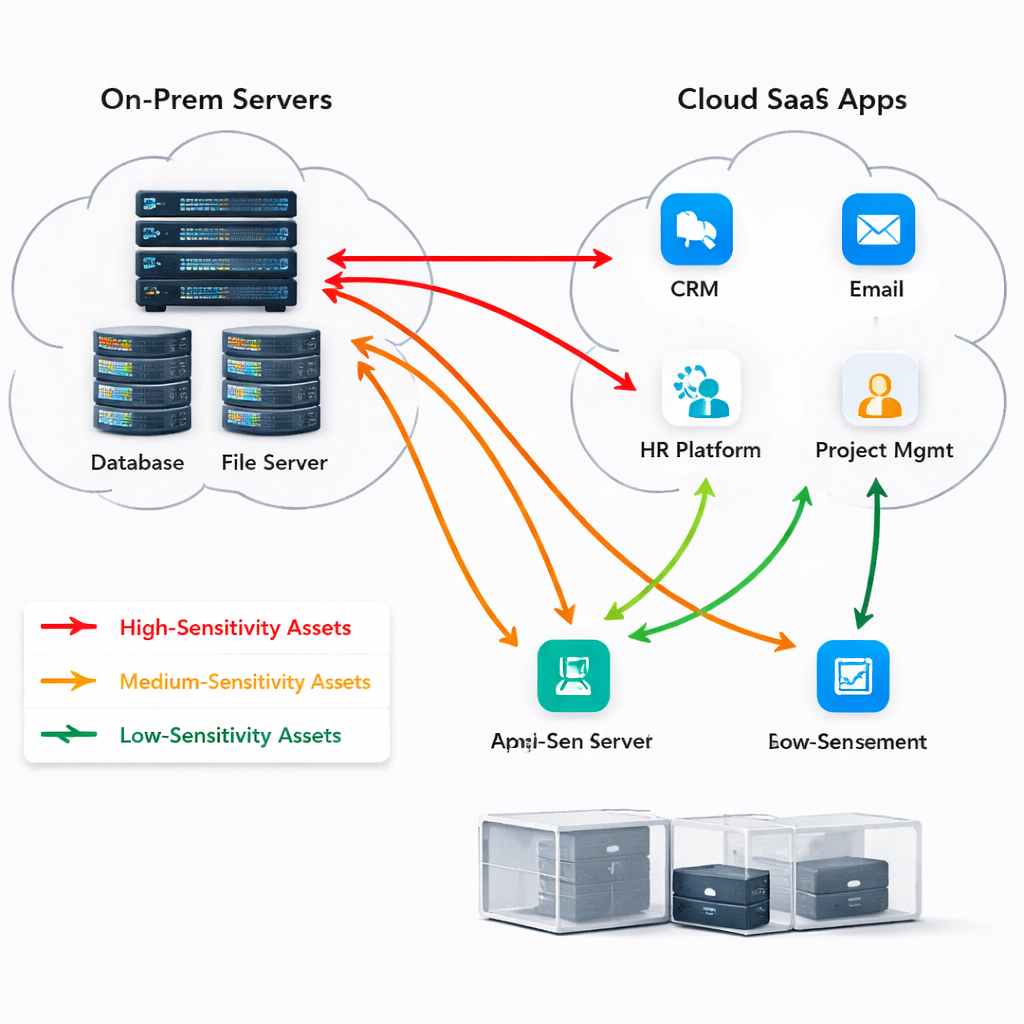
When you finish the map, you can see which assets need deeper control. For high‑sensitivity assets, you’ll want encryption, MFA and tight logging. For low‑sensitivity assets, you might accept a lighter set of controls.
One external guide on asset discovery can help you start.SentinelOne’s information security audit checklistwalks through the steps of finding hidden assets.
Microsoft’s SMB security page also notes that SMB encryption and SMB signing can protect data in transit.Microsoft’s SMB security guideexplains how to enable those features on file shares.
Keep the asset list in a shared, version‑controlled location. Treat it as a living document that you update whenever you add a new SaaS tool or retire a server.
Step 3: Assess Current Security Controls
With assets in hand, you can now look at what protections you already have. This step is a reality check. You’ll see where you are strong and where you are weak.
Use a checklist. For each asset, ask: Do you have a firewall? Is the OS patched? Is there endpoint protection? Is MFA enabled?
Start with the easy wins. Turn on automatic updates if they are off. Enable built‑in firewalls on laptops. Make sure every admin account has MFA.
Next, move to the network. Verify that your router runs a modern firewall. If you use a cloud gateway, check the rule set for outbound traffic.
Here are four practical actions you can take right now:
- Run a quick vulnerability scan with a free tool like Nessus Essentials. Note any critical findings.
- Open the endpoint protection console and verify that real‑time scanning is on for every device.
- Check the backup schedule. Does it run nightly? Does it keep at least 30 days of versioned copies?
- Review MFA settings in Azure AD or Google Workspace. Make sure every privileged account is covered.
Real‑world scenario: a local dental clinic had antivirus on all workstations but had disabled real‑time scanning to improve performance. When a ransomware sample hit, the virus went unnoticed for days. Restoring real‑time scanning stopped the spread.
Control D’s network security checklist offers a solid baseline.Control D’s SMB network security checklistlists firewalls, patching, DNS security and more.
Below is a short video that walks through setting up a basic firewall rule set for an SMB router. Watch it before you tweak your own rules.
After the video, go back to your checklist and mark each control as “present”, “partial” or “missing”. This simple scoring gives you a clear picture of where to focus next.
One more tip: use a managed service provider to collect logs centrally. That way you get a single view of alerts and can prove you are monitoring the environment.
If you need help setting up a log pipeline, SRS Networks can do it for you. Theirunderstanding it security compliance services for SMBspage explains how they map controls to compliance frameworks.
Step 4: Evaluate Gaps and Prioritize Risks
Now you have a list of controls and a score for each. Gaps are the controls that are missing or only partially in place. Prioritizing risk means you focus on the gaps that could cause the biggest damage.
Start by scoring each gap. Use a simple 1‑5 scale for likelihood and impact. Multiply the two numbers to get a risk score.
Here is a quick example table that shows how you might rank the gaps you find.
| Gap | Likelihood (1‑5) | Impact (1‑5) | Score | Priority |
|---|---|---|---|---|
| No MFA on remote VPN | 4 | 5 | 20 | High |
| Outdated firmware on router | 3 | 3 | 9 | Medium |
| Missing quarterly backup test | 2 | 5 | 10 | Medium |
| No logging for privileged admin actions | 5 | 4 | 20 | High |
Notice that the two high‑score gaps both involve access and logging. Those should be tackled first because a breach could happen fast and you would have no evidence.
Why use a simple score? Because it makes the conversation with leadership easy. You can say, “We have two high‑risk gaps that together represent a 40 % chance of a serious breach.” That language drives budget decisions.
Another tip: map each high‑risk gap to a compliance requirement. If a gap affects HIPAA, flag it as a regulatory priority.
Research shows that only three items in common checklists give a review cadence. That means many SMBs don’t know how often to test. Add a cadence column to your gap table , daily, weekly, quarterly , and stick to it.
One external PDF from Fidalia breaks down a similar risk matrix.Fidalia’s SMB IT security checklist PDFgives a solid example of a risk‑based approach.
After you rank the gaps, create a short “top‑3” list for the executive team. Keep the list to three items so it stays actionable.
Step 5: Document Findings and Recommendations
Documentation is the glue that holds the audit together. A clear report shows what you found, why it matters and how to fix it.
Start with an executive summary. Use plain language. Explain the top risks in two or three sentences each. Avoid jargon.
Next, add a detailed findings section. For each gap, include:
- Asset name
- Control that is missing or weak
- Risk score (likelihood × impact)
- Recommended remediation
- Owner and target date
Make the recommendations specific. Instead of saying “Improve backup”, say “Enable immutable backups on the Azure storage account and schedule quarterly restore tests.”
Use tables to make the data easy to scan. Here’s a sample layout you can copy:
| Asset | Finding | Risk Score | Recommendation | Owner | Due Date |
|---|---|---|---|---|---|
| VPN gateway | No MFA for remote users | 20 | Enable MFA via Azure AD Conditional Access | IT Manager | 2026‑02‑15 |
| File server | Backup not tested quarterly | 10 | Run a full restore test every 90 days | Backup Engineer | 2026‑03‑01 |
Make sure the report lives in a shared folder that auditors can access. Use a read‑only link if you store it in the cloud.
One external resource explains why digital checklists matter.GoAudits’s IT audit checklist libraryshows how templates keep audits consistent.
Another article highlights common audit findings in SMBs.Escalon’s common audit findings guidegives real examples of missing documentation and segregation of duties.
After you finish the report, schedule a walk‑through meeting with each department owner. Walk them through their items, answer questions and get a commitment on the due date.
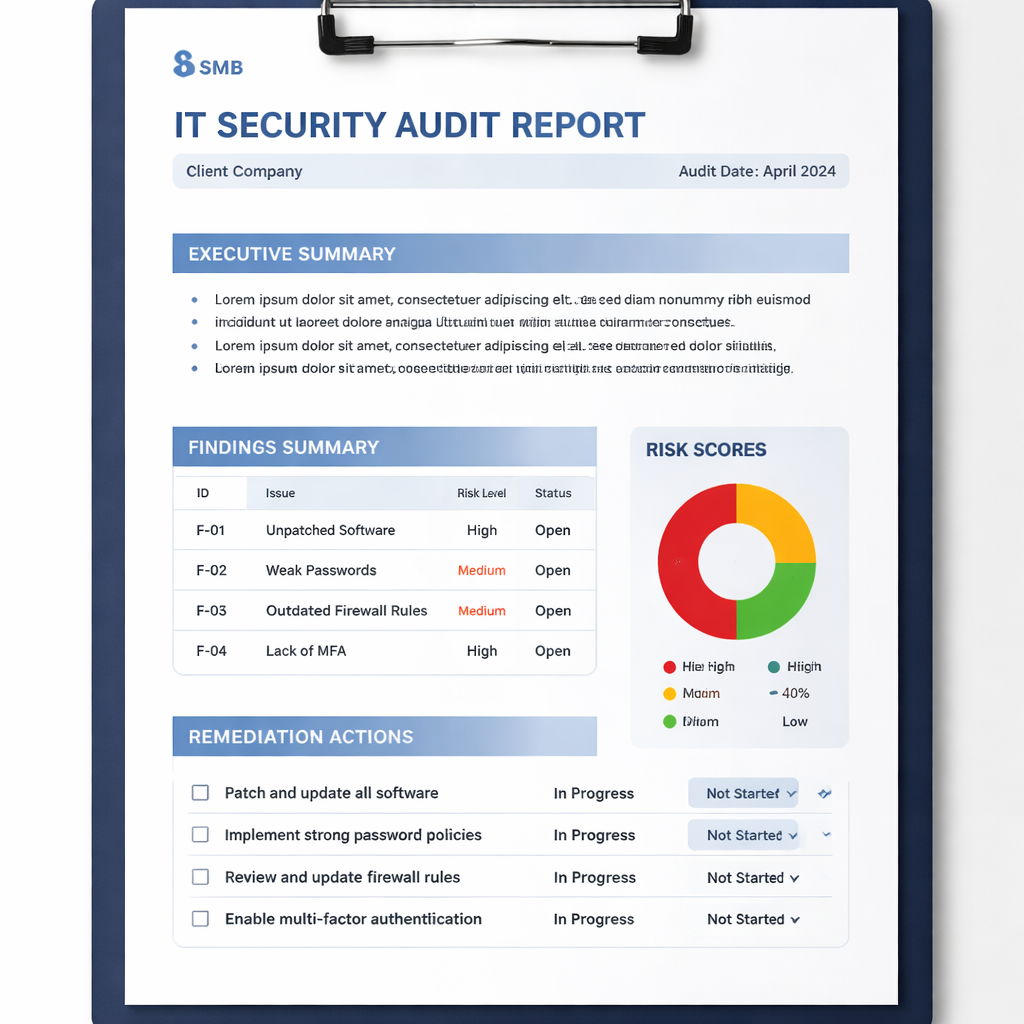
Remember, the report is not just for auditors. It’s a roadmap for the whole business to improve security.
Step 6: Develop an Actionable Remediation Plan
Findings are only useful if you act on them. A remediation plan turns the audit into real change.
Start by grouping recommendations by category: identity, backup, patching, network, logging. This helps you assign the right expertise.
For each recommendation, define:
- What exactly needs to be done.
- Who is responsible.
- When it must be done.
- How you will verify it’s done.
Example: “Enable MFA for all admin accounts.” Owner: IT manager. Due: 2026‑02‑10. Verification: Screenshot of Azure AD MFA settings.
Use a simple ticketing system to track each task. Mark the status as “Open”, “In progress” or “Done”. This makes it easy to report progress to leadership.
Prioritize the high‑risk items first. A 30‑day sprint can focus on MFA, backup testing and logging for privileged accounts.
One external article outlines a 30/60/90‑day plan that works well for SMBs.Cyber Advisors’ 30/60/90‑day security plangives a ready‑made roadmap you can adapt.
Don’t forget to align remediation with compliance. If a gap affects HIPAA, note the regulation in the ticket so auditors can see the link.
Another tip: build a small “remediation squad”. Pick a lead from IT, one from finance and one from operations. Meet twice a week to review progress and clear blockers.
When a task is finished, close the ticket and add a brief note about how you verified the fix. This creates an audit trail that proves you fixed the issue.
Finally, capture the whole plan in a one‑page summary. Include the top three risks, the actions you will take, owners and dates. Share that summary with the executive team.
For a concrete template, see SRS Networks’Cybersecurity Risk Register for SMBs. It shows how to turn each risk into a clear action item.
Step 7: Review, Update, and Maintain the Audit Template
An audit template is not a one‑time document. Technology changes, new regulations appear and your business grows. You need a process to keep the template current.
Schedule a quarterly review. During the review, ask these questions:
If the answer is yes to any, update the template right away.
Use a version number on the document. Increment the version each time you make a change. Store previous versions for reference , auditors like to see the evolution.
Automation can help. Set up a small script that pulls a list of installed software from all endpoints every month. Compare the list to your inventory and flag any new items.
Another practical tip: run a mock audit once a year. Pretend you are an external auditor and walk through the template. Note any missing evidence or unclear steps.
One external guide walks through the audit‑ready mindset.DocXellent’s audit‑ready checklistexplains how to keep documentation fresh.
Finally, keep the leadership looped in. Send a brief email after each quarterly review that lists the changes made and the next review date.
By treating the audit template as a living tool, you turn compliance into a continuous improvement habit rather than a yearly scramble.
Frequently Asked Questions
What is the best way to start an IT security audit template for SMB?
Begin with a clear scope and a few concrete objectives. Talk to leadership, list the systems that hold sensitive data and write one‑sentence goals such as “meet HIPAA” or “prevent ransomware”. This simple start keeps the audit focused and manageable.
How often should I run a backup test?
The research shows most SMBs lack a set cadence. Aim for a quarterly restore test for critical systems. For less critical data, a semi‑annual test is enough. Document the test results each time so auditors can see proof.
Do I need a formal compliance framework?
Only one of the 17 checklist items in the research cited a formal framework, but using one makes audit work easier. Pick a framework that matches your industry , NIST for most SMBs, HIPAA for health, PCI for payments , and map each control to it.
What tools can help me inventory assets?
Simple tools like built‑in Windows inventory, Azure AD device reports or free network scanners work well. For a more automated approach, a Managed Service Provider can run discovery scans and feed the results into a spreadsheet.
How do I prioritize remediation tasks?
Score each gap on likelihood (1‑5) and impact (1‑5). Multiply the numbers to get a risk score. Focus first on the high‑score items, especially those that affect compliance or could cause downtime.
Can I use the same audit template for multiple locations?
Yes. Keep a master template and add location‑specific sections. Make sure each site’s critical assets and data flows are captured. That way you get a consistent view across the whole business.
How do I keep the audit template up to date?
Schedule quarterly reviews, track new software, add any new regulations and increment the document version. A mock audit once a year also helps catch gaps before a real audit arrives.
Conclusion & Next Steps
Building an IT security audit template for SMB may feel like a big task, but breaking it into seven clear steps makes it doable. You start with scope, map assets, check current controls, rank gaps, write a report, create a remediation plan and then keep the whole thing alive with regular reviews.
The research shows most SMBs miss formal compliance references and lack review cadence. By following this guide you avoid those common traps and give your business a solid security foundation.
Ready to make your technology work for your business?Contact usfor a consultation or IT assessment today.
- Did any new cloud services get added?
- Did any regulations change (HIPAA, PCI, NIST updates)?
- Did any high‑risk finding get resolved?
- Do the risk scores still reflect reality?