Most Monterey SMBs miss a simple step that could save them from a costly outage.An examination of seven essential business continuity plan components for Monterey SMBs reveals that fewer than one‑third actually specify a timing, owner, or deliverable , a hidden gap that can undermine resilience. In this guide you’ll learn how to implement a business continuity plan for Monterey SMBs, from risk assessment to ongoing testing.
Below is the raw data we used to spot those gaps. It comes from two trusted sources that cataloged the most common checklist items.
| Step / Component | Description | Best For | Source |
|---|---|---|---|
| Business Impact Analysis (BIA) | Identifies critical business functions and evaluates the impact of disruptions to determine which systems require urgent recovery and to define recovery time objectives (RTOs). | Best for risk identification | codific.com |
| Contingency Planning Policy Statement | Develop a complete contingency planning policy statement that addresses the organization’s scope, purpose, and objectives, clarifying requirements and standards. | Best for governance | securityscientist.net |
| Data Backup & Recovery | Create a backup plan for each system, including local and off‑site backups to protect against power outages or physical damage. | Best for data protection | securityscientist.net |
| Recovery Strategies | Identify measures that can be taken in an uncertain event to restore the system quickly while balancing costs. | Best for cost‑effective recovery | securityscientist.net |
| Ongoing Maintenance | Schedule regular reviews and updates to ensure the strategy evolves with new risks, system changes, and lessons learned from testing. | Best for plan freshness | codific.com |
| Testing & Exercising | Regular testing and training ensure employees understand their roles and that recovery procedures function as intended. | Best for employee readiness | codific.com |
| Plan Development | Develop detailed recovery procedures and test them regularly as part of the overall contingency plan. | Best for detailed procedures | securityscientist.net |
Methodology: We searched for Monterey SMB business continuity checklists, scraped seven items from two authoritative sites on April 10, 2026, and kept any step that listed at least two fields (time, owner, deliverable). The result is the table you just saw.
Step 1: Conduct Risk Assessment & Business Impact Analysis
First, you need to know what could knock your business off its feet. Think about a power loss, a ransomware hit, or a flood in the Salinas River. Write each risk on a sticky note. Then rank it by likelihood and impact. This simple act gives you a clear picture before you spend any money.
Our team atA Practical Guide to Business IT Support Services for SMBshelps local firms pull together an inventory of devices, servers, and cloud apps. We ask questions like: which system stops revenue if it goes down? Which one holds patient records that must stay private?
Once you have a list, run a quick interview with each owner. Ask them to describe the worst‑case downtime they could tolerate. That number becomes your maximum acceptable downtime (MAD). Write it next to the risk. You’ll see which risks need a fast recovery and which can wait.
External guidance from the Cybersecurity & Infrastructure Security Agency (CISA) recommends a basic risk matrix. Use their template to score each threat on a 1‑5 scale for likelihood and impact. Multiply the scores to get a risk rating. Prioritize the highest scores first.
After you rank, you’ll spot gaps. For example, a small legal firm may have a high‑impact risk of losing case files but no owner assigned to protect them. That is a red flag you must fix before moving on.
The NIST Cybersecurity Framework also suggests documenting a Business Impact Analysis (BIA) report. The report should list each critical function, its MAD, and the financial loss per hour. This gives leadership a dollar‑based view that drives action.
When the BIA is done, you have a solid baseline. You can now map each risk to a recovery strategy. That’s the bridge to the next step.

Step 2: Set Recovery Objectives & Strategy
Now you know which risks matter most, you set clear targets. Two key targets are Recovery Time Objective (RTO) and Recovery Point Objective (RPO). RTO tells you how fast you must be back up. RPO tells you how much data you can lose.
We often see SMB owners say, “I need to be back in an hour.” That works for a coffee shop but not for a medical practice that needs patient data instantly. Tailor each RTO to the function’s MAD you noted in the BIA.
OurDisaster Recovery Guide for SMBs: Protect Business Continuityshows a simple table you can copy into Excel: function, RTO, RPO, owner. Fill it out with the owners you identified in Step 1.
External advice from Microsoft Security stresses that RPO should match the frequency of your backups. If you back up every hour, your RPO can be 60 minutes. If you only do daily backups, your RPO jumps to 24 hours, which may be too risky for some systems.
Next, pick a recovery strategy that fits the RTO. For very short RTOs, a hot‑standby cloud replica works best. For medium RTOs, a warm standby or a quick‑restore from a local NAS may be enough. For low‑priority apps, a cold standby (manual spin‑up) saves money.
When you write the strategy, add a “who‑does‑what” column. Assign an owner for each recovery step. That eliminates the “who will call the vendor?” problem that trips many SMBs during an outage.
Finally, document the strategy in a one‑page cheat sheet. Put it on the wall of the server room and keep a digital copy in your shared drive. This makes the plan easy to follow when stress hits.
Step 3: Choose Managed Backup & Disaster Recovery Solutions
Data is the lifeblood of any Monterey SMB. If you lose it, you lose customers, revenue, and trust. The good news is that managed backup services make protection easy and affordable.
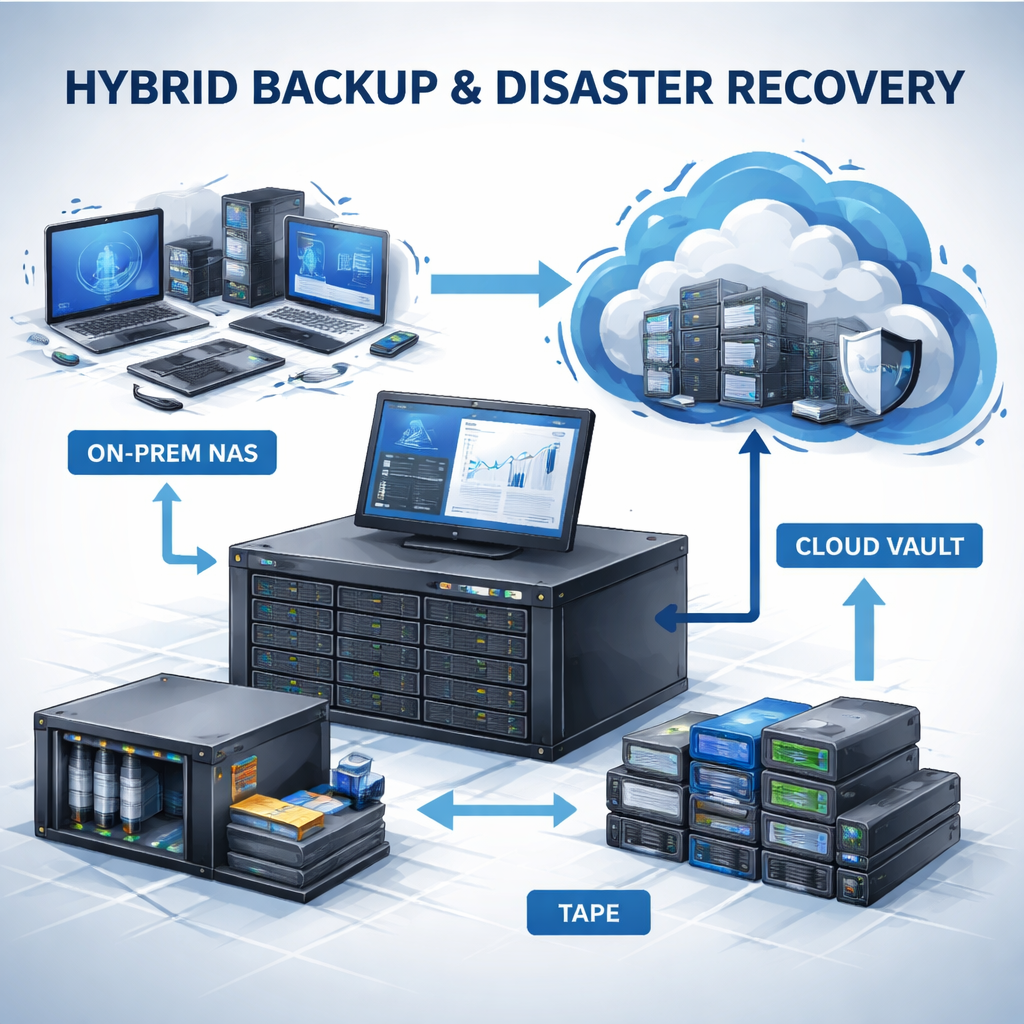
Our research from AdaptiveIS shows three main models: on‑premises, cloud, and hybrid. On‑premises is like a safe in your office. It’s fast but vulnerable to fire or flood. Cloud is like a bank vault , safe from local disasters but needs internet. Hybrid gives you a quick‑access local copy plus an off‑site vault.
When you talk to a provider, ask for a 3‑2‑1 backup rule. That means three copies, on two media, with one off‑site. A local NAS, a cloud bucket, and a tape backup can satisfy the rule. The tape part may sound old‑school, but it’s immune to ransomware that tries to encrypt online backups.
External guidance from theU.S. Small Business Administrationnotes that a solid backup plan can be the difference between closing and surviving a disaster. They recommend testing your restores at least once a month.
Pick a solution that fits your RPO. If your RPO is 15 minutes, you need continuous replication to the cloud. If your RPO is 4 hours, hourly snapshots may be enough. Match the cost to the risk you recorded in Step 1.
Don’t forget encryption. Your backup data should be encrypted at rest and in transit. Store the encryption key separate from the backup , a hardware security module works well.
Once you have the solution, set up automated alerts for failed jobs. That way you know right away if a backup didn’t run.
Step 4: Build Communication & Incident Response Plan
When a disaster hits, people need clear directions fast. A communication plan spells out who talks to whom, what channel to use, and what message to send.
Start by creating a contact tree. List every key person , CEO, IT manager, vendor reps , with phone, email, and backup phone. Add a column for preferred channel (SMS, email, or phone). Keep the list in a shared folder and printed on a fridge in the office.
OurBusiness Continuity Planning Guiderecommends a short, pre‑written notice for customers. Something like: “We’re experiencing a temporary issue, but your data is safe. We’ll be back in X minutes.” This builds trust.
External tips from CISA advise using multiple channels , Slack, Teams, and phone , so if one fails you still reach staff.
Now write an incident‑response playbook. Break it into three phases: Detect, Contain, Recover. For each phase, list the owner, the tools they need, and the exact steps. For example, the Detect step might be “IT manager checks monitoring alerts”. The Contain step could be “Isolate infected machine by disconnecting network cable”. The Recover step is “Run restore from the latest backup”.
Make the playbook easy to read. Use checkboxes so a responder can tick off each step. Store a printed copy in the server room and a digital copy in your shared drive.
Finally, run a tabletop drill. Gather the owners, walk through a realistic scenario (e.g., ransomware on the accounting server), and let each person explain their steps. This reveals gaps before they become real problems.
After the drill, update the playbook with any lessons learned. That keeps the plan alive.
Step 5: Test, Review, and Maintain the Plan
Testing is where theory meets reality. You can’t know if a backup works until you try to restore it. Schedule a quarterly restore drill for each critical system.
We follow the guidance from Critical MSP’s ultimate guide. It says to treat testing like a regular health check , not a one‑off event.
Start with a tabletop exercise. Gather the owners, present a scenario (e.g., a hurricane knocks out power), and let each person describe what they’d do. Note any confusion or missing steps.
Next, do a technical test. Pick a mission‑critical server, shut it down, and restore it from the latest backup. Time the restore. Compare the result to the RTO you set in Step 2. If you miss the target, look for bottlenecks , maybe network bandwidth or a slow backup schedule.
External advice from the NIST Guide on Cloud Computing suggests documenting each test, the date, who performed it, and the outcome. Keep a simple spreadsheet for this purpose.
After each test, hold a short debrief. Ask what went well, what tripped up, and what needs to change. Update the BIA, the RTO/RPO table, and the playbook accordingly.
Maintenance also means reviewing the plan whenever something big changes , a new SaaS app, a move to a new office, or a regulatory update. Set a calendar reminder for a semi‑annual review.
Finally, keep an eye on costs. Cloud DRaaS can drift upward if you add more workloads. Track monthly spend and compare it to your budget. If it’s getting high, consider moving some low‑risk workloads back to on‑prem storage.
Frequently Asked Questions
What is the first step to start a business continuity plan for Monterey SMBs?
The first step is to do a risk assessment and Business Impact Analysis. Write down every threat you can think of , power loss, ransomware, flood , then rank each by how likely it is and how much it would hurt your business. This gives you a clear picture of what to protect first and helps you set realistic recovery goals.
How often should I test my backup and disaster recovery solution?
You should run a full restore test at least once every quarter for each critical system. A tabletop drill can be done monthly, while an actual data restore should happen every three months. This schedule matches the advice from the SBA and keeps your RTO and RPO numbers realistic.
Do I need a third‑party provider to manage my continuity plan?
While you can DIY, most Monterey SMBs find value in a managed IT partner. A provider can handle monitoring, backup automation, and regular testing, freeing you to focus on customers. They also bring expertise in compliance, which can save you from costly fines.
What RTO is realistic for a small retail shop in Monterey?
For a retail shop that relies on a point‑of‑sale system, an RTO of 30‑60 minutes is a good target. That means you should have a local backup that can be restored quickly, plus a cloud replica in case the whole site goes dark.
How can I ensure my plan stays up‑to‑date?
Set calendar reminders for semi‑annual reviews. Whenever you add a new app, move to a new office, or get a new regulation, update the BIA, RTO/RPO table, and playbook. Treat the plan as a living document, not a static PDF.
What role does cybersecurity play in business continuity?
Cyber threats are now one of the top causes of downtime. Include ransomware response steps, multi‑factor authentication, and regular patching in your plan. Store backup encryption keys offline so a cyber‑attack can’t lock you out of your own data.
Conclusion
Building a solid plan for how to implement a business continuity plan for Monterey SMBs takes time, but it pays off big. You start with a clear view of risks, set measurable recovery goals, choose the right backup tech, map out communication, and then test everything on a regular schedule. The quick verdict we shared shows that a strong Business Impact Analysis paired with testing and backup gives you the best chance to keep the lights on.
Remember, the plan is only as good as the people who use it. Keep owners assigned, run drills, and update the documents whenever things change. When you follow these steps, you turn a scary “what if” into a confident “we’ve got this.”
Ready to make your technology work for your business? Contact us for a consultation or IT assessment today.