Losing years of customer data, invoices, or patient records can cripple a small business overnight. The threat feels even more real when you realize that 94 percent of companies suffering major data loss never fully recover. Most people think the answer is just to buy another hard drive or try out a cloud service. The truth is, recovery depends on how well your entire data backup plan is built, tested, and ready for the chaos nobody sees coming.
Table of Contents
- Why Data Backup Matters For Local Businesses
- Essential Data Backup Best Practices For 2025
- Choosing Backup Solutions For Your Industry
- How IT Support Can Strengthen Your Data Backup
2025 Data Backup Best Practices for SMBs: Table of Contents
| Takeaway | Explanation |
|---|---|
| Implement the 3-2-1 Backup Rule | Maintain three copies of data on two different media types, with one copy stored offsite. This ensures robust protection against data loss. |
| Prioritize Data Security Measures | Use encryption, access control, and automated backup processes to safeguard data integrity and availability from potential threats. |
| Tailor Solutions to Industry Needs | Recognize that each industry has unique backup requirements; customize strategies based on compliance, data volume, and operational demands. |
| Invest in Professional IT Support | Partner with IT experts to develop and maintain comprehensive backup strategies, ensuring resilience against data threats and operational disruptions. |
| Regularly Test and Update Backup Systems | Conduct periodic recovery simulations and audits to verify that backup processes function correctly and meet evolving business needs. |
Why Data Backup Matters for Local Businesses
Data backup represents a critical lifeline for small and medium businesses in an increasingly digital world. Without a robust backup strategy, organizations risk losing years of critical information, customer records, financial documents, and operational data in a single catastrophic event.
The Devastating Cost of Data Loss
The consequences of inadequate data protection can be truly alarming. According to Business Partner Magazine, 94% of companies that experience a major data loss never fully recover. Even more striking, 43% of businesses never resume operations after a significant data loss incident, and 51% will close within two years of such a disaster.
Local businesses face unique challenges that make data backup not just a technical recommendation, but a survival strategy. Hardware failures, human errors, cyber attacks, and natural disasters can strike without warning. The financial impact of data loss can range from temporary operational disruption to complete business closure.
Critical Reasons for Comprehensive Backup Strategies
TechTarget highlights that implementing data backup solutions comes at a relatively low cost compared to the potential expenses of not having a backup plan. The U.S. Geological Survey emphasizes that effective backups protect organizations against multiple potential threats:
- Human Error Protection: Accidental file deletion or modification can be quickly reversed
- Hardware Failure Mitigation: Recover critical data when physical systems break down
- Cybersecurity Defense: Maintain clean backup copies in case of ransomware or virus attacks
- Disaster Recovery: Quickly restore operations after unexpected events
For local businesses in sectors like healthcare, manufacturing, retail, and professional services, data represents more than just files. It encompasses customer relationships, operational history, financial records, and intellectual property. A comprehensive backup strategy ensures that these valuable assets remain secure and recoverable, regardless of potential disruptions.
The key is not just having backups, but having strategic, tested, and reliable backup systems that can quickly restore normal business operations. This means implementing multiple backup methods, storing copies in different locations, and regularly testing recovery processes to ensure data can be retrieved when needed most.
By prioritizing data backup best practices, local businesses transform potential vulnerabilities into resilient operational frameworks that can withstand technological challenges and unexpected events.
To help visualize the impact of data loss and the necessity of backup, the table below summarizes key statistics shared in this section:
| Statistic | Value |
|---|---|
| Companies that never fully recover after major data loss | 94% |
| Businesses that never resume after a data loss incident | 43% |
| Businesses closing within two years after data loss | 51% |
Essential Data Backup Best Practices for 2025
As technology evolves, data backup strategies must adapt to protect businesses from increasingly sophisticated threats and complex digital environments. The landscape of data protection demands more than simple file copying backup approaches of the past.
The 3-2-1 Backup Rule: A Modern Foundation
The University of Hawai’i recommends the critical 3-2-1 backup strategy that remains essential in 2025. This approach involves maintaining three separate copies of data:
- Primary Data Copy: Your original working data
- Local Backup Copy: Stored on a different media type
- Offsite/Cloud Backup: Geographically separated from primary locations
This method provides robust protection against multiple failure scenarios, ensuring that businesses can recover quickly from potential data loss events. The diversification of storage locations minimizes risk and increases resilience.
Below is a table outlining the components of the 3-2-1 backup rule and what each entails:
| Data Copy Type | Location | Purpose |
|---|---|---|
| Primary Data | Onsite (main system) | Day-to-day business operations |
| Local Backup | Onsite (separate media) | Quick access for fast recovery from common issues |
| Offsite/Cloud Backup | Offsite/Cloud | Protection against onsite disasters and major disruptions |
Advanced Backup Configuration and Security
RecordsKeeper.AI emphasizes the critical role of encryption and access control in modern backup strategies. Data protection now extends beyond simple storage to comprehensive security measures:
- Encryption in Transit: Protect data while being transferred between systems
- Encryption at Rest: Secure stored backup data against unauthorized access
- Strict Access Controls: Limit backup system permissions to authorized personnel
The U.S. Geological Survey further recommends implementing automated backup processes with routine integrity checks. This approach ensures that backups are consistently created and remain functional when needed.
Modern backup best practices require businesses to view data protection as a dynamic, ongoing process. Regular testing of backup and recovery procedures helps identify potential vulnerabilities before they become critical failures. Organizations should schedule periodic recovery simulations to verify that backup systems perform as expected under various scenarios.
The complexity of data backup in 2025 demands a proactive approach. Businesses must consider factors like data volume, recovery time objectives, compliance requirements, and evolving cybersecurity threats. Implementing a comprehensive backup strategy is no longer optional but a fundamental requirement for operational continuity.
Successful data backup in 2025 means thinking beyond traditional methods. It requires a holistic approach that combines technological solutions, strategic planning, and continuous improvement. By embracing these advanced backup best practices, businesses can transform potential data vulnerability into a robust, resilient information management strategy.
Choosing Backup Solutions for Your Industry
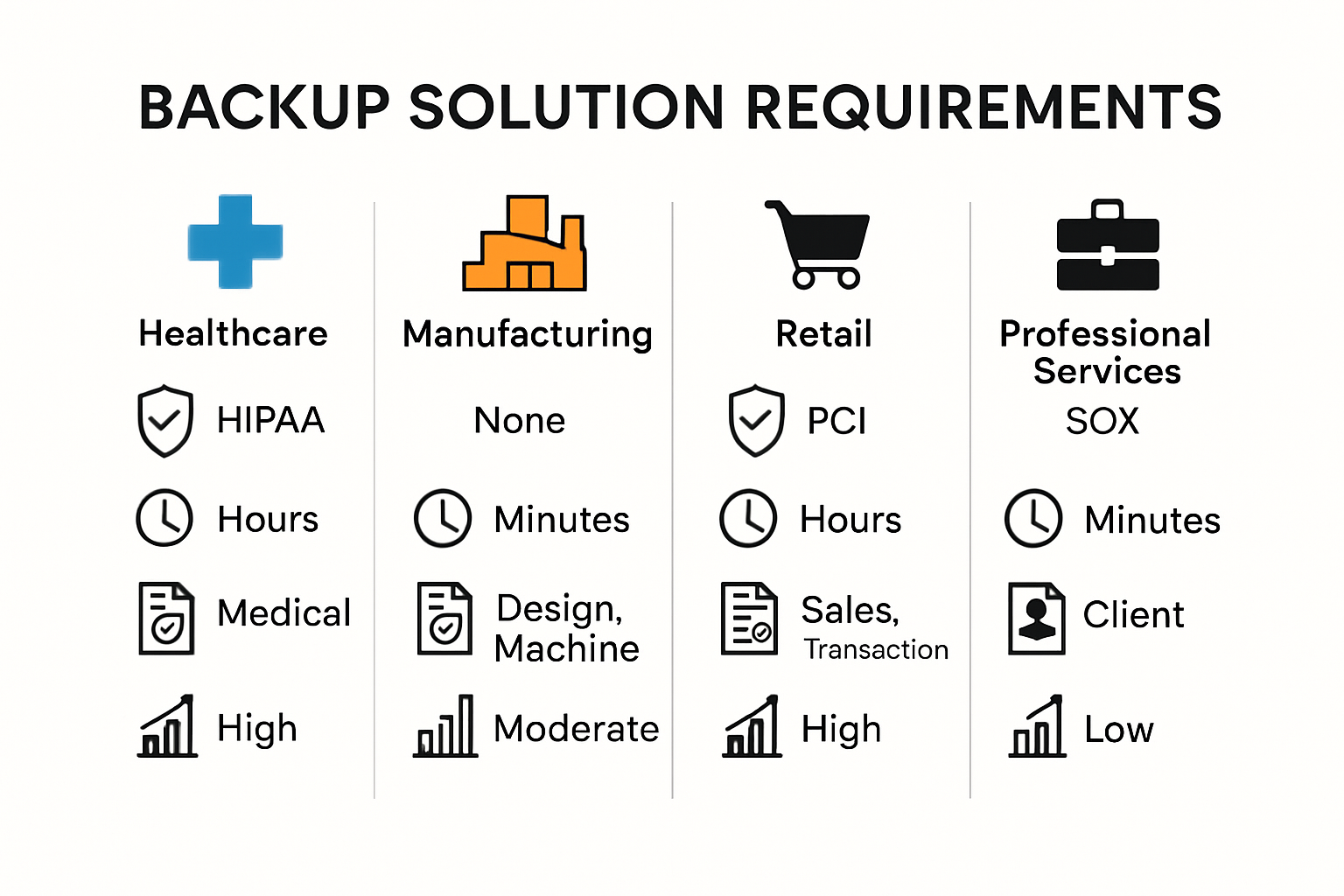
Selecting the right data backup solution requires a nuanced understanding of industry-specific challenges and technological requirements. Different sectors demand unique approaches to data protection, making a one-size-fits-all strategy ineffective for comprehensive business continuity.
Healthcare: Compliance and Critical Data Protection
Healthcare organizations face extraordinary data protection challenges. HIPAA Journal emphasizes that medical practices must implement backup solutions that not only preserve data integrity but also ensure strict compliance with patient privacy regulations. Critical considerations include:
- HIPAA Compliance: Encryption of all patient data
- Rapid Recovery Capabilities: Minimal downtime for critical medical systems
- Secure Storage Mechanisms: Protecting sensitive patient information from unauthorized access
Manufacturing and Retail: Operational Continuity Strategies
Manufacturing Technology Insights highlights that industrial and retail businesses require backup solutions that address complex operational ecosystems. These industries generate massive volumes of transactional and operational data that must be protected with minimal disruption:
- Real-Time Backup Systems: Capturing continuous operational data
- Scalable Storage Solutions: Accommodating rapidly growing data volumes
- Rapid Restoration Capabilities: Minimizing production and sales interruptions
Professional Services: Intellectual Property and Client Data Protection
Law firms, engineering companies, and consulting businesses rely on intellectual property and confidential client information. Their backup strategies must balance security, accessibility, and compliance. Key considerations include robust encryption, strict access controls, and comprehensive audit trails.
Backup solutions in 2025 are not merely technical implementations but strategic business continuity tools. Each industry requires a tailored approach that considers unique operational requirements, regulatory environments, and technological infrastructures.
The most effective backup strategies integrate multiple layers of protection. This means combining local backups, cloud storage, and redundant systems that can quickly restore operations during unexpected disruptions. Organizations must view backup solutions as dynamic frameworks that evolve with technological advancements and emerging security threats.
For local businesses in the Monterey Bay Area, selecting the right backup solution means partnering with technology providers who understand regional business ecosystems. The ideal solution balances technical sophistication with practical, cost-effective implementation that aligns with specific industry needs.
Ultimately, choosing the right backup solution is about more than protecting data. It represents a comprehensive strategy for maintaining business resilience, protecting valuable assets, and ensuring continuous operational capability in an increasingly complex digital environment.
How IT Support Can Strengthen Your Data Backup
Effective data backup requires more than just technological solutions. Professional IT support plays a critical role in developing, implementing, and maintaining robust backup strategies that protect businesses from potential data loss and operational disruption.
Centralized Backup Management and Automation
TechTarget emphasizes the importance of centralized and automated backup management. IT support professionals can implement comprehensive systems that ensure:
- Consistent Backup Processes: Standardized approaches across all business systems
- Automated Scheduling: Regular, predictable backup intervals
- Error Monitoring: Automated alerts for potential backup failures
- Log Management: Systematic tracking of backup activities
Automation transforms backup from a manual, error-prone task into a reliable, systematic process. By removing human intervention, IT support reduces the risk of missed backups or inconsistent data protection strategies.
Security Education and Policy Implementation
Digital Guardian highlights the crucial role of employee education in data protection. IT support can strengthen backup strategies through:
- Security Training Programs: Educating staff about data protection risks
- Policy Development: Creating clear guidelines for data handling
- Threat Awareness: Teaching employees to recognize potential security vulnerabilities
- Access Control Management: Implementing strict permissions protocols
Strategic Data Protection Planning
The U.S. Small Business Administration recommends a strategic approach to data backup. Professional IT support can help businesses:
- Identify Critical Data: Determine which files and systems are most crucial
- Develop Recovery Strategies: Create comprehensive disaster recovery plans
- Implement Redundant Backup Systems: Ensure multiple layers of data protection
- Conduct Regular Backup Audits: Test and verify backup integrity
IT support transforms data backup from a technical requirement into a strategic business continuity tool. By providing expertise, technology, and ongoing management, these professionals help organizations build resilient data protection frameworks.
The most effective backup strategies integrate human expertise with technological solutions. IT support professionals bring deep understanding of emerging threats, technological innovations, and industry-specific challenges. They can customize backup approaches that align with your specific business needs, regulatory requirements, and operational complexities.
For local businesses in the Monterey Bay Area, partnering with experienced IT support means more than just technical assistance. It represents a comprehensive approach to protecting your most valuable digital assets, ensuring business continuity, and maintaining operational resilience in an increasingly complex technological environment.

Frequently Asked Questions
What is the 3-2-1 backup rule?
The 3-2-1 backup rule is a data backup strategy that involves keeping three copies of your data on two different types of media, with one copy stored offsite or in the cloud. This ensures robust protection against data loss due to various scenarios such as hardware failure or disasters.
Why is data backup important for small businesses?
Data backup is crucial for small businesses as it safeguards against data loss from hardware failures, cyber attacks, or natural disasters. Without a proper backup strategy, businesses risk losing critical information, which can lead to severe financial and operational repercussions.
How often should data backups be tested?
Data backups should be tested regularly, at least quarterly, to ensure that the backup processes are functioning properly. Conducting recovery simulations helps identify potential issues and confirm that data can be restored quickly when needed.
What factors should I consider when choosing a backup solution?
When selecting a backup solution, consider factors such as your industry’s specific needs, compliance requirements, data volume, recovery time objectives, and the security features of the backup system. Tailoring your solution to these aspects can enhance data protection and operational continuity.
Avoid Data Loss Headaches — Explore Reliable, Local IT Backup Solutions Today
If reading about lost business records, compliance risks, and costly downtime makes you wonder whether your own backup strategy is enough, you are not alone. Many Monterey Bay businesses struggle with fragmented backup systems and lack confidence in their disaster recovery plans. The article highlights critical gaps like missing offsite copies, untested backups, and overlooked security. These are the exact challenges that lead to lost revenue and stressful outages.
Let SRS Networks help you build a resilient, always-ready backup and business continuity solution. Our team in Salinas knows how local regulations, industry compliance, and unique operational needs affect your risk. We offer personalized, managed IT support designed to enforce the 3-2-1 rule, automate your backups, and reduce your exposure to data loss. See why local businesses trust our rapid response and proactive planning. Visit SRS Networks now to request a free backup health check or schedule a security strategy session. Your future business resilience starts with one conversation today.