

Picture this: you’re in the middle of a busy day at your firm, a client calls with a pressing deadline, and suddenly the computer on their desk glitches out. You’ve got cases, deadlines, and a growing client base that all depend on your tech working like a well‑oiled machine.
Do you ever feel like you’re juggling flaming torches while walking a tightrope? That’s the reality many law firms face when their IT hiccups turn into hours of lost productivity.
What if I told you that a reliable IT support partner can shift that juggling act into a smooth routine? A partner who knows the legal landscape and can keep your confidential files secure while making sure your tools are up‑to‑date.
At SRS Networks, we’ve watched the same pattern play out for dozens of small to mid‑size law practices across Salinas and Monterey. We see the same red‑flag moments: ransomware scares, compliance headaches, and the endless stream of “urgent” support tickets.
Here’s the quick rundown: 1) Proactive monitoring catches problems before they snowball. 2) Managed help desk ensures every ticket is resolved in record time. 3) Cybersecurity layers guard your data the way you’d guard a client’s secret.
Imagine a world where you’re not scrambling to reboot a server after midnight; instead you’re closing cases, signing new clients, and maybe even sipping coffee at noon without the fear that your systems will fail.
Ready to trade in the “tech emergency” mindset for a predictable, secure infrastructure? Let’s explore how a focused IT strategy can free up your time, protect your clients, and give your firm the edge it deserves.
In the coming sections, we’ll break down how each layer—from daily help desk support to deep‑rooted cybersecurity—fits into a seamless strategy that lets you focus on the law, not on tech headaches, and peace today.
TL;DR
Law firm downtime turns into legal risk; a proactive IT partner keeps systems online, data safe, and compliance on track for your practice today.
With SRS Networks, 24‑hour monitoring, instant ticket fixes, and ransomware safeguards let you focus on cases, not tech headaches, efficiently turning IT into a strategic asset.
Understanding IT Support Needs for Law Firms
Imagine you’re on the phone with a client about a looming court filing, and the screen on the laptop beside you flashes a cryptic error. It’s a scenario that feels more like a plot twist than a typical day. That glitch is a reminder that the law firm’s tech stack isn’t just a backdrop—it’s the stage where every argument, every discovery, and every client interaction plays out.
In practice, most small to mid‑size law offices juggle three relentless demands: keeping confidential files safe, staying compliant with state bar rules, and delivering the kind of speed that can make or break a case. When an IT hiccup sneaks in, it doesn’t just cost a few minutes; it can derail deadlines, compromise data, and erode the trust you’ve built with clients.
What you need is an IT partner that speaks the same language as legal professionals—someone who understands that a “quick fix” isn’t the same as a “future‑proof solution.” It’s about building a foundation that lets you focus on the law while your infrastructure keeps pace.
Regulatory pressure is a constant companion in the legal world. From the California Bar’s data‑security standards to federal mandates on e‑discovery, a single breach can trigger hefty fines and reputational damage. That’s why many firms lean on a layered approach: proactive monitoring, a responsive help desk, hardened security protocols, and a robust backup plan.
Take, for example, a Bay‑Area personal‑injury firm that struggled with slow logins, printer glitches, and occasional data sync failures. After partnering with a dedicated IT provider, they saw a 70 % drop in support tickets and a 90 % reduction in system downtime. The key was a custom “Essential IT Support Plan” that focused on security, reliability, and simplicity—exactly the kind of roadmap that law offices need.
Proactive monitoring is the first line of defense. It’s the difference between discovering a server issue at 2 a.m. because an alert rang off the wall and scrambling after a client calls about a missing document. 24‑hour monitoring tools scan for anomalies in real time, often before a human even notices a problem.
The help desk isn’t just a ticketing system; it’s the human touch that turns frustration into calm. A dedicated legal help desk can triage issues based on urgency, route complex problems to specialists, and provide status updates that keep attorneys and paralegals in the loop.
Security layers must be built with the law’s confidentiality requirements in mind. Encryption, multi‑factor authentication, and regular penetration testing create a moat that protects client data from both external attackers and accidental exposure.
Backup and disaster recovery are the safety net that holds everything together. Daily incremental backups, off‑site replication, and a documented recovery plan mean that if a ransomware attack or hardware failure strikes, the firm can bounce back in hours, not days.
Ready to map out your own IT support strategy? Start with these three actionable steps:
- Conduct a risk assessment—identify the most critical data, the biggest threats, and the systems that are most vulnerable.
- Define clear service level agreements (SLAs) for response and resolution times; make sure they align with your legal deadlines.
- Choose an IT partner that offers a dedicated, law‑focused managed service. For example, Managed IT Services for Law Firms focuses on the specific needs of legal practices.
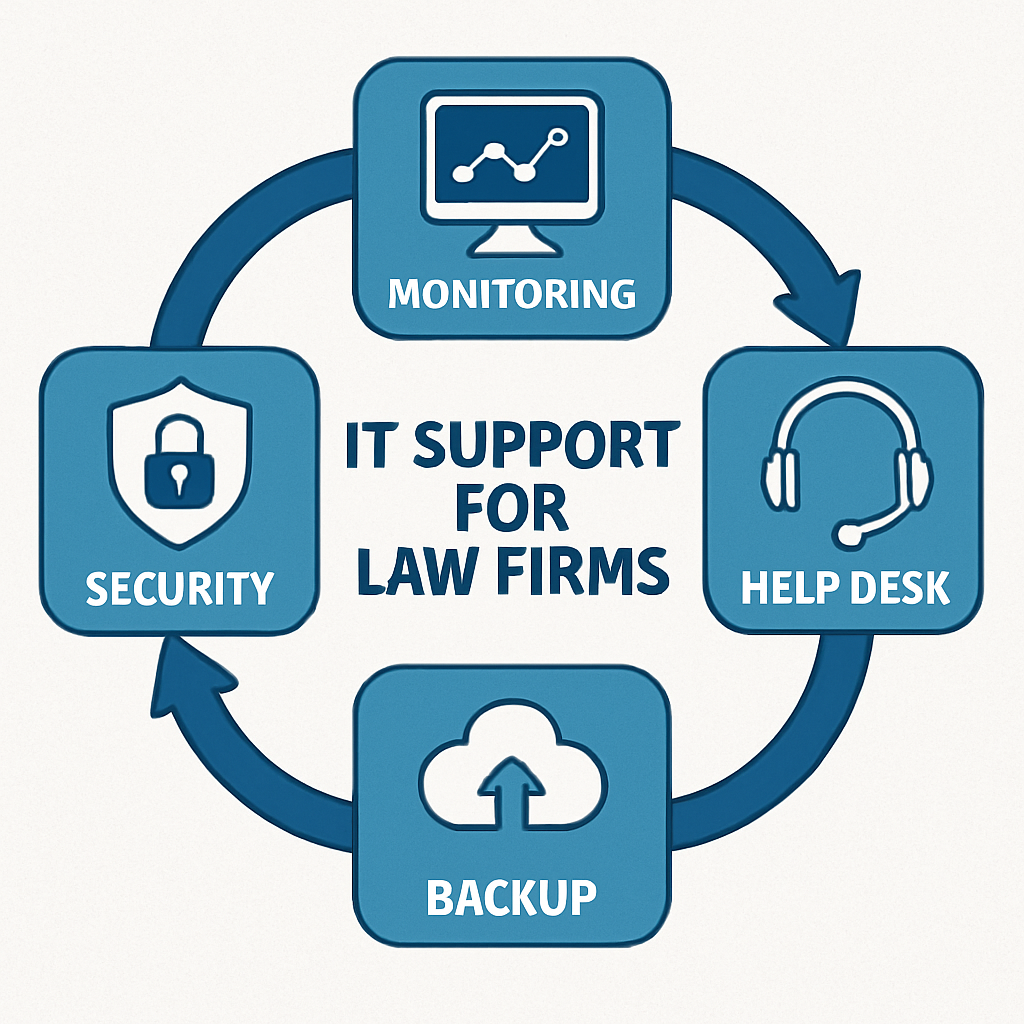
Here’s a quick visual of the IT support ecosystem for law firms: a central hub of monitoring, a frontline help desk, fortified security, and a solid backup foundation—all working in sync.
Now, let’s put theory into practice. Below is a short video that walks you through setting up an end‑to‑end IT support plan for a small law office. Watch how the layers align to protect your clients and your case load.
After you’ve watched, jot down the four pillars that matter most for your firm: monitoring, help desk, security, and backup. Use them as a checklist when evaluating potential IT partners.
In a world where a single cyber‑incident can cost a firm years of credibility, the right IT support isn’t a luxury—it’s a necessity. If you’re ready to take the next step toward peace of mind, reach out and let’s design a solution that keeps your practice running smoothly, no matter what the tech throws at you.
Implementing Managed IT Services: A Roadmap for Legal Practices
Let’s get practical. You’ve already mapped the four pillars—monitoring, help desk, security, and backup. Now it’s time to turn that map into a step‑by‑step plan that keeps your firm running without the nightly tech panic.
First, audit your current stack. Grab a handful of desks, list every device, operating system, and application you use for client work. Write down who owns each piece and who’s in charge of updates. That list will be the baseline against which you measure improvement.
Step 1: Define Clear Service Levels
Ask yourself: What does “on‑time” look like for a case deadline? Most law practices need a 4‑hour response time for anything that could delay a filing. Draft a simple SLA that ties resolution time to the firm’s billable hours—if a ticket drags over 4 hours, you’re losing money. This isn’t about legal jargon; it’s about translating tech metrics into the language your partners speak.
Step 2: Pick a Partner That Knows Law‑Specific Needs
Not all MSPs get the ABA’s technology competence rule. Look for a provider that has built‑in support for practice‑management tools like Clio or PracticePanther, and that can audit your systems for data‑privacy gaps. When you find a fit, bring that partner into your audit—let them walk through your inventory and spot blind spots.
Step 3: Build the Monitoring Layer
Deploy a 24/7 agent on every server and critical workstation. The agent should auto‑alert you if disk space runs low, a service crashes, or a network latency spike hits 200 ms. In practice, this means you see the issue before the first client call. Pair that with a dashboard that flags recurring patterns—like a printer that jams every Friday—which signals deeper hardware wear.
Step 4: Set Up a Proactive Help Desk
Your help desk shouldn’t just answer calls; it should triage based on urgency and route to the right specialist. Create ticket categories: Low‑impact: password reset, file recovery; High‑impact: email outage, client portal access. Train your staff on how to document symptoms—simple screenshots often save a ticket from looping back.
Step 5: Harden Security With Layered Controls
Start with encryption at rest and in transit. Then add multi‑factor authentication for all external access. Follow up with a scheduled penetration test every six months and a quarterly review of third‑party vendor risks. In one client case, adding a VPN and MFA cut phishing‑related incidents by 80 % in the first quarter.
Step 6: Backup & Disaster Recovery Playbook
Define what needs to be recovered first: case files, billing data, court filings. Use incremental backups to reduce bandwidth and storage costs, but keep daily full snapshots for a 30‑day retention window. Test the restoration process every three months—if it takes longer than 4 hours, you’ll need to re‑engineer the plan.
Step 7: Continuous Improvement Loop
Schedule a monthly review meeting with your MSP. Bring the SLA dashboard, ticket statistics, and security alerts. Ask: Did we meet the 4‑hour response goal? Did any incident expose a new vulnerability? Adjust policies, tweak monitoring thresholds, or upgrade hardware as needed. Treat this meeting like a case briefing: short, focused, and outcome‑driven.
Remember, the goal isn’t just uptime; it’s predictable, billable‑friendly performance. When your systems behave like clockwork, you can focus on argument strategy, not on rebooting a laptop. If you’re ready to set up this roadmap, IT Services for Law Firms | Salinas CA | SRS Networks can help you tailor every layer to your firm’s rhythm.
Strengthening Cybersecurity and Compliance for Law Firms
When a client’s confidential file vanishes overnight, it’s not just a tech glitch—it’s a potential breach that could land the firm in front of regulators, courts, and a tarnished reputation.
Law firms sit on a goldmine of data: client emails, case documents, billing histories, even sensitive medical records for health‑law practices. That makes you a prime target for cyber‑criminals, which is why cybersecurity isn’t optional; it’s a legal obligation.
Know the Rules Before You Lock the Doors
In the U.S., state bar associations and the Federal Trade Commission set strict rules about how you store, transmit, and delete client information. If you’re in California, you’re bound by the California Bar’s data‑security standards, while federal clients must heed HIPAA or NIST guidelines. The good news? These frameworks give you a roadmap—just follow their steps and you’re in the clear.
Step One: Conduct a Compliance Gap Analysis
Pull together a quick inventory: list every device, cloud account, and app that touches client data. Then line up that inventory against each regulation—GDPR for EU clients, HIPAA for health‑law matters, or NIST for federal cases. The result is a clear picture of where you’re compliant and where you’re exposed.
Step Two: Harden Your Technical Defenses
Start with encryption at rest and in transit. Don’t forget two‑factor authentication for every user with access to sensitive files. Firewalls, intrusion detection systems, and regular patching turn your network into a fortified wall. In a recent audit, a mid‑size San Jose firm that added VPN access and MFA saw phishing incidents drop by 80 % within three months.
Step Three: Create a Real‑Time Monitoring Dashboard
Set alerts for unusual login patterns, large file transfers, or policy‑violating actions. When an alert pops, your team should have a playbook ready: isolate the device, revoke credentials, and run an immediate forensic scan. Having a dedicated incident response team reduces recovery time from hours to minutes.
Step Four: Keep Everyone on the Same Page
Hold quarterly “cyber‑security health checks” with your legal staff. Review recent alerts, audit logs, and any policy updates. Use these meetings to remind everyone that data protection isn’t a one‑time checkbox—it’s a culture. Encourage a “report‑it‑first” mindset: the sooner a suspicious activity is flagged, the easier it is to mitigate.
Data Protection Beyond the Firewall
Backup isn’t just a safety net; it’s part of compliance. Your backup strategy should align with the 30‑day retention rule many regulators require. Store copies off‑site or in a secure cloud, and run a full restoration test at least quarterly. If the restoration takes longer than four hours, tweak your process.
Legal‑Specific Training: The Human Firewall
Phishing attacks often exploit human error. Conduct a monthly “red‑team” exercise where fake phishing emails are sent to a sample of attorneys. Measure click rates, and then run a quick debrief. The results not only improve security but also build a culture of vigilance.
When an Incident Happens, Act Fast
Have a clear incident response plan that outlines notification timelines to clients, regulatory bodies, and internal stakeholders. Many firms forget that the law requires prompt breach disclosure—failure to do so can trigger hefty fines.
Let’s Talk About Your Next Step
Implementing a layered security strategy doesn’t have to feel like a marathon. Start with a simple gap analysis, then add encryption and MFA, and finish by building a culture of continuous improvement. If you’re in San Jose or the Bay Area, IT Services for Law Firms | San Jose CA | SRS Networks can help you tailor each layer to your practice’s rhythm.
Ready to make your technology work for your firm? Contact us for a consultation or IT assessment today.
Cloud Migration Strategies for Law Offices
When you’re a lawyer, every minute counts. A sudden server outage can mean a missed filing deadline or a client losing trust. So the next time you think about moving to the cloud, you need a game plan that keeps the wheels turning while you focus on the case.
Here’s the reality: 83 % of top law firms are pushing to modernize their tech stack, yet only about a third have a solid migration roadmap. That gap is where most firms stumble.
Know Your Starting Point
Before you even pick a provider, inventory every file, app and user. Ask: how many active case files are on legacy servers, how many are stored in shared drives, and who accesses them from home or court.
The result is a migration inventory map. It tells you what to move, what to keep on‑prem, and where to double‑check compliance rules like HIPAA or the California Bar’s data‑security standards.
Choose a Legal‑Grade Cloud Partner
Not every cloud is created equal. Consumer tools like Google Drive or Dropbox can leave sensitive notes exposed. Legal‑grade clouds offer end‑to‑end encryption, audit logs and granular access controls.
One example from the field: a mid‑size litigation firm moved its document‑management system to a provider that kept audit trails for every edit and offered role‑based permissions. The result? A 45 % drop in data‑breach incidents over six months.
If you’re looking for a benchmark, check out Sync.com’s blog on cloud services for law firms – they detail how to evaluate encryption, audit logs and compliance features for the legal market.
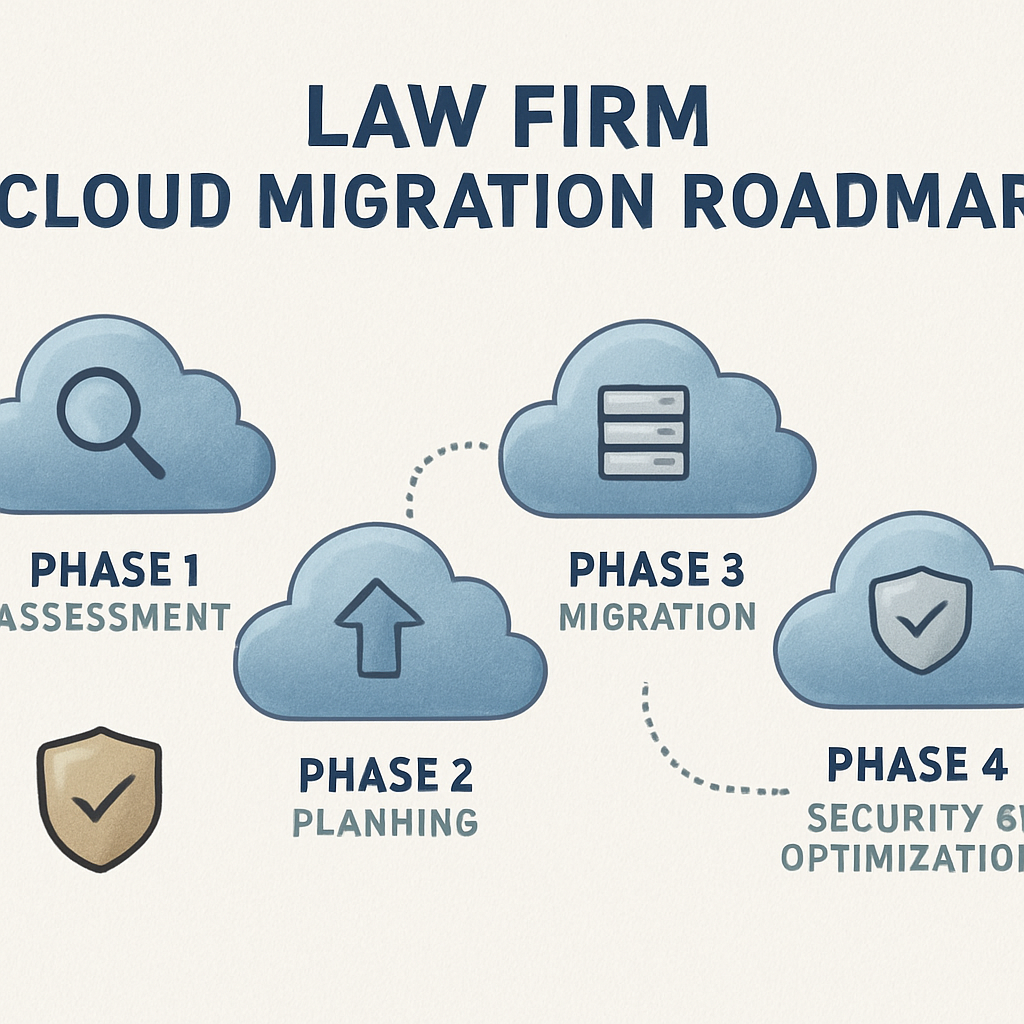
Plan the Move in Phases
Phase one is a pilot. Pick a handful of cases, migrate them, test access from an attorney’s laptop and a client portal. Capture any hiccups and tweak the process.
Phase two expands to all practice groups. Use a staggered schedule to avoid hitting peak litigation periods. Keep backup copies in a separate location until the new system shows stability.
Phase three is de‑commissioning. Once you confirm that all data is intact and audit logs match, retire the old servers. A clean exit prevents orphaned data that could become a liability.
Embed Security From Day One
Security isn’t an add‑on; it’s baked into every migration step. Enable multi‑factor authentication for every user, enforce password rotation, and set up automated threat monitoring on the new platform.
The same law firm that migrated to the cloud also instituted an automatic alert system for unusual login patterns. When a new IP accessed a case file, the admin got an instant SMS and could block the session.
The key takeaway? Security is a continuous loop, not a one‑time checkbox. Run quarterly compliance scans and keep your team trained on phishing best practices.
Measure Success with Clear Metrics
Set up a dashboard that tracks migration progress, downtime hours, and incident response times. Compare these against pre‑migration baselines to quantify gains.
For instance, after migration, the same firm reported a 70 % reduction in support tickets and a 90 % drop in system downtime, translating into faster billable hours.
Ask yourself: what’s the value of an extra hour of availability for a senior partner? The financial upside often outweighs the upfront migration cost.
The last piece? Keep the conversation open. Schedule quarterly reviews with your cloud provider to review logs, update policies and plan for new tech like generative AI that the firm may want to adopt next year.
So, are you ready to move your firm into a cloud that protects, powers, and scales with your practice?
Backup, Disaster Recovery, and Business Continuity: A Comparative Overview
Let’s face it: a sudden outage is the worst kind of surprise you get in a law office. Files disappear, client portals go dark, and the clock keeps ticking. That’s why backup, disaster recovery (DR), and business continuity (BC) aren’t just buzzwords—they’re the safety net that keeps your practice breathing even when the unexpected hits.
So what’s the real difference between the three? Think of backup as the daily copy you keep on a safe drive, DR as the step‑by‑step plan to get those copies back on line, and BC as the broader strategy that keeps your partners, paralegals, and clients operational while you rebuild.
Backup Basics: The First Line of Defense
Backups should be automatic, incremental, and stored off‑site—ideally encrypted. In our experience, a 30‑day retention window balances cost with recovery flexibility. You want to avoid the “it’s fine until the next storm” mindset.
Here’s a quick checklist:
- Schedule daily incremental backups.
- Store at least one full backup per week.
- Encrypt all data at rest.
- Verify restores quarterly.
Disaster Recovery: The Playbook for Getting Back Online
Once your data is safely backed up, the DR plan tells you how fast you can restore it. Two metrics drive the plan: Recovery Time Objective (RTO) and Recovery Point Objective (RPO). RTO is the maximum downtime you can tolerate; RPO is the latest data point you’re willing to lose.
Most small‑to‑mid‑size law firms target an RTO of 4 hours and an RPO of 15 minutes. Achieving this requires a documented playbook, tested failover systems, and a clear chain of command during an incident.
Business Continuity: The Big Picture
BC is the umbrella that covers staffing, communication, and client notification. It’s why you have a “remote work kit” ready and why you’ve practiced the “call‑out” procedure in a mock drill.
Key elements:
- Define critical services and their priority.
- Maintain a 24/7 hotline for attorneys.
- Pre‑write client communication templates.
- Keep an up‑to‑date inventory of hardware and software.
Comparative Snapshot
| Aspect | Primary Focus | ||
|---|---|---|---|
| Backup | Data replication and encryption | Automated daily, weekly full, off‑site storage | Cost‑efficient, low maintenance |
| Disaster Recovery | Recovery strategy and playbook | RTO/RPO targets, failover testing | Requires scheduled drills |
| Business Continuity | Operational resilience and communication | Remote work kits, client alerts, staffing plans | Helps maintain client trust |
Does this make sense? Think of backup as the “insurance policy,” DR as the “claim process,” and BC as the “emergency response team.” They overlap, but each fills a unique gap.
Now, let’s tie this back to what you’re doing. If your firm uses a cloud‑based practice management tool, a vendor like Clio offers built‑in disaster‑ready features that dovetail with these concepts. See how they frame their approach here.
For the backup side, an online service such as IBackup delivers encrypted, automated backups that can be restored in minutes—exactly the kind of reliability small law firms need. Learn more about their setup here.
Actionable takeaway: review your backup schedule, test your DR playbook, and update your BC checklist. If you’re unsure how to start, a quick audit of your RTO/RPO and an inventory of critical assets is the best first step.
Ready to tighten your safety net? Reach out for an assessment, and let’s put a concrete plan in place that protects your clients and your reputation.
Conclusion
By the time you’re looking at backup, disaster recovery, and business continuity, it’s not just a tech checklist—it’s the safety net that keeps your clients’ trust intact.
In our 28‑year history serving Salinas and Monterey businesses, we’ve seen a small litigation office hit a ransomware burst and recover the full case file in under four hours, thanks to a pre‑tested playbook.
Now, pull together a quick tri‑step routine: 1️⃣ Run a monthly backup verification test; 2️⃣ Schedule quarterly DR drills that mirror a real outage; 3️⃣ Keep a one‑pager BC map that shows who calls, who fixes, and how clients are notified.
So, what’s the next move? Grab a free audit, sketch that map, and test it—because the only thing worse than a data loss is a client who thinks you’re out of your depth.
Ready to make tech feel like a partner, not a headache? Reach out today and let’s build a plan that keeps your practice running smooth and your clients smiling.
Remember, the goal isn’t perfection—it’s predictable uptime. If you’re already monitoring but still hit a snag, consider a layered security review or a backup policy tweak. Small adjustments can shave hours off recovery time and save money you can reinvest in client services.
Frequently Asked Questions
What should a law firm look for in an IT support partner?
First, check that the provider knows the legal stack—Clio, PracticePanther, Microsoft 365, and e‑discovery tools are non‑negotiables. Second, ask about 24/7 monitoring and a 4‑hour response SLA for anything that could delay a filing. Finally, look for a clear incident‑response playbook that includes client notification timelines; that’s the difference between a smooth recovery and a client panic.
How often should a law firm test its disaster‑recovery plan?
Ideally every quarter. A quarterly drill forces you to pull the system back up, validate data integrity, and confirm that the recovery team can hit the key checkpoints within the agreed RTO. If the restoration takes longer than four hours, tweak your backup cadence or upgrade your failover hardware. Think of it as a fire drill—practice makes it painless.
Can a small firm afford robust cybersecurity without breaking the bank?
Absolutely. Start with encryption at rest and in transit—most modern endpoints support it out of the box. Add multi‑factor authentication for all external logins; that single layer can cut phishing incidents by up to 80%. Finally, schedule a half‑annual penetration test or use a managed service that offers that as part of a subscription; you pay for peace of mind, not a full‑time security team.
What’s the difference between backup, disaster recovery, and business continuity?
Backup is the raw copy—daily incremental and weekly full snapshots stored off‑site. Disaster recovery is the playbook that tells you how fast you can restore those snapshots after a breach or hardware failure. Business continuity is the broader plan—remote‑work kits, client‑communication templates, and staffing contingencies that keep the practice moving even if the server room is down.
How can a law firm protect client data during a cloud migration?
Choose a cloud partner that offers end‑to‑end encryption, immutable audit logs, and role‑based access controls. Map each data type—case files, billing records, health‑law documents—to the appropriate compliance standard (HIPAA, California Bar, NIST). Run a pilot migration with a handful of non‑critical cases, verify audit logs, and only then roll out to the rest of the practice.
What should a law firm do if a ransomware attack hits?
First, isolate the infected endpoint and disconnect it from the network to stop the spread. Second, refer to the incident‑response playbook: notify the legal team, activate the backup restore from the last clean snapshot, and keep the client informed with a pre‑written notification template. Third, conduct a forensic review to understand the vector and patch the vulnerability before the next breach.
Do law firms need a separate IT help desk or can they use a generic tech support?
A law‑focused help desk understands the urgency of a missing email or an inaccessible case file. They triage by impact—an email outage that delays a filing is high priority, while a printer jam is low. A specialized desk can also provide status updates in the language attorneys understand, turning frustration into calm.
Next Steps & Resources
Now that you’ve mapped out the four pillars—monitoring, help desk, security, and backup—time to move from plan to action. Start by drafting a simple playbook that lists what each team member does when an alert pops. Keep it on a shared sheet; a few bullet points are enough to prevent confusion.
Next, set up a monthly “tech‑standup” with the practice manager and IT lead. Bring the SLA dashboard, ticket stats, and any new vulnerabilities. Treat it like a case briefing: short, focused, and results‑driven.
Finally, schedule a quarterly backup test. Pick a non‑critical file, restore it, and record the time it takes. If it exceeds your RTO, tweak your schedule or storage strategy.
So, what’s the next move? Pick one of these actions, assign a owner, and watch the chaos shrink.
Doing this once a quarter keeps your systems resilient and frees up your attorneys to focus on clients today.






