Think your small business is too small to be a target? Think again. Hackers don’t care about your size. They care about weak spots. And many Monterey small businesses have plenty of them.
An IT security audit is your best bet to find those weak spots before someone else does. It’s a checkup for your whole tech setup. This guide will walk you through a full Monterey small business IT security audit, step by step. You’ll learn exactly what to look at, what tools can help, and how to fix what you find.
No jargon. No fluff. Just a clear plan you can follow. Let’s get started.
Why Monterey SMBs Need Regular IT Security Audits
Running a business in Monterey is tough enough without worrying about a cyberattack. Whether you run a restaurant on Cannery Row, a dental practice in Salinas, or a law firm in Carmel, your digital data is at risk. A single breach can cost you customers, money, and your reputation.
Small businesses in California face real threats. According to a recent report, about 43% of small businesses in the state experienced a cyberattack in the past year. And the average cost of a data breach for small businesses can reach six figures. For many, that’s a death sentence. In fact, 60% of small companies go out of business within six months of a data breach or cyberattack. That’s a tough statistic to ignore.
An IT security audit isn’t a one-and-done thing. Threats change. Your tech stack changes. New vulnerabilities pop up every day. That’s why regular audits matter. They help you stay ahead of attackers and keep your business running smoothly.
Think of an audit like a physical exam for your network. You wouldn’t skip your checkup for five years, right? Same logic applies here. A Monterey small business IT security audit gives you a clear picture of your security posture. It shows you where you’re strong and where you’re weak. And it helps you prioritize what to fix first.
Worried about compliance? Many industries have strict rules. Healthcare must follow HIPAA. Law firms must protect client confidentiality. Businesses that take credit cards must follow PCI DSS. An audit helps you check those boxes too.
The FTC offers solid guidance on the basics of cybersecurity for small businesses. But a real audit goes deeper. It looks at your specific risks, not just generic tips.
Bottom line: A regular Monterey small business IT security audit is not optional , it’s a critical investment that protects your revenue, reputation, and future.
Step 1: Define the Scope and Objectives of Your Audit
Before you start poking around your network, you need a plan. What exactly are you auditing? What do you want to find out? Setting clear scope and objectives keeps your audit focused and useful.

Start by asking a few big questions:
- What data is most important to protect? Customer lists, financial records, patient charts, email archives?
- What systems keep your business running? Your main server, cloud apps, point-of-sale system?
- What threats are you most worried about? Ransomware, phishing, insider mistakes, data leaks?
- What compliance rules apply to you? HIPAA, PCI DSS, CCPA, NIST?
Your answers will shape the entire audit. For example, a medical office in Monterey will focus heavily on HIPAA compliance. A real estate brokerage might prioritize email security. A retail shop should look at payment card safety.
Write down your scope. Keep it simple. Something like: “We will audit all devices connected to our office network, all cloud accounts used for business, and all backup systems. We will check for outdated software, weak passwords, missing security updates, and unsafe network configurations.”
Set objectives too. What do you want to achieve? Maybe you want to find every device that hasn’t been updated in six months. Or verify that no former employees still have access. Or test your backup restores.
A common mistake is trying to audit everything at once. That’s overwhelming. Instead, break it into phases. First, focus on the highest-risk areas. Then expand later.
If you need help defining your scope, consider using a structured approach like the one in our IT Security Audit Checklist , it gives you a clear starting point.
Bottom line: Clearly defining the scope and objectives of your Monterey small business IT security audit ensures you focus on what matters most and avoid wasting time.
Step 2: Inventory and Classify Your Digital Assets
You can’t protect what you don’t know you have. Step two is all about listing every piece of technology in your business. This sounds tedious, but it’s vital.
Start with hardware: every desktop, laptop, tablet, phone, printer, server, and network switch. Then list software: operating systems, office suites, accounting software, email platforms, cloud services. Don’t forget virtual stuff: cloud storage (Google Drive, Dropbox), SaaS apps (QuickBooks, Salesforce, Zoom), and even employee devices that connect to your network (BYOD).
Now classify each asset by how sensitive it is. Use categories like Public, Internal, Confidential, and Restricted. For example:
- Public: Your company website, marketing brochures
- Internal: Employee training materials, internal wikis
- Confidential: Client contact lists, financial spreadsheets
- Restricted: Patient health records, credit card numbers, legal correspondence
For each asset, note who owns it, where it lives (on-premise, cloud, hybrid), and what security controls are on it (like encryption, password protection, access logs).
This inventory is the backbone of your Monterey small business IT security audit. Without it, you’re flying blind.
Here’s a quick table to help you organize:
| Asset Name | Type | Data Sensitivity | Owner | Location | Current Controls |
|---|---|---|---|---|---|
| Office Server 2019 | Physical Server | Confidential | IT Manager | On-premise | Firewall, AV, weekly patches |
| Microsoft 365 Tenant | Cloud Service | Confidential | Office Admin | Cloud | MFA, DLP policies |
| Point-of-Sale System | Cloud App | Restricted (PCI) | Store Manager | Cloud | Encrypted, tokenized |
| Laptops (10 units) | Endpoints | Internal | Employees | Hybrid | BitLocker, AV, up-to-date |
| Company Google Drive | Cloud Storage | Internal | HR | Cloud | 2FA, sharing limits |
Don’t forget about shadow IT. Shadow IT is any hardware or software your team uses without telling IT. It could be a free file-sharing app, a personal email used for work, or a developer’s test server. These are blind spots that attackers love.
Use discovery tools to find shadow IT. Many network scanners can detect devices and apps on your network.
Bottom line: By inventorying and classifying every digital asset, you’ll know exactly what to protect and how to prioritize your security efforts.
Step 3: Assess Current Security Controls and Policies
Now that you know what you have, it’s time to check how well you’re protecting it. This step looks at your current security measures , both technical and human.
Start with your basic controls. Ask these questions:
- Do you have a firewall? Is it properly configured (no default passwords, strict inbound rules)?
- Is Wi-Fi secured with WPA2 or WPA3? Is there a separate guest network?
- Is multi-factor authentication (MFA) turned on for all critical accounts? Email, banking, cloud admin, remote access?
- Are antivirus/antimalware tools deployed on all endpoints? Are they up to date?
- Are software and operating systems patched regularly? Is patching automated where possible?
- Do you use encryption for data at rest and in transit? Consider full-disk encryption on laptops, HTTPS everywhere, encrypted connections to cloud services.
Now look at your policies. Do you have written rules for:
- Password management: Minimum length, complexity, rotation? Use a password manager?
- Access control: Who can access what? Is the principle of least privilege applied? Are old employee accounts removed quickly?
- Data handling: How is sensitive data classified, stored, and destroyed?
- Incident response: Do you have a plan for what to do when a breach happens? Who do you call? How do you contain it?
- Employee training: Do staff know how to spot phishing emails? Do they take regular security awareness training?
Many Monterey small businesses skip policies because they think they’re too small. That’s a mistake. A single page of simple rules can prevent the most common attacks.
Use the NIST Cybersecurity Framework as a guide. It’s free and designed for businesses of all sizes. The framework covers Identify, Protect, Detect, Respond, and Recover. It’s a practical way to check if you’ve covered all bases.
Here’s a short video that explains how the NIST framework can help small businesses build a strong security posture:
The video shows the five core functions: Identify, Protect, Detect, Respond, Recover. Each function has specific steps you can take. Use it to spot gaps in your current controls.
Don’t forget about physical security. Is your server room locked? Are backup drives stored safely? Who has keys?
That stat from Verizon’s Data Breach Investigations Report shows why policies and training matter so much. Technology alone won’t save you.
Bottom line: A thorough assessment of your security controls and policies reveals the gaps that a Monterey small business IT security audit is designed to find.
Step 4: Review Backup and Disaster Recovery Plans
Ransomware is the top threat for small businesses right now. Attackers lock your files and demand payment. If you don’t have good backups, you’re in serious trouble.
A key part of any Monterey small business IT security audit is checking your backup and disaster recovery (DR) setup. Here’s what to look at:
- 3-2-1 backup rule: At least three copies of your data, on two different media, with one copy offsite (cloud or physical).
- Immutable backups: Can an attacker delete or encrypt your backups? Immutable backups can’t be altered or deleted for a set time. Use them.
- Test restores: When did you last actually restore a file from backup? Most businesses assume backups work, but they often fail. Test quarterly.
- Recovery time objective (RTO): How quickly do you need systems back up after a disaster? Hours? Days? Your backup plan should meet that target.
- Recovery point objective (RPO): How much data can you afford to lose? The gap between backups. For critical files, it should be short (minutes, not hours).
Watch out for common mistakes. According to research on Monterey small business IT security audit practices, one of the biggest errors is skipping backup recovery tests. You might think you’re safe, but until you actually restore, you don’t really know.
Also, make sure your backups are isolated from your main network. If an attacker gets into your network, they shouldn’t be able to reach your backups. An air gap or separate cloud tenant works well.
Consider using a professional Backup & Disaster Recovery service that includes monitoring and automated testing. It’s one less thing to worry about.
Your DR plan should include contact lists, roles, responsibilities, and step-by-step instructions. Store a copy offsite (paper or digital, but protected).
Bottom line: Your backup and disaster recovery plan is your safety net , make sure it’s strong and tested as part of your Monterey small business IT security audit.
Step 5: Develop a Prioritized Remediation Roadmap
You’ve done the audit. You have a list of issues. Now what? It’s time to create a plan to fix them, sorted by priority.
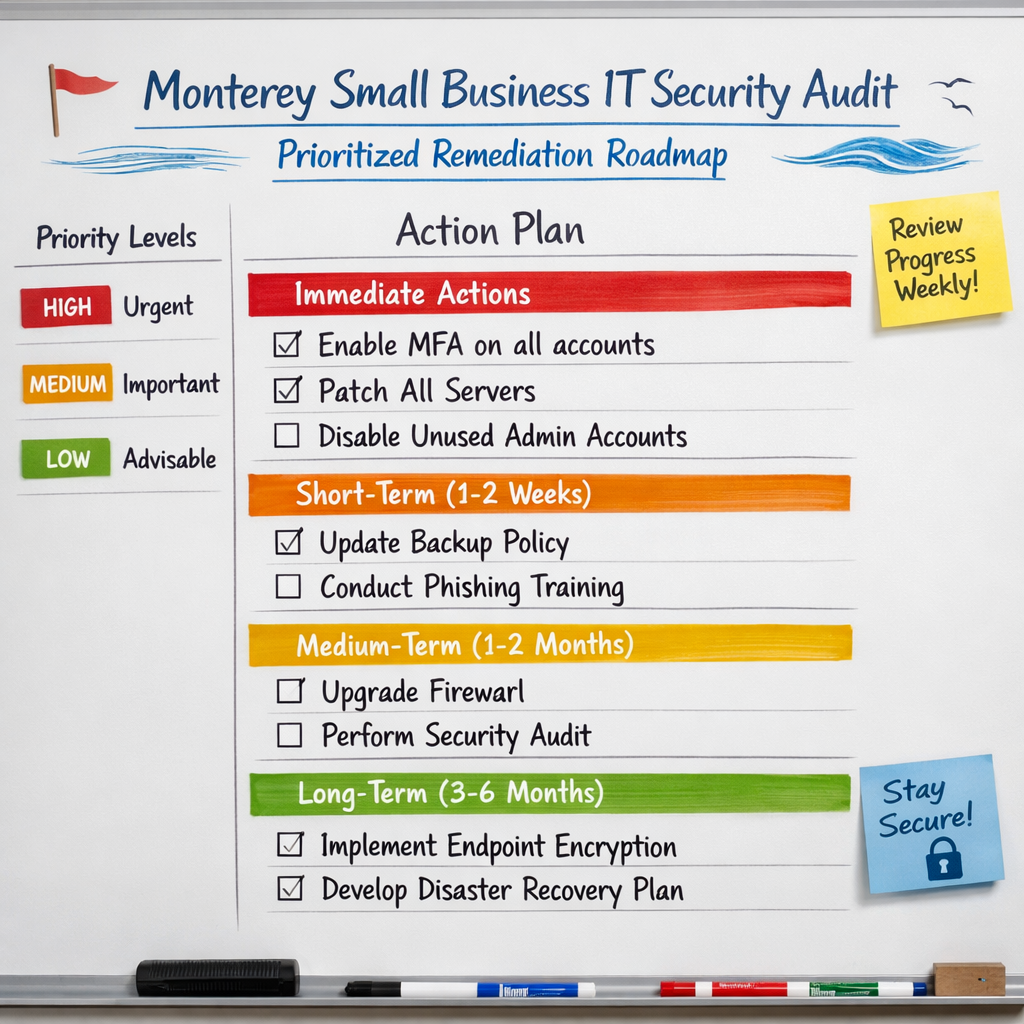
Start by grouping findings into three buckets:
- Critical: Issues that could cause a breach right now. Examples: no MFA on email, unpatched internet-facing server, missing backups. Fix these within days.
- High: Issues that increase risk significantly but aren’t imminently exploitable. Examples: outdated software on workstations, weak password policy, no employee security training. Fix within weeks.
- Medium/Low: Best practices that improve your security posture. Examples: no logging, no incident response plan, no regular vulnerability scanning. Fix within months.
Assign owners for each fix. Make sure someone is accountable. Set deadlines, but be realistic. You can’t do everything at once.
Use a simple spreadsheet or project management tool to track progress. Share it with your leadership team so they see the importance.
The CISA Cyber Guidance for Small Businesses offers a great action plan that breaks tasks down by role: CEO, Security Program Manager, IT team. Use it to organize your own roadmap.
Don’t forget to celebrate wins. When you enable MFA across the board, that’s a big step. Acknowledge it. It keeps momentum going.
Your roadmap should also include ongoing activities: quarterly vulnerability scans, annual penetration tests, regular policy reviews. This makes your Monterey small business IT security audit a continuous process, not a one-time event.
Bottom line: A prioritized remediation roadmap turns audit findings into concrete actions that protect your Monterey small business from the biggest threats first.
Common Security Gaps Found in Monterey Small Businesses
Every business is different, but certain gaps show up again and again in Monterey small business IT security audit checklists. Knowing these patterns can help you spot them faster.
Here are the top ones we see:
- No multi-factor authentication. Many businesses still rely on passwords alone. That’s dangerous. MFA blocks 99.9% of automated attacks.
- Old employee accounts still active. When someone leaves, their access should be revoked immediately. Often it’s forgotten for months.
- Unpatched software. Especially on servers and network devices that “no one touches.” Attackers scan for known vulnerabilities.
- No backup testing. As mentioned, this is a huge blind spot. You don’t know if your backups work until you test them.
- Weak password policies. ‘Password123’ is still in use. Employees reuse passwords across personal and work accounts.
- No security training. Employees don’t know how to spot a phishing email. They click first, ask later.
- Over-reliance on antivirus alone. Antivirus is just one layer. You need email filtering, firewalls, endpoint detection, and behavior monitoring.
- Poor Wi-Fi security. Guest network not separated from main network. Using outdated WEP or WPA.
- No incident response plan. When something happens, everyone panics. Without a plan, you waste precious time.
- Missing data classification. If you don’t know which data is sensitive, you can’t protect it properly.
These gaps are common, but they’re also fixable. A Monterey small business IT security audit will uncover them, and a good remediation plan will close them.
According to Cybersecurity Ventures, 60% of small companies that suffer a breach go out of business within six months. That’s why closing these gaps matters so much.
Don’t assume you’re not a target. You are.
Bottom line: Knowing the common security gaps helps you focus your Monterey small business IT security audit on the areas that need the most attention.
Frequently Asked Questions
What is a Monterey small business IT security audit?
A Monterey small business IT security audit is a systematic review of your business’s technology systems, policies, and practices to identify vulnerabilities and ensure data protection. It covers everything from network security and access controls to backup procedures and employee training. The goal is to find weaknesses before cybercriminals do and to help you meet compliance requirements like HIPAA or PCI DSS.
How often should my Monterey small business perform an IT security audit?
At least once a year is the minimum. But many experts recommend quarterly reviews for key areas like backups, vulnerability scans, and user access. If you handle sensitive data (patient records, payment information, legal files), consider semi-annual audits. After any major change , new software, office move, staff turnover , do an event-based audit. The LevelBlue blog suggests balancing frequency with your resources; don’t over-audit if you can’t act on findings.
Can I do an IT security audit myself, or should I hire a professional?
You can start with a self-assessment using a basic checklist. But for a thorough Monterey small business IT security audit, hiring a professional is safer. They have the tools , vulnerability scanners, penetration testing , and the experience to find hidden problems. A professional also provides an unbiased view and can help you create a remediation plan. Many managed IT providers like SRS Networks offer audit services that are complete and tailored to small businesses.
What are the most important things to check in an IT security audit?
Focus on these five areas: 1) Multi-factor authentication (MFA) on all critical accounts. 2) Software updates and patch management. 3) Backup and disaster recovery testing. 4) Employee access rights and offboarding procedures. 5) Security policies and training. These cover the most common entry points for attackers. A good Monterey small business IT security audit checklist will include many more items, but these are the top priority.
How long does a typical IT security audit take for a small business?
It depends on the size of your business and the depth of the audit. A basic audit can take a few hours to a day. A complete Monterey small business IT security audit that includes vulnerability scanning, policy review, and employee interviews might take two to three days. Add time for reporting and remediation planning. Some providers offer a phased approach, starting with the highest-risk areas to deliver quick wins.
What is the cost of an IT security audit for a Monterey small business?
Costs vary widely. DIY checklists are free but limited. A professional audit from a local provider like SRS Networks might range from a few hundred to a few thousand dollars, depending on scope. Consider it an investment. The average cost of a data breach for a small business is over $100,000. An audit is a fraction of that. Some providers include a basic audit as part of a managed IT services package.
What should I do with the results of my IT security audit?
First, read the report and understand the findings. Prioritize issues by criticality and create an action plan with owners and deadlines. Fix critical items immediately (e.g., enable MFA, patch vulnerabilities). Schedule regular follow-ups to track progress. Use the audit as a baseline for continuous improvement. Share key findings with your leadership and employees if relevant. Finally, schedule your next audit to maintain momentum. The Monterey small business IT security audit is not the end , it’s the beginning of a stronger security culture.
Do I need to meet any compliance requirements with my audit?
Yes, depending on your industry. Healthcare providers must comply with HIPAA. Businesses that accept credit cards need PCI DSS. All California businesses handling personal data must follow CCPA. A Monterey small business IT security audit can help you check if you’re meeting those requirements. Work with an auditor who understands these regulations. Non-compliance can lead to heavy fines and legal trouble. Many local IT providers, including SRS Networks, offer compliance-focused audits.
Conclusion
Running a Monterey small business IT security audit might feel like a big task. But it’s one of the best things you can do for your business. It protects your data, your customers, and your bottom line.
Let’s recap the five steps:
- Define scope and objectives , know what you’re auditing and why.
- Inventory your assets , you can’t protect what you don’t know.
- Assess controls and policies , check your technical and human defenses.
- Review backups and DR , make sure you can recover from a disaster.
- Create a remediation roadmap , fix the biggest issues first.
Don’t forget to involve your team. Security is everyone’s job. Train your employees. Celebrate wins. And make audits a regular habit, not a rare event.
If you’d like expert help with your Monterey small business IT security audit, SRS Networks has been serving the Monterey Bay area for over 28 years. We can guide you through every step, from inventory to remediation. Contact us for a consultation or to schedule an assessment. Your business deserves strong protection.
Stay safe out there.