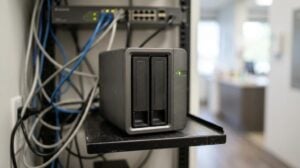
Most Monterey SMBs focus on spotting suspicious processes, yet the real ransomware blind spot is assuming backups work without ever testing them. That mistake can shut down a bakery, a clinic, or a law office in minutes. In this guide we walk you through a Monterey ransomware readiness checklist you can start using today. You’ll learn how to inventory assets, test backups, harden endpoints, train staff, and build a response plan that keeps your business running.
Step 1: Inventory Your IT Assets and Data
First thing you need to do is write down every device that talks to your network. That means laptops, desktops, tablets, point‑of‑sale terminals, printers, and even smart lights that use Wi‑Fi. A simple spreadsheet works. Add columns for device name, IP address, owner, and what data lives on it.
Why does this matter? Ransomware hunters look for high‑value data. If you know which machines hold payroll files, patient records, or credit‑card info, you can protect those machines first.
- List hardware , include make, model, and OS version.
- Classify data , tag as High, Medium, or Low risk.
- Assign owners , a person who knows the device inside out.
Next, map where the data lives. Is it on a local drive, a network share, or a cloud service? Write that down next to each asset. This map becomes the backbone of every later step.
Here’s a quick tip: use the free CISA asset‑inventory guide to make sure you don’t miss hidden servers or IoT gadgets.
Imagine you run a boutique shop in Monterey. You think you only have two cash registers, but a hidden tablet used for inventory shows up in the sweep. Now you know that tablet also stores sales data that could be ransomed.
Once you have the list, schedule a review every quarter. Update it when you add new hardware or retire old gear.
Bottom line:Knowing every asset and data type lets you focus protection where it matters most.
Step 2: Assess Your Current Security Controls
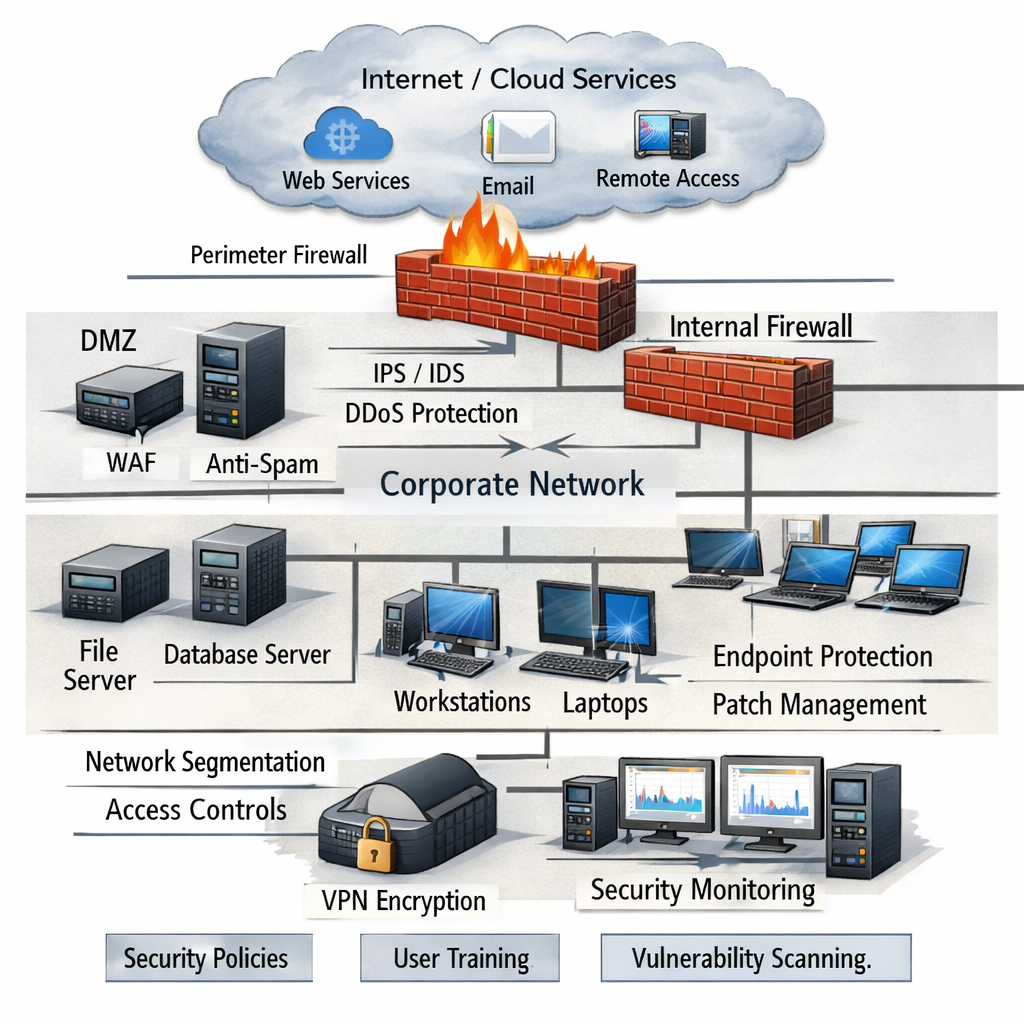
Now that you have an inventory, look at the guards you already have. Do you run antivirus? Do you have a firewall? Are patches applied automatically?
Start with the firewall. Check that it only allows the ports you need. Block everything else. For a small office, that might mean only ports 80, 443, and 3389 for remote admin.
Next, review your anti‑malware solution. Is it set to scan every file on every device? Does it have ransomware‑specific heuristics?
Ask yourself these questions:
- Are all systems running the latest OS updates?
- Do you have endpoint detection and response (EDR) installed?
- Is multi‑factor authentication (MFA) enabled for admin accounts?
To help you benchmark, the CISA Cyber Essentials checklist offers a free PDF that covers the basics. It’s a trusted government source and works well for Monterey SMBs.
“The best time to start building backups was yesterday.”
After you note what you have, note what you lack. Maybe you don’t have EDR on older Macs, or perhaps you haven’t set up MFA for cloud apps.
Write a gap list. Prioritize the gaps that affect high‑risk assets first.
Bottom line:Assessing existing controls reveals the low‑hanging fruit you can fix right away.
Step 3: Implement Strong Backup and Disaster Recovery
Backups are the single most impactful control for any Monterey ransomware readiness checklist. Without a good backup you either pay the ransom or lose data.
First, choose a backup method that writes data to an off‑site location. Cloud storage works well for small firms. Make sure the storage bucket is set to immutable so ransomware can’t delete or change the files.
Second, set a schedule. Daily incremental backups keep the data fresh. Weekly full backups let you restore a clean point.
Third, test the restore. Many firms assume backups work, but they never open the vault. Run a test restore at least once a month. Verify that the files open and that the application runs.
The video above walks through a quick restore test on a Windows server.
When you choose a backup vendor or managed backup and disaster recovery service, look for these features:
- Immutable storage (cannot be overwritten).
- Versioning , keep at least 30 days of history.
- Encryption at rest and in transit.
Here’s an example from a local dental office. They used a cloud backup that stored files in an immutable bucket. When ransomware hit, they restored the patient database in under an hour and never paid the extortionists.
For standards, follow the NIST Cybersecurity Framework. It tells you how to set recovery objectives (RPO and RTO) and how to measure success.
Bottom line:A solid backup plan lets you bounce back without paying a ransom.
Step 4: Strengthen Endpoint and Network Defenses
Now that you can back up data, add layers that stop ransomware before it reaches the files.
Start with endpoint protection. Install an EDR tool on every workstation. EDR watches for rapid file encryption, suspicious PowerShell commands, and known ransomware signatures.
Next, segment your network. Put servers that hold high‑value data on a separate VLAN. Only allow traffic from approved workstations.
Then, lock down remote access. Use a VPN with MFA and restrict RDP access to a handful of IP addresses.
Don’t forget macOS devices. Apple’s built‑in Activity Monitor can show odd processes. Regularly review login items in System Settings to catch unwanted auto‑starts.
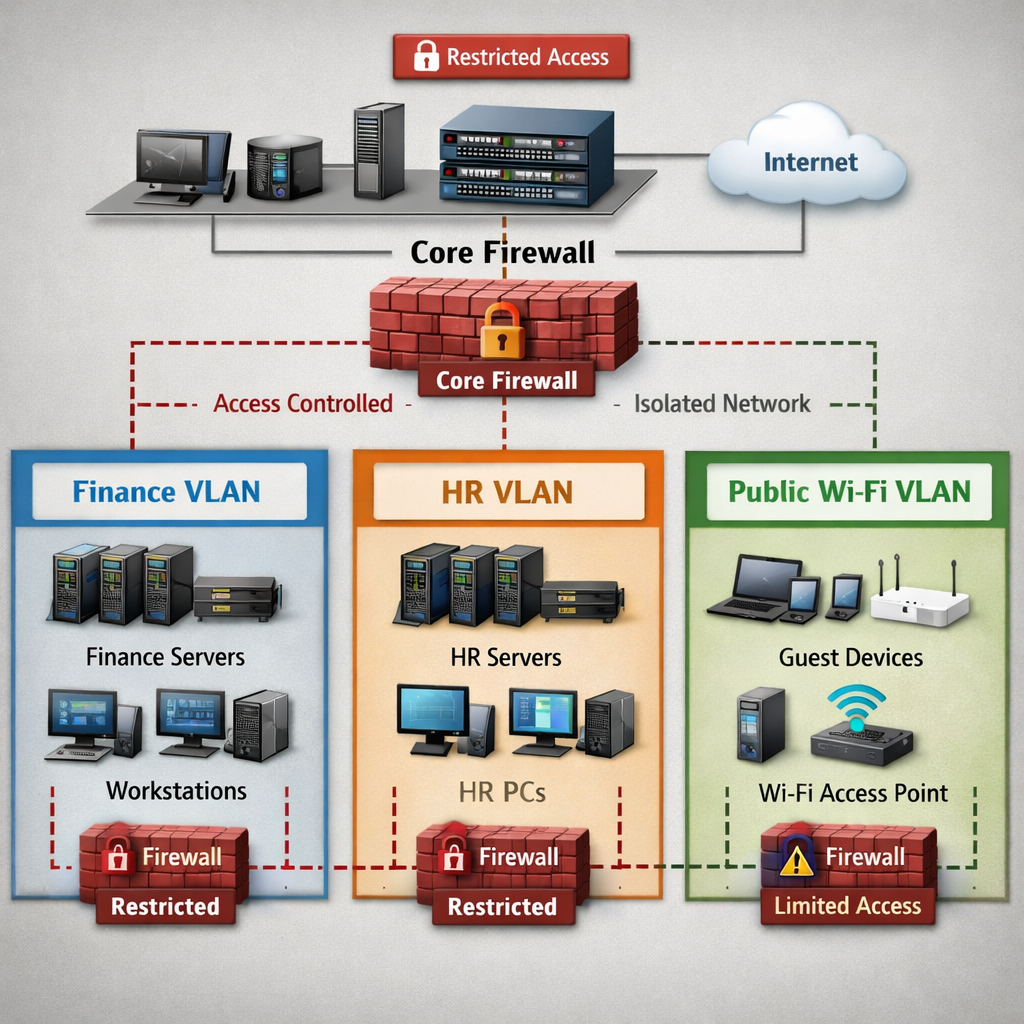
Here’s a quick checklist you can print:
- EDR on all endpoints.
- Network segmentation for critical servers.
- VPN with MFA for remote work.
- Disable unnecessary services (e.g., SMB v1).
Think about a local accounting firm that added network segmentation. When ransomware tried to spread from a compromised laptop, the firewall blocked it from reaching the payroll server.
Bottom line:Strong endpoint and network controls give ransomware fewer ways to get in.
Step 5: Implement Multi‑Factor Authentication and Access Controls
MFA adds a second lock on every account. Even if a password is stolen, the attacker still needs a phone or token.
Begin with admin accounts. Require MFA for any account that can change system settings or install software.
Next, enforce least‑privilege access. Give users only the permissions they need to do their job. If a receptionist doesn’t need access to the finance folder, remove that right.
Use role‑based access control (RBAC) in your cloud services. Most SaaS apps let you create groups and assign permissions at the group level.
Here’s a step‑by‑step for adding MFA to Microsoft 365:
Make sure you have a backup method for lost devices, like a hardware token or a phone‑based code.
For more on MFA, SRS Networks offers a managed MFA rollout that fits Monterey SMB budgets.
Bottom line:MFA and least‑privilege access lock out attackers even if passwords are leaked.
Step 6: Educate Employees on Ransomware Threats
People are the last line of defense. A single click on a phishing email can bring down the whole network.
Start with a short training video that explains what ransomware looks like. Keep it under five minutes. Follow up with a quick quiz to test recall.
Run a phishing simulation once a quarter. Send a fake invoice email and see who clicks. Use the results to target extra training where it’s needed.
Here’s a simple table you can use to track training progress:
| Employee | Role | Last Training Date | Phishing Click Rate |
|---|---|---|---|
| Alice | Office Manager | 2026‑02‑10 | 2% |
| Bob | Accountant | 2026‑03‑05 | 0% |
| Carol | Technician | 2026‑01‑22 | 5% |
After each simulation, hold a 10‑minute debrief. Show the fake email, point out the red flags, and give tips on how to verify senders.
Make security part of onboarding. New hires should set up MFA on day one and watch the ransomware basics video.
Think of a local law firm that added quarterly phishing tests. Their click rate dropped from 12% to 3% in six months, and they never saw a ransomware hit.
Bottom line:Regular, practical education reduces the human error that ransomware exploits.
Step 7: Develop and Test an Incident Response Plan
An incident response (IR) plan is a playbook you follow when ransomware shows up.
Start with four phases: Detect, Contain, Eradicate, Recover. Write a short paragraph for each phase that tells who does what.
Detect: Set up alerts in your EDR tool. When a file starts encrypting, the tool should fire an alarm.
Contain: Isolate the infected machine. Pull the network cable or disable the Wi‑Fi port. Do this within five minutes of the alert.
Eradicate: Run the vendor’s ransomware removal script. Apply any missing patches.
Recover: Pull the latest clean backup and restore the affected system. Verify the data before reconnecting to the network.
Run a tabletop drill every quarter. Gather the IT team, the office manager, and a senior exec. Walk through each step on a whiteboard. Note any gaps.
Document every action. After a real event, write a short post‑mortem that lists what worked and what didn’t.
SRS Networks can help you build and rehearse a plan that meets the local compliance needs of Monterey businesses.
Bottom line:A clear, practiced response plan lets you act fast and limit damage.
Frequently Asked Questions
What is the first thing to do in a Monterey ransomware readiness checklist?
The first step is to create a clear inventory of every device, server, and cloud service you use. Mark each item with its data impact level, high, medium, or low. This inventory gives you a solid base for the rest of the checklist and helps you focus on the most critical assets first.
How often should I run a vulnerability scan on high‑risk assets?
High‑risk assets such as payroll servers or patient‑record databases should be scanned at least weekly. Weekly scans catch new CVEs quickly and give you a short window to patch before ransomware can exploit them. Pair scans with automated patch deployment for the best protection.
Can I rely only on automated tools for ransomware protection?
Automation finds missing patches, open ports, and known CVEs fast. But a human analyst adds context, validates critical alerts, and helps prioritize fixes based on business impact. A mix of tools and people gives you a balanced Monterey ransomware readiness checklist.
Which controls give the biggest reduction in ransomware risk?
The biggest impact comes from three layers: network segmentation, multi‑factor authentication, and immutable backups. Segmentation stops lateral movement, MFA blocks credential‑theft attacks, and immutable backups let you restore without paying. Adding endpoint detection rounds out the defense.
How do I know if my backup strategy is ransomware‑ready?
Check that backups are stored off‑site or in an immutable cloud bucket that can’t be reached from your internal network. Verify that the backup is immutable, once written it can’t be altered. Test a full restore at least once a month and record the time it takes. If you can recover critical data in under an hour, your backup meets the checklist standards.
What compliance frameworks should I align with for ransomware protection?
Start with the NIST Cybersecurity Framework 2.0 because it maps to most industry regulations. Then add specific rules: HIPAA for health data, PCI‑DSS for payment data, and CCPA for California personal information. Using the framework lets you build one set of controls that satisfies all these rules.
How can I measure the effectiveness of my ransomware readiness efforts?
Track four metrics: time to detect, time to contain, recovery point objective (RPO) compliance, and recovery time objective (RTO). Compare your numbers against the goals in your incident response plan. Regular testing and metric reviews show you where the checklist works and where it needs tweaking.
Should I handle ransomware recovery myself or use a managed service?
If you have a small IT team, a managed recovery service gives you expertise, fast restore times, and post‑mortem analysis. Look for a provider that offers immutable backups, 24/7 monitoring, and a clear SLA. SRS Networks provides a local, managed recovery service that fits Monterey SMB budgets.
Ready to put the Monterey ransomware readiness checklist into action? Contact SRS Networks for a free assessment and let our experts help you protect your business today.
- Log in to the admin portal.
- Go to Users → Active users.
- Select the user and click “Enable MFA”.
- Choose the authentication method (authenticator app works best).