

Most SMBs in Monterey get stuck with vague promises and no real way to hold an IT provider accountable. That gap often shows up in the one free SLA template you find online , it skips the numbers that matter most. In this guide you’ll walk through every step to build a solid Monterey IT service level agreement template that protects your business and keeps technology running.
We’ll start with figuring out what you actually need, then choose the right metrics, write clear roles, set fair pricing, and finally get the agreement signed and in use. By the end you’ll have a living document you can rely on every day.
Step 1: Assess Business Needs and Define Services
Before you draft anything, you need a crystal‑clear picture of what your business depends on. List every server, workstation, point‑of‑sale system, cloud app, and network device. Then rank each item by impact if it goes down, data‑risk level, and how often you already need help.
And ask yourself: which services are mission‑critical? For a dental office that handles patient records, the electronic health‑record (EHR) system is non‑negotiable. For a legal firm, the document‑management portal is the heartbeat. By mapping these priorities you’ll know exactly which services belong in the SLA.
Next, turn that inventory into service definitions. Write a short sentence for each service that says what’s covered , e.g., “24/7 monitoring of the EHR server, including OS patches and antivirus updates.” Keep the language plain; your CFO and your IT staff should read the same line and understand it.
Don’t forget the exclusions. If the provider won’t manage third‑party SaaS apps, note that explicitly. Otherwise you’ll get surprise charges later.
Finally, set realistic expectations. Look at industry benchmarks , most managed‑service firms aim for 99.9% uptime on core servers and a 15‑minute acknowledgment window for critical tickets. Adjust those numbers to match your own risk tolerance.
What Is an IT SLA? A Plain‑English Guide for SMB Leaders explains why clear scope and measurable targets are the backbone of any agreement.
Bottom line:A solid inventory and clear service definitions give you a firm foundation for the SLA.
Step 2: Identify Service Metrics and KPIs
Metrics turn vague promises into hard numbers you can track. Start with the basics: response time, resolution time, and uptime. Then layer in business‑specific KPIs like Mean Time to Acknowledge (MTTA) or First‑Contact Resolution (FCR) for help‑desk tickets.
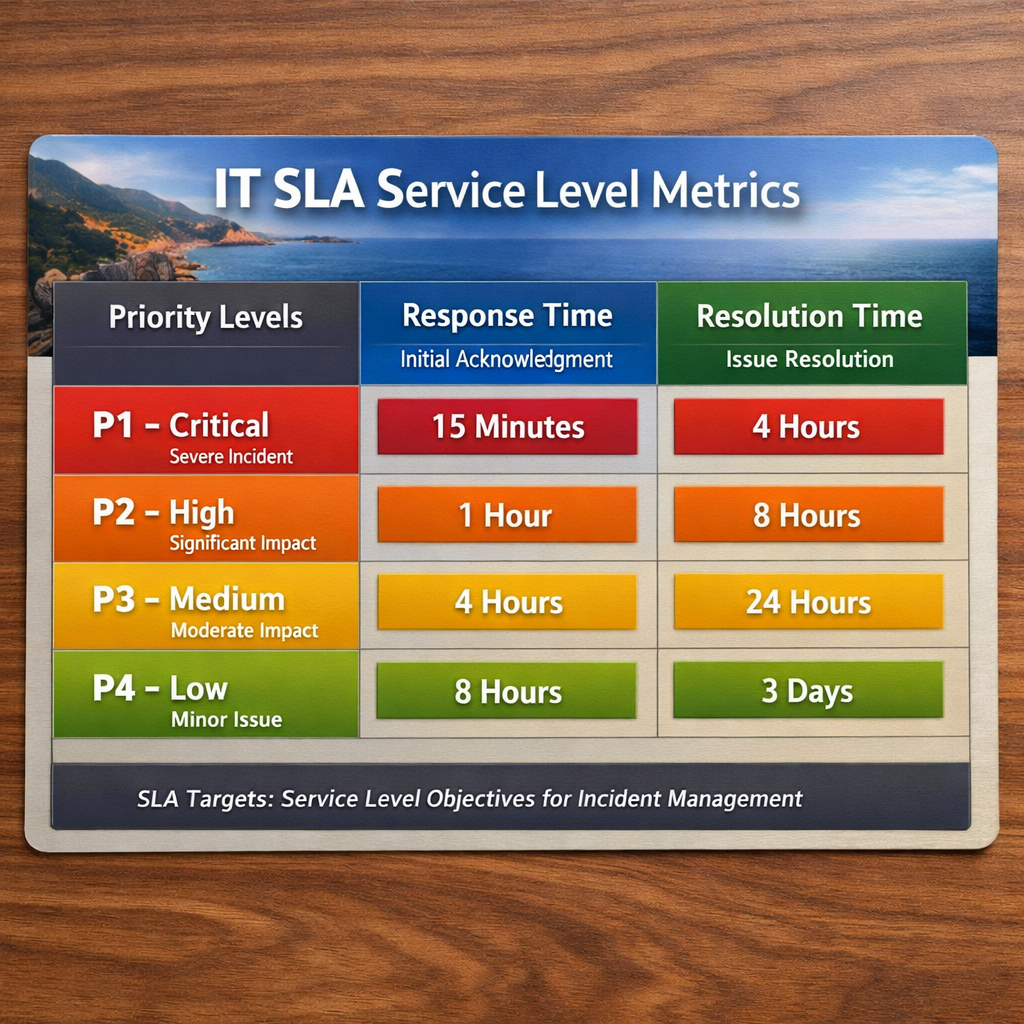
And think about severity levels. A “critical” incident , such as a server outage that stops sales , needs a faster response than a “low” request like a software update. Define at least three tiers (Critical, High, Normal) and assign a timer to each.
Here’s a quick starter table you can copy into your SLA draft:
These numbers aren’t random. According to a study by the U.S. Small Business Administration, firms that track clear service metrics see up to35%fewer disputes and28%higher client satisfaction.
But numbers alone aren’t enough. You need a way to capture them. Most MSPs use a ticketing platform that can auto‑calculate MTTA and MTTR. Make sure the tool you pick can generate monthly reports that show compliance against each SLA target.
And don’t forget compliance metrics if you handle regulated data. The Cybersecurity & Infrastructure Security Agency (CISA) recommends tracking patch‑management cadence and multi‑factor authentication coverage as part of any IT security SLA.
CISA’s guidance on security metrics provides a solid baseline you can embed directly into your agreement.
Bottom line:Choose clear, tiered metrics and back them with an automated tracking system.
Step 3: Draft Roles, Responsibilities, and Escalation Procedures
Now that you know what you need and how you’ll measure it, write down who does what. Split the responsibilities between the provider and the client. For example, the provider might handle patching, backups, and 24/7 monitoring, while the client is responsible for maintaining an up‑to‑date asset inventory.
And be explicit about escalation. If a critical ticket breaches its response window, the SLA should say exactly who gets notified , the on‑call technician, the service manager, and ultimately the CIO. Use a flow chart to illustrate the steps; visual aids reduce confusion during an outage.
Here’s a simple escalation ladder you can adapt:
- Level 1 , First‑line technician (acknowledge within 15 min)
- Level 2 , Senior engineer (escalate if not resolved in 1 hr)
- Level 3 , Service manager (notify after 2 hrs of breach)
- Level 4 , Executive sponsor (trigger after 4 hrs)
Make sure each level has a clear hand‑off point and documented communication method (phone, email, ticket comment).
Below is a short video that walks through building an escalation flow in a ticketing system.
After you watch, add the same steps to your SLA draft. The goal is to eliminate any “who does what” gray area before a real incident hits.
When you compare providers, How to Choose Managed IT Services for Small Business in Monterey CA highlights why a detailed escalation matrix is a deal‑breaker.
Bottom line:Assign every task, set escalation rules, and document them in plain language.
Step 4: Set Pricing, SLA Tiers, and Penalties
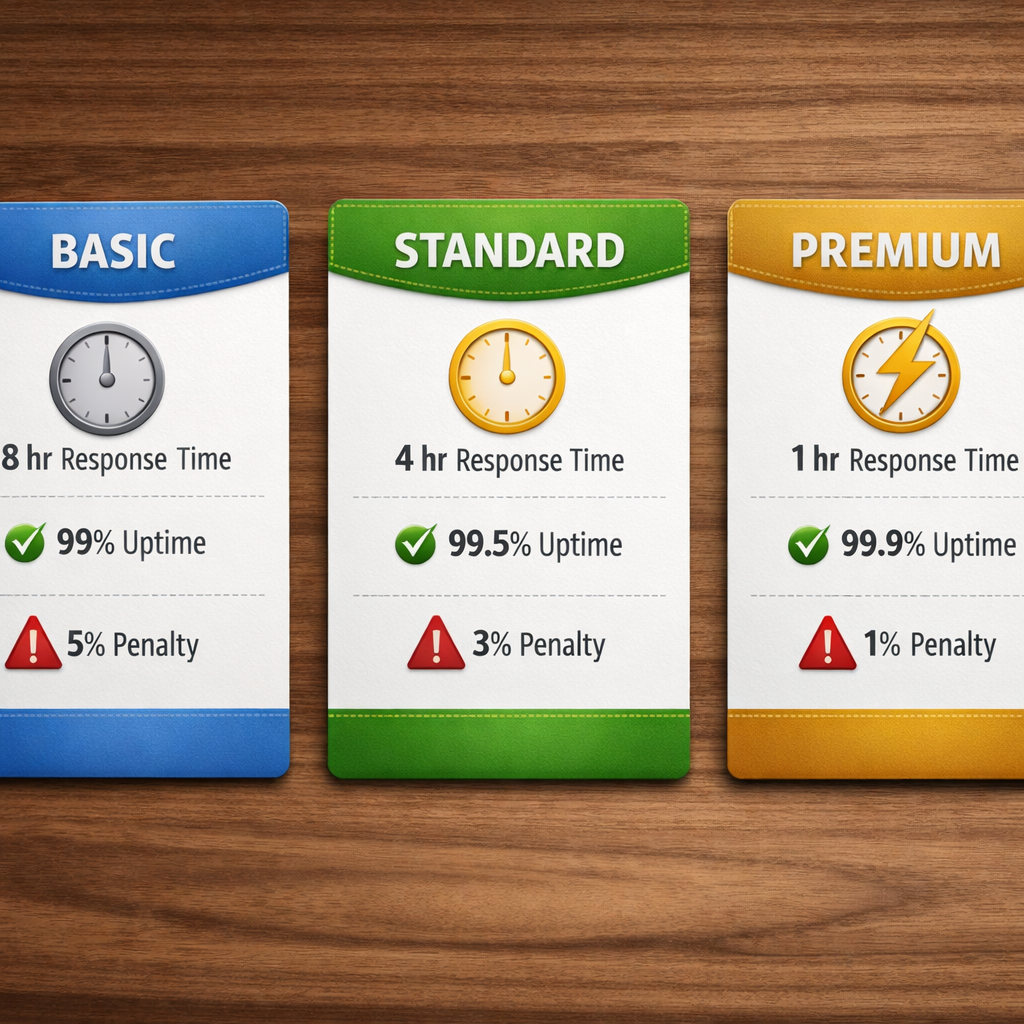
Pricing should mirror the service levels you just defined. Most providers offer tiered packages , basic, standard, and premium , each with its own response windows and uptime guarantees. Map your internal priorities to one of these tiers.
And be upfront about penalties. If the provider misses a critical response time, you might receive a service credit equal to 5% of that month’s fee. For repeated breaches, the contract could allow you to terminate with reduced notice.
Here’s a quick comparison you can paste into the agreement:
Make sure the pricing model aligns with your budget cycles. Many SMBs prefer a predictable monthly fee over a per‑incident charge because it smooths cash flow.
And remember compliance. If you’re in healthcare, the SLA should reference HIPAA‑required response times. The NIST Cybersecurity Framework gives a solid baseline for those security‑related clauses.
NIST’s Cybersecurity Framework outlines the risk‑management steps you can embed directly into your SLA language.
Bottom line:Align tiered pricing with service expectations and embed clear penalties for missed targets.
Step 5: Review, Approve, and Implement the SLA
The draft isn’t final until every stakeholder signs off. Schedule a review meeting with your IT manager, CFO, and the provider’s account lead. Walk through each clause line‑by‑line and ask, “What happens if this part fails?”
And set a review cadence. Most agreements include a quarterly performance report and an annual formal review. Mark those dates on your company calendar so the SLA stays current as technology evolves.
Implementation starts with the ticketing system. Configure SLA timers for each priority level so the platform automatically flags breaches. Set up automated email alerts to the escalation contacts you defined earlier.
Don’t forget documentation. Store the signed SLA in a shared drive, and give the IT help‑desk a one‑page cheat sheet that lists the most important response times and escalation contacts.
Finally, communicate the SLA to the whole organization. A short internal memo that says, “If your computer freezes, you now have a 15‑minute response guarantee,” builds confidence and sets expectations.
When you need a partner who actually follows through, SRS Networks Managed IT Services offers a proven SLA process built for Monterey‑area businesses.
Bottom line:Review, get signatures, embed the SLA in your tools, and keep it alive with regular checks.
FAQ
What should be included in a Monterey IT service level agreement template?
A good template covers service scope, support hours, response and resolution targets, priority definitions, uptime guarantees, escalation paths, security responsibilities, backup and recovery terms, reporting cadence, and penalty clauses. Each section should be written in plain language so both IT staff and business leaders understand the expectations.
How do I decide which metrics are most important for my business?
Start with the services that affect revenue or compliance the most. For a retail POS system, uptime and transaction‑processing speed are critical. For a law firm, data‑loss prevention and backup‑restore times matter most. Align each metric to a business impact, then set realistic targets based on industry benchmarks.
Can I use a free template and just add my own numbers?
You can, but the free Monterey‑area template from legaltemplates.net lacks pre‑filled response‑time and resolution‑time sections. Adding those numbers yourself is essential; otherwise you’ll have a document that looks complete but offers no real protection.
What escalation process works best for SMBs?
A four‑level ladder works well: first‑line tech acknowledges within minutes, senior engineer steps in if the issue isn’t resolved in an hour, the service manager is notified after two hours, and an executive sponsor gets an alert after four hours. Document each handoff and the communication method.
How often should I review my SLA?
Schedule a quarterly performance review to check metric compliance and a full annual review to adjust targets, pricing, or scope. Use the quarterly report to spot trends, and the annual meeting to align the SLA with new business goals or technology changes.
What penalties should I include for missed targets?
Common penalties are service credits , for example, a 5% credit on the month’s fee for each critical‑response breach. You can also add a clause that allows contract termination with reduced notice if breaches happen repeatedly. Make sure the penalties are enforceable and clearly described.
Conclusion
Building a Monterey IT service level agreement template isn’t a one‑off paperwork task. It’s a living framework that ties your business goals to measurable IT performance. By assessing needs, picking the right metrics, defining roles, pricing tiers, and penalties, then reviewing and embedding the agreement, you create a safety net that keeps technology from derailing your growth.
Ready to stop guessing and start measuring? Contact SRS Networks for a free consultation. We’ll walk you through each step, tailor the SLA to your industry , whether you’re a healthcare practice, a legal office, or a growing e‑commerce store , and put the agreement into action so you can focus on what matters most: serving your customers.






