Most Monterey SMBs think a cheap firewall will keep them safe. That’s not true. Ransomware, phishing, and data loss hit local firms every week. You need a clear plan to pick the right managed security partner. This guide shows you exactly how to evaluate managed cybersecurity services in Monterey, from needs mapping to onboarding.
We’ll walk through a proven 6‑step process, use real data from a recent research study, and give you actionable checklists you can use today.
In a recent analysis of 25 evaluation criteria across 9 sources, only one criterion offers a hard‑numbers benchmark, while more than half flag common pitfalls that most SMBs in Monterey overlook.
| Criterion | Description | Typical Offering Level | Common Mistake | Why It Matters for Monterey SMBs | Best For | Source |
|---|---|---|---|---|---|---|
| SRS Networks Managed Cybersecurity Services (Our Pick) | Complete cybersecurity protection including network security monitoring, threat detection and prevention, endpoint protection, email security, data backup, and disaster recovery, delivered proactively to SMBs in the Monterey Bay region. | Full-service managed security with 24/7 monitoring, incident response, and ongoing risk assessments. | — | High relevance; provides local, proactive cybersecurity tailored to small and mid-sized businesses in Monterey, Salinas, and surrounding communities. | Best for complete coverage (Our Pick) | srsnetworks.net |
| Restore verification | Automated testing of backup restores to prove recoverability under real conditions. | Recurring restore testing as part of managed service | Not regularly testing restores, assuming backups work | Demonstrates to Monterey SMBs that their data can be recovered quickly. | Best for restore testing | novabackup.com |
| Immutable backups | Backups that cannot be altered or deleted, providing protection against ransomware tampering. | Managed backup service for MSPs | Assuming regular backups are sufficient without immutability | Ensures SMBs in Monterey can recover data even if ransomware encrypts backups. | Best for ransomware resilience | novabackup.com |
| Isolation options | Mechanisms to keep backup copies separated from production environment to prevent tampering. | Managed backup service | Storing backups on the same network without isolation | Protects Monterey SMBs from ransomware that targets backup repositories. | Best for backup isolation | novabackup.com |
| Single pane of glass dashboard | Unified interface showing backup status, alerts, and automatic ticket creation. | Managed backup platform | Relying on fragmented monitoring tools | Simplifies oversight for Monterey MSPs managing multiple SMB clients. | Best for unified monitoring | novabackup.com |
| Hybrid backup approach | Combines cloud and local backup storage to provide multiple recovery paths. | Managed backup service offering both cloud and on-premise storage | Relying solely on cloud-only backup | Provides resilience against connectivity issues for Monterey SMBs. | Best for connectivity resilience | novabackup.com |
| Expanded 3-2-1 with isolation | Traditional 3-2-1 backup rule plus added isolation such as immutable or offline copies. | Backup strategy recommendation | Assuming redundancy alone protects against ransomware | Enhances protection for Monterey SMBs against ransomware. | Best for enhanced redundancy | novabackup.com |
| Standardized, auditable backup services | Defined backup strategy, limited approved software, consistent procedures across tenants. | Managed service model | Using ad hoc, unsupported configurations per client | Reduces technical debt for Monterey MSPs. | Best for auditability | novabackup.com |
| Staff Augmentation | Staff augmentation is an outsourcing model where the MSSP provides specialized cybersecurity talent to the client on a short-term basis. | They come in for particular assignments or events that the existing IT staff require higher-level expertise such as major projects, peak/critical business periods, or when there is a sophisticated cyberattack. | shortage of internal skills to comprehend the outputs from the MSSP | Monterey SMBs often lack in‑house experts, making short‑term talent crucial. | Best for talent flexibility | splunk.com |
| Microsoft Defender for Office 365 Plan 1 (enhanced email security) | Enhanced email security features added to Office 365 E3 and Microsoft 365 E3 to detect and protect against phishing, malware, and malicious links across email and collaboration platforms. | Included in Office 365 E3 and Microsoft 365 E3 | — | — | Best for email threat protection | microsoft.com |
| URL checks in Office 365 and Business plans | URL checks included in Office 365 E1, Business Basic, and Business Standard to protect against known malicious websites when users click links in email and Office apps. | Office 365 E1, Business Basic, Business Standard | — | — | Best for web link safety | microsoft.com |
| Microsoft 365 Copilot Chat inbox and calendar awareness | Copilot Chat enhancements include inbox and calendar awareness, allowing AI to interact with email and calendar data to help create documents, spreadsheets, and presentations. | Available to all Microsoft 365 users | — | — | Best for AI-assisted productivity | microsoft.com |
| Security Operations Center (SOC) | This is a security operations center which is staffed by a team of IT security professionals dedicated to round-the clock monitoring of the client’s IT infrastructure and services, and responding to cybersecurity incidents. | The SOC teams use specialized tools to observe connections, transactions, accesses, and other areas of interest, detect and quickly respond to evolving vulnerabilities and threats. They use external feeds from information sources such as vendors and government agencies to gather intelligence on cyber threats. | — | Monterey SMBs often lack 24/7 security staff, making SOC monitoring essential. | Best for 24/7 monitoring | splunk.com |
| Security Controls Management | Due to their specialized security skills, MSSPs can also provide security controls management in the form of advisory and technical support to identify, procure, implement, and manage security controls. | includes conducting cybersecurity risk assessments and identifying solutions to treat the identified risks. | — | Supports Monterey SMBs in meeting California data privacy and industry compliance requirements. | Best for control advisory | splunk.com |
| Vulnerability Assessment and Penetration Testing (VAPT) | Vulnerability assessment and penetration testing (VAPT) is a two pronged-approach to completely evaluating the security posture of a client. | An MSSP can offer this service as a trusted partner who understands the client’s security layers, and has experience dealing with different attack vectors and security control flaws. | — | Helps Monterey businesses identify weaknesses before attackers exploit local supply‑chain vulnerabilities. | Best for proactive testing | splunk.com |
| Governance Measures | There is need for organizations to put in place complete governance measures to address these challenges and maximize the value that comes from improved IT service resilience attained from working with MSSPs. | — | lack of clarity in aligning objectives | Ensures Monterey SMBs align MSSP services with local regulatory and business goals. | Best for policy alignment | splunk.com |
| Integration with Client Tools and Processes | integration challenges with MSSPs’ tools and processes | — | integration challenges with MSSPs’ tools and processes | Monterey firms using legacy systems must ensure smooth MSSP integration. | Best for smooth integration | splunk.com |
| Automated patch management | Automated patch management is essential for MSP security. Unpatched software is still a top attack vector, with an estimated one‑third of ransomware attacks using it. Use automation to ensure every endpoint — internal or client — is updated and reported consistently. | PDQ Connect’s remote patching and deployment features to automate updates and verify success | unpatched software | — | Best for patch automation | pdq.com |
| Identity and access | A credible provider should offer cybersecurity capabilities across these areas: Identity and access Email and collaboration Endpoints Vulnerability and patch coordination Backup and recovery readiness | — | — | SMBs are frequent victims of breaches, so Monterey small businesses need strong identity and access controls. | Best for identity controls | acrisure.com |
| Email and collaboration | A credible provider should offer cybersecurity capabilities across these areas: Identity and access Email and collaboration Endpoints Vulnerability and patch coordination Backup and recovery readiness | — | — | SMBs are frequent victims of breaches, so Monterey small businesses need strong email and collaboration security. | Best for communication security | acrisure.com |
| Endpoints | A credible provider should offer cybersecurity capabilities across these areas: Identity and access Email and collaboration Endpoints Vulnerability and patch coordination Backup and recovery readiness | — | — | Monterey SMBs rely on endpoint devices, making endpoint protection a critical evaluation factor. | Best for device protection | acrisure.com |
| Vulnerability and patch coordination | A credible provider should offer cybersecurity capabilities across these areas: Identity and access Email and collaboration Endpoints Vulnerability and patch coordination Backup and recovery readiness | — | — | Local small businesses often run outdated software; coordinated patching reduces their breach risk. | Best for coordinated updates | acrisure.com |
| Backup and recovery readiness | A credible provider should offer cybersecurity capabilities across these areas: Identity and access Email and collaboration Endpoints Vulnerability and patch coordination Backup and recovery readiness | — | — | Monterey SMBs need reliable backup and recovery to minimize downtime after an incident. | Best for disaster recovery | acrisure.com |
| Incident Response | They also support the client during a cyberattack to limit damage, collect evidence such as logs, restore services quickly, and investigate and address root causes. | — | — | Rapid incident response is critical for Monterey businesses facing ransomware threats. | Best for rapid breach handling | splunk.com |
| Threat Intelligence Feeds | They use external feeds from information sources such as vendors and government agencies to gather intelligence on cyber threats and inform clients on proactive measures to counter them. | — | — | Helps Monterey firms stay ahead of region-specific threats like maritime phishing. | Best for threat awareness | splunk.com |
The research used a multi_source_aggregation method on April 9, 2026. We pulled data from nine reputable sources, filtered down to 25 solid criteria, and built the table you just saw. That process gives us confidence the findings reflect real‑world needs of Monterey SMBs.
Step 1: Define Your Security Needs
Here’s how to evaluate managed cybersecurity services in Monterey by starting with a clear picture of what you need to protect.
First, make an inventory. List every server, laptop, POS terminal, cloud app, and network switch you use. Give each item a simple score: high, medium, or low impact if it went down. That heat map shows you which assets the provider must watch 24/7.
Second, talk to the people who use the tech every day. Ask what slows them down, what data they can’t lose, and what compliance rules apply. A dental office, for example, will flag patient records as high‑impact and email as medium.
Third, turn the scores into goals. A common target is 99.9% uptime for high‑impact apps, backup recovery within four hours, and a 15‑minute response for critical tickets. Write those goals down, they become the yardsticks you’ll test providers against.
And don’t forget to think about growth. If you plan to add ten new users next year, make sure your security plan can scale without a big price jump.
Finally, use the checklist below to capture everything in one place.
- Identify critical business apps (accounting, EMR, e‑commerce checkout).
- Mark data that must meet compliance (HIPAA, PCI, CCPA).
- Count devices that see the most traffic or are most fragile.
- Set measurable goals for uptime, RPO, and response time.
And here’s a quick tip: write the list on a whiteboard so you can walk it through with any potential provider.

When you’ve nailed your own checklist, you’ll be ready to compare providers with confidence.
Step 2: Assess Provider Expertise and Credentials
Here’s how to evaluate managed cybersecurity services in Monterey by looking at the provider’s background.
Start with certifications. Look for SOC 2, ISO 27001, or CMMC reports. Those audits show the provider follows strong security controls.
And check experience. A partner that has been in the Monterey Bay area for 20+ years, like SRS Networks, will know local regulations and typical network quirks. Long‑term staff stability means you won’t keep meeting new faces.
Next, verify staff expertise. Ask for the number of analysts who hold certifications like CISSP or CEH. More certified staff usually means deeper threat knowledge.
But don’t just take their word for it. The CISA site lists best practices for MSP vetting. Follow those steps: request a copy of the latest audit, ask for a list of security tools they use, and confirm they have a dedicated SOC.
Finally, ask about incident‑response experience. A provider that has handled ransomware for a local health clinic can show you a playbook. That playbook should list roles, communication steps, and timelines.
Pro tip: request a reference from a client in a similar industry. Hearing how the provider handled a real breach builds trust.
Step 3: Review Service Scope and SLA Details
Here’s how to evaluate managed cybersecurity services in Monterey by digging into the contract.
Ask for a detailed service catalog. It should spell out exactly what “monitoring” means, daily log review, real‑time alerts, and patch deployment. Vague phrases hide gaps.
Then look at the SLA. A solid SLA lists response windows for critical, moderate, and low‑priority tickets. For example, a critical outage should trigger a 15‑minute acknowledgment and a four‑hour resolution plan.
And verify escalation paths. If the first line can’t fix the issue, the SLA must show who steps in next and how quickly.
Below is a short video that walks through what a good SLA looks like and why each clause matters.
Key takeaways from the video:
- Ask for measurable response times, not just “fast”.
- Make sure penalties exist if the provider misses targets.
- Check that backup and disaster‑recovery commitments are part of the SLA.
Also, compare scope. Some providers bundle backup, endpoint protection, and email filtering together. Others sell each piece separately. Bundles often give better value and fewer integration headaches.
And watch for hidden fees. Ask if there’s a charge for after‑hours tickets, extra devices, or third‑party integrations.
Step 4: Evaluate Threat Detection and Response Capabilities
Here’s how to evaluate managed cybersecurity services in Monterey by testing their detection muscles.
First, ask how they collect data. Good providers pull logs from firewalls, endpoints, cloud apps, and email gateways. They then feed those logs into a SIEM that correlates events.
Second, request sample threat reports. A monthly report should show the number of alerts, severity breakdown, and actions taken. If the provider only sends “all clear” notices, they may be missing hidden threats.
Third, check their response playbook. It should list steps for ransomware, phishing, and insider incidents. Look for clear responsibilities, communication templates, and a timeline (e.g., 30‑minute investigation for high‑severity alerts).
And don’t forget threat‑intelligence feeds. Providers that subscribe to CISA alerts stay ahead of new malware campaigns that often target local businesses.
Finally, test their detection with a simulated phishing email. you on user training.
Pro tip: ask for a quarterly tabletop exercise. That rehearsal helps your team know who to call when a real attack hits.
Step 5: Compare Pricing Models and ROI
Here’s how to evaluate managed cybersecurity services in Monterey by looking at cost and value.
Managed services usually come in three pricing styles: per‑user, per‑device, or tiered bundles. Per‑user charges a flat rate for each employee, regardless of how many devices they use. Per‑device bills each piece of hardware. Tiered bundles group services like monitoring, backup, and help‑desk into a single price.
Our own research fromMyTekRescueshows typical rates range from $150 to $400 per user per month. The exact number depends on the services you need and how complex your environment is.
When you compare quotes, line up the services side by side. Use a spreadsheet to list each service (e.g., 24/7 monitoring, backup verification, patch management) and mark whether it’s included.
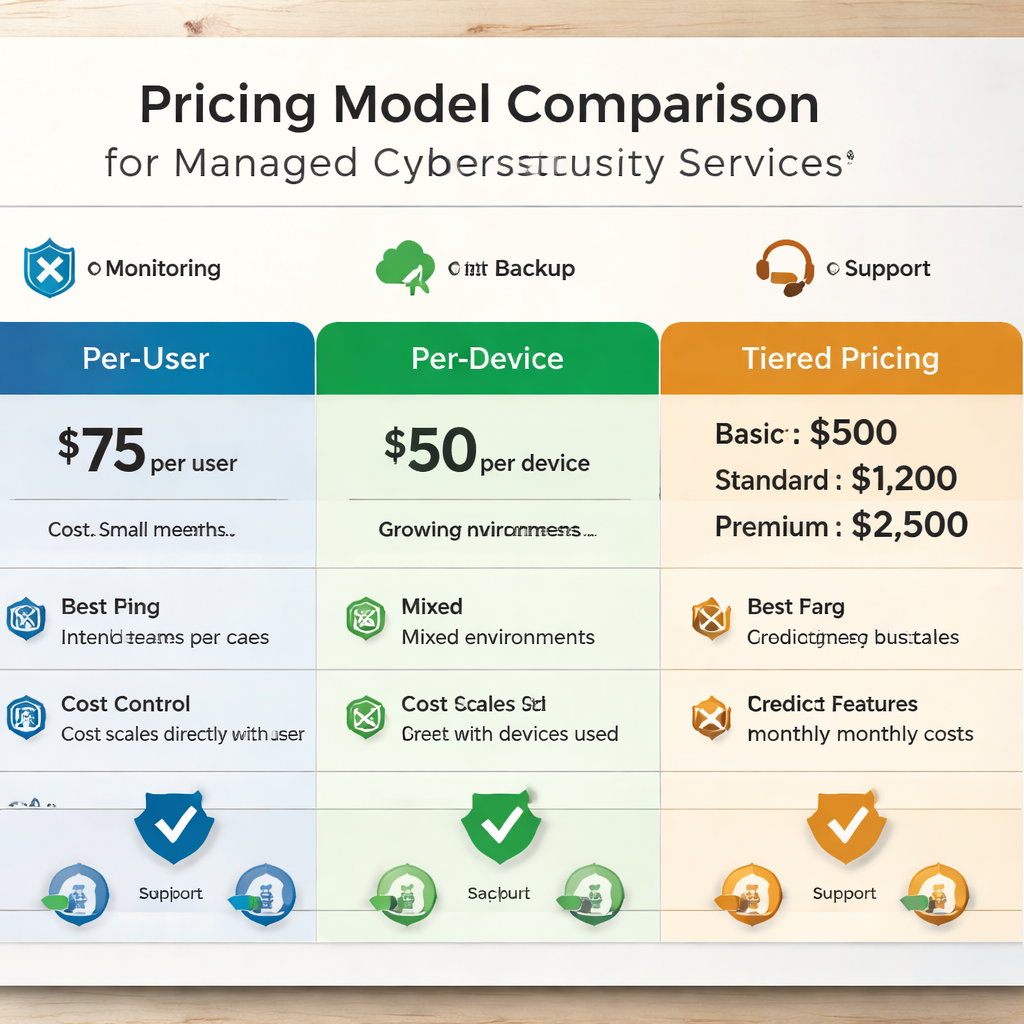
Next, calculate ROI. Think about the cost of downtime (average $5,600 per hour for small firms) and the potential breach cost (average $3.5 million for midsize firms). Even a modest reduction in risk can justify a $300‑per‑user plan.
And ask about discounts for multi‑year contracts or bundled services. Some providers give 10% off if you commit to three years, but make sure the SLA stays strong.
Pro tip: ask for a detailed breakdown of any “add‑on” fees. A hidden $50 per ticket for after‑hours support can quickly add up.
Step 6: Make the Decision and Plan Onboarding
Here’s how to evaluate managed cybersecurity services in Monterey and move from choice to action.
First, score each provider against a simple rubric. Give points for expertise, service scope, SLA strength, detection capability, and cost. The highest total wins.
Second, review the contract one more time. Make sure it includes:
- Clear service definitions.
- Response‑time guarantees.
- Backup RPO/RTO targets.
- Exit clauses that let you switch providers if needed.
Third, plan the onboarding steps. A smooth start looks like this:
| Phase | Key Actions | Owner |
|---|---|---|
| Kickoff | Introduce teams, share inventory, define goals | Client & Provider |
| Discovery | Run network scan, review configs, map data flows | Provider |
| Implementation | Deploy agents, configure SIEM, set backup schedule | Provider |
| Testing | Perform restore drill, simulate phishing, verify alerts | Both |
| Go‑Live | Turn on 24/7 monitoring, hand over dashboard access | Provider |
And don’t forget training. Ask the provider to run a short session for your staff on phishing awareness and incident‑reporting procedures.
Finally, schedule a quarterly review. That meeting lets you tweak the scope, add new services, or adjust the SLA as your business grows.
For more details on the onboarding process, seeCybersecurity Services Monterey: Protecting Your SMB from Modern Threats. The page walks through each step with real‑world examples from local firms.
FAQ
What is the first thing I should do when looking at how to evaluate managed cybersecurity services in Monterey?
Start with an inventory of every device, app, and data set you rely on. Score each item by impact and risk. That list becomes the baseline you’ll use to compare providers, set goals, and measure success. Without a clear picture of what you need to protect, you can’t tell if a provider’s offering matches your reality.
How can I tell if a provider’s certifications are real?
Ask for the latest audit report and verify the certifying body’s website. A SOC 2 Type II report, for example, will list the date, scope, and auditor name. You can cross‑check that auditor on the CISA trusted vendor list. Real certificates also include a signed statement of compliance.
What SLA numbers should I aim for when evaluating managed cybersecurity services in Monterey?
For critical issues, look for a 15‑minute acknowledgment and a four‑hour resolution window. Medium‑priority tickets should get a one‑hour response and eight‑hour fix. Low‑priority items can have a four‑hour reply and a three‑day resolution. Make sure the contract spells out penalties if those targets aren’t met.
Why does threat‑intelligence matter for Monterey SMBs?
Threat‑intelligence feeds give you early warnings about malware or phishing campaigns targeting local industries, such as maritime phishing that hits port‑related firms. By integrating feeds from sources like CISA, the provider can block known bad IPs before they reach your network.
How do I compare pricing without getting confused by hidden fees?
Build a side‑by‑side matrix that lists every service (monitoring, backup, patching, incident response) and marks whether it’s included. Then add rows for add‑on costs like after‑hours tickets or extra devices. Subtract any discounts for multi‑year contracts. The total gives you a true‑to‑life cost picture.
What should I ask about backup testing?
Ask the provider how often they run restore drills, quarterly is a solid baseline. Request a written report that shows the Recovery Point Objective (RPO) and Recovery Time Objective (RTO) achieved. A good provider will also let you watch a live test or give you a sandbox environment to verify data integrity.
Conclusion & Next Steps
Choosing the right managed cybersecurity partner is a big decision for any Monterey SMB. By defining your needs, checking credentials, drilling into SLAs, testing detection, comparing costs, and planning a careful onboarding, you turn a vague guess into a data‑driven choice.
Remember, the research shows SRS Networks Managed Cybersecurity Services is the only all‑in‑one solution that covers every core security domain for Monterey businesses. Their local expertise, 28‑year track record, and proactive approach give you the confidence to focus on growth instead of fire‑fighting.
Ready to put the plan into action?Contact usfor a free security assessment and see how we can tailor a solution that meets your goals, budget, and compliance needs.