Small businesses everywhere trust passwords to shield their most important data. Yet 60 percent of small businesses fold within six months after a cyberattack involving weak credentials. You might think crafting a longer password with a mix of letters and numbers is enough to keep threats at bay. Think again. The real difference comes from using totally unique passwords for every single account and building a password culture that protects your entire business ecosystem from the inside out.
Table of Contents
- Why Strong Passwords Matter For Your Business
- Steps To Create A Strong And Unique Password
- Password Management Tips For Teams And Staff
- Common Mistakes And How To Avoid Them
Quick Summary
| Takeaway | Explanation |
|---|---|
| Implement strong passwords for accounts | Use passwords of at least 12 characters, including upper/lowercase letters, numbers, and symbols. This makes them harder to crack. |
| Create unique passwords for each account | Avoid reusing passwords. Each business account should have its own password to minimize security risks. |
| Establish organizational password policies | Develop comprehensive guidelines that enforce mandatory length, complexity, and periodic updates for all employees. |
| Conduct staff training on password security | Employees should be trained to recognize phishing scams and use password managers effectively to enhance security. |
| Regularly review password practices | Continually audit and update passwords, alongside implementing multi-factor authentication to enhance defense against breaches. |
Why Strong Passwords Matter for Your Business
In the digital age, passwords serve as the first line of defense for businesses against cybersecurity threats. Small to medium-sized businesses are particularly vulnerable to cyber attacks, with hackers viewing them as attractive targets due to potentially weaker security infrastructure. The consequences of a compromised password can be devastating, potentially resulting in significant financial losses, data breaches, and long-term reputational damage.
The Financial and Operational Risks of Weak Passwords
Businesses face substantial risks when they neglect password security. According to the United States Computer Emergency Readiness Team (US-CERT), weak passwords can expose organizations to targeted attacks that compromise sensitive business information. Cybercriminals actively seek out vulnerabilities, and a single weak password can provide an entry point to your entire network.
The financial implications are staggering. A single data breach can cost small businesses tens of thousands of dollars in direct damages, lost productivity, and recovery efforts. Beyond the immediate financial impact, businesses risk losing customer trust and facing potential legal consequences. Clients and partners expect robust security measures, and a password-related breach can quickly erode the reputation you’ve worked hard to build.
Protecting Your Business Ecosystem
Passwords are more than just access credentials they are critical security barriers protecting your business’s most valuable assets. Every employee, from entry-level staff to senior management, plays a crucial role in maintaining password security. Weak passwords create vulnerabilities that can compromise entire organizational systems.
Consider the interconnected nature of modern business technology. A single compromised password can potentially expose:
- Financial Systems: Access to banking and accounting platforms
- Customer Data: Sensitive client information and contact details
- Operational Networks: Internal communication and project management tools
Beyond the immediate technical risks, businesses must also consider regulatory compliance. Many industries have strict requirements for data protection, and weak password practices can result in significant penalties and legal challenges.
Effective password management is not just a technical requirement it’s a fundamental business strategy. By implementing strong password protocols, businesses can significantly reduce their cybersecurity risk, protect their assets, and demonstrate a commitment to professional and responsible operations. The small investment of time and effort in creating robust passwords can prevent potentially catastrophic security breaches that could threaten the very survival of your organization.
Steps to Create a Strong and Unique Password
Creating a strong and unique password is a critical skill for protecting your business’s digital assets. Unlike generic security recommendations, businesses need strategic approaches that balance complexity with memorability. According to the National Institute of Standards and Technology (NIST), robust password creation is fundamental to maintaining robust cybersecurity defenses.
Length and Complexity: Your First Line of Defense
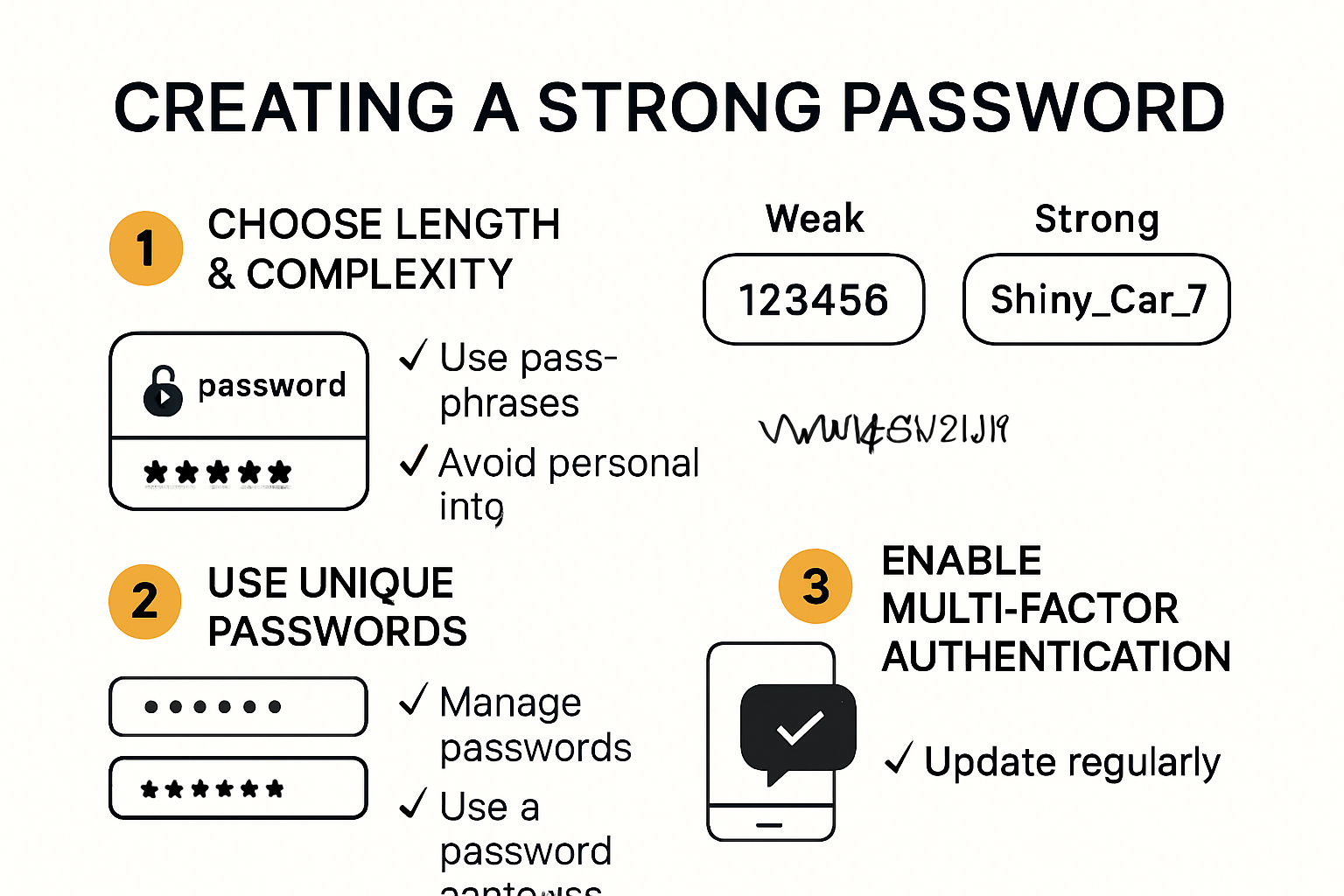
The cornerstone of a strong password is its length and unpredictability. Experts recommend creating passwords that are at least 12 characters long, incorporating a mix of uppercase and lowercase letters, numbers, and special symbols. This strategy dramatically increases the complexity and makes your password significantly harder for automated systems to crack.
Consider using a passphrase approach rather than a traditional password. Instead of a random string of characters, create a memorable sentence or combination of words that only you would understand. For example, “Blue_Elephant5!Dances_Quietly” is both complex and potentially easier to remember than a purely random sequence.
Unique Passwords for Every Account
One of the most critical mistakes businesses make is reusing passwords across multiple platforms. Each business account should have a completely unique password. This means your email password should differ from your financial management system password, which should be different from your cloud storage credentials.
To manage this complexity, consider using a professional password manager. These tools can generate and securely store complex, unique passwords for each of your business accounts. They encrypt your password database, providing a secure vault that eliminates the need to memorize multiple intricate passwords.
Advanced Password Protection Strategies
Beyond basic password creation, businesses should implement additional layers of security. Multi-factor authentication adds an extra verification step, requiring a second form of identification beyond the password. This could be a time-based one-time password, a physical security key, or a biometric verification.
Regularly updating passwords is another crucial strategy. Establish a routine for password rotation, particularly for high-risk accounts that handle sensitive business information. Aim to change critical passwords every 60-90 days, ensuring that even if a password is compromised, its window of vulnerability is limited.
Remember, a strong password is not just a technical requirement it’s a fundamental business protection mechanism. By investing time in creating robust, unique passwords, you’re building a critical defense against potential cyber threats that could compromise your business’s integrity and financial stability.
Password Management Tips for Teams and Staff
Effective password management is a collective responsibility that requires comprehensive strategies and team-wide commitment. Carnegie Mellon University emphasizes that implementing robust password controls is critical for protecting organizational digital assets, particularly for system-level and shared service accounts.
Establishing Organizational Password Policies
Developing clear, comprehensive password guidelines is essential for maintaining cybersecurity across your organization. The Cybersecurity and Infrastructure Security Agency (CISA) recommends creating explicit policies that require employees to use strong, unique passwords for all business accounts.
Key elements of an effective password policy should include:

- Mandatory Password Length: Requiring passwords of at least 12-14 characters
- Complexity Requirements: Enforcing a mix of uppercase, lowercase, numbers, and special characters
- Regular Password Rotation: Implementing scheduled password changes for critical accounts
- Prohibited Password Practices: Explicitly banning password reuse and common weak password patterns
Training and Awareness Programs
Technology alone cannot guarantee password security. According to the Massachusetts Executive Office of Technology Services and Security, comprehensive staff training is crucial in creating a culture of cybersecurity awareness.
Consider developing interactive training modules that educate employees about:
- Phishing Recognition: Identifying potential social engineering attempts
- Password Manager Usage: Teaching staff how to effectively use secure password management tools
- Two-Factor Authentication: Explaining the importance of additional verification steps
- Personal vs Professional Password Practices: Highlighting the risks of using personal passwords for work accounts
Advanced Password Protection Strategies
Beyond basic guidelines, businesses should implement advanced password protection mechanisms. This includes using enterprise-grade password managers, setting up centralized password management systems, and creating protocols for immediate password changes during personnel transitions.
Additionally, businesses should:
- Implement role-based access controls
- Monitor and audit password usage
- Create incident response plans for potential password-related security breaches
- Regularly review and update password management strategies
Remember that password security is an ongoing process. As technology evolves and new threats emerge, your organization must remain adaptable and proactive in protecting its digital infrastructure. By fostering a culture of cybersecurity awareness and implementing robust password management strategies, businesses can significantly reduce their risk of unauthorized access and potential data breaches.
Common Mistakes and How to Avoid Them
Password security is a critical component of business cybersecurity, yet many organizations continue to make fundamental errors that expose them to significant risks. The National Cybersecurity Alliance emphasizes that understanding and addressing common password mistakes is essential for protecting sensitive business information.
Password Creation Pitfalls
Many businesses unknowingly compromise their security through seemingly innocuous password practices. One of the most prevalent mistakes is using predictable or easily guessable passwords. This includes using personal information like birthdays, names of family members, or simple sequential numbers that can be quickly decoded by sophisticated hacking tools.
Another critical error is creating passwords that are too short or lack complexity. Hackers utilize advanced algorithms and computational power to crack simple passwords within minutes. Businesses must move beyond basic combinations and develop more robust password strategies that incorporate multiple character types and unexpected patterns.
Dangerous Sharing and Storage Practices
Password sharing remains a significant security vulnerability for many organizations. Employees often share credentials through unsecured communication channels, believing they are streamlining workflow. However, this practice creates multiple points of potential unauthorized access. Each shared password exponentially increases the risk of potential security breaches.
Equally problematic is the practice of storing passwords in unsecured locations. This includes:
- Physical Vulnerabilities: Writing passwords on sticky notes near workstations
- Digital Risks: Saving passwords in unencrypted computer files
- Communication Hazards: Sending passwords through unencrypted email or messaging platforms
Technological and Human Error Challenges
Businesses often underestimate the importance of comprehensive password management. This includes failing to implement multi-factor authentication, neglecting regular password updates, and not training employees about potential cybersecurity threats.
Additional critical mistakes include:
- Reusing passwords across multiple platforms
- Not updating passwords after employee departures
- Ignoring software updates that patch security vulnerabilities
- Failing to monitor and audit account access
Effective password management requires a holistic approach that combines technological solutions with comprehensive staff education. By recognizing these common mistakes and implementing strategic safeguards, businesses can significantly reduce their vulnerability to cyber threats.
Below is a checklist table highlighting common password mistakes mentioned in the article, helping you quickly identify vulnerabilities in your organization’s current practices.
| Common Mistake | Risk Level | Present in Your Business? |
|---|---|---|
| Using predictable/easy-to-guess passwords | High | Yes / No |
| Creating short or simple passwords | High | Yes / No |
| Reusing passwords across platforms | High | Yes / No |
| Sharing passwords through unsecured means | High | Yes / No |
| Storing passwords insecurely | High | Yes / No |
| Failing to use multi-factor authentication | High | Yes / No |
| Not updating after employee departures | Medium | Yes / No |
Remember that password security is not a one-time task but an ongoing process. Regularly reviewing and updating your password strategies ensures that your business remains protected against evolving digital threats. Investing time and resources in robust password management is not just a technical requirement it is a fundamental business protection strategy.
Frequently Asked Questions
What constitutes a strong password for businesses?
A strong password should be at least 12 characters long and include a mix of uppercase letters, lowercase letters, numbers, and special symbols to increase its complexity.
Why is it important to use unique passwords for every account?
Using unique passwords for each account minimizes the risk of a security breach. If one password is compromised, it does not put all your other accounts at risk.
How often should passwords be changed?
It’s advisable to change critical passwords every 60-90 days to reduce the time window in which a compromised password can be exploited.
What are the benefits of using a password manager?
A password manager securely stores and generates complex, unique passwords for each of your accounts, making it easier to maintain strong password practices without having to remember every individual password.
Take Charge of Your Password Security With SRS Networks
Struggling with managing strong and unique passwords across your team? As outlined in this article, reusing weak passwords or relying on outdated security habits can leave your entire business network open to costly cyberattacks. If your local business is worried about compromised credentials, confusing password policies, or enforcing staff security practices, now is the time to act. Let experienced IT professionals help you build reliable, compliance-ready password solutions tailored for your operation.
Partner with SRS Networks to eliminate your password headaches and reinforce your business defenses. Our cybersecurity solutions are designed for local organizations determined to protect sensitive data, stay productive, and meet industry compliance standards. Visit our homepage to schedule a free security consultation and discover how simple proactive IT support can transform your approach to password protection. Secure your business today before a weak password exposes your future.