Cloud computing is rapidly changing how Bay Area businesses handle their technology needs. Over 90 percent of organizations now use some form of cloud services, slashing upfront costs and speeding up innovation. Surprising, right? Many still picture cloud computing as a tool only massive tech giants can afford. In truth, local firms of all sizes are tapping into this power to stay agile, cut expenses, and outpace competitors.
Table of Contents
- What Is Cloud Computing And How Does It Work?
- Key Benefits Of Cloud Computing For Local Industries
- Cloud Computing Types And Real-World Examples
- How Bay Area Organizations Can Get Started
Quick Summary
| Takeaway | Explanation |
|---|---|
| Cloud computing enhances operational flexibility. | Local businesses can scale resources based on demand without heavy capital investments, adapting quickly to changes. |
| Cost efficiency is a major advantage. | Organizations only pay for needed resources, reducing unnecessary upfront costs and optimizing budget allocations. |
| Various cloud deployment models exist. | Businesses can choose between public, private, hybrid, and multicloud models based on their specific needs and compliance requirements. |
| Strategic planning is crucial for implementation. | A structured approach including readiness assessments and phased migration reduces risks linked to cloud adoption. |
| Employee training is essential for success. | Organizations must ensure staff members understand new workflows and security protocols to effectively harness cloud technology. |
What Is Cloud Computing and How Does It Work?
Cloud computing represents a revolutionary approach to managing and delivering computing resources that transforms how businesses handle technology infrastructure. At its core, cloud computing allows organizations to access and utilize powerful computing capabilities without the traditional burden of maintaining physical hardware and complex IT systems.
The Fundamental Architecture of Cloud Computing
Understanding cloud computing begins with its fundamental architecture. According to the National Institute of Standards and Technology (NIST), cloud computing is a model that enables ubiquitous, convenient, on-demand network access to a shared pool of configurable computing resources. These resources include networks, servers, storage, applications, and services that can be rapidly provisioned and released with minimal management effort.
The architecture of cloud computing is built on several key characteristics that distinguish it from traditional computing models. First, it offers on-demand self-service, allowing users to provision computing capabilities automatically without requiring human interaction with service providers. Second, it provides broad network access, meaning resources can be accessed through standard mechanisms across different client platforms.
Cloud Service Models Explained
Cloud computing operates through three primary service models that cater to different business needs:
-
Infrastructure as a Service (IaaS): Provides fundamental computing infrastructure like virtual machines, storage, and networks. Businesses can rent these resources instead of purchasing and maintaining physical hardware.
-
Platform as a Service (PaaS): Offers a complete development and deployment environment in the cloud. Developers can build, test, and deploy applications without managing the underlying infrastructure.
-
Software as a Service (SaaS): Delivers software applications over the internet, eliminating the need for local installation and maintenance. Users can access these applications through web browsers.
Below is a summary table comparing the three primary cloud service models and their main features:
This table summarizes the differences between Infrastructure as a Service (IaaS), Platform as a Service (PaaS), and Software as a Service (SaaS).
| Service Model | What It Provides | User Responsibility | Common Examples |
|---|---|---|---|
| IaaS | Virtual machines, storage, networks | Manage OS, applications, data | Amazon EC2, Microsoft Azure VM |
| PaaS | Development and deployment environment | Manage applications, data | Heroku, Google App Engine |
| SaaS | Software delivered via internet | Use the application | Google Workspace, Salesforce |
How Cloud Computing Works in Practice
In practical terms, cloud computing works by distributing computing resources across multiple remote servers connected through the internet. When a business uses cloud services, its data and applications are stored and processed on these remote servers rather than on local computers or internal servers.
This distributed approach offers significant advantages. Businesses can scale their computing resources up or down based on demand, pay only for the resources they use, and access advanced technologies without substantial upfront investments. Research from Gartner indicates that cloud computing enables organizations to be more agile, innovative, and cost-effective in their technology strategies.
The magic of cloud computing lies in its ability to abstract complex technological infrastructure. For a business in the Bay Area, this means accessing enterprise-grade computing power without the complexity of managing physical servers, purchasing expensive hardware, or maintaining a large IT infrastructure team. Instead, cloud services provide flexible, scalable solutions that can adapt to changing business needs rapidly and efficiently.
By leveraging cloud computing, businesses can focus on their core competencies while leaving the intricate details of technology management to specialized cloud service providers. This approach not only reduces operational costs but also provides access to cutting-edge technologies and enhanced security measures that would be challenging and expensive to implement independently.
Key Benefits of Cloud Computing for Local Industries
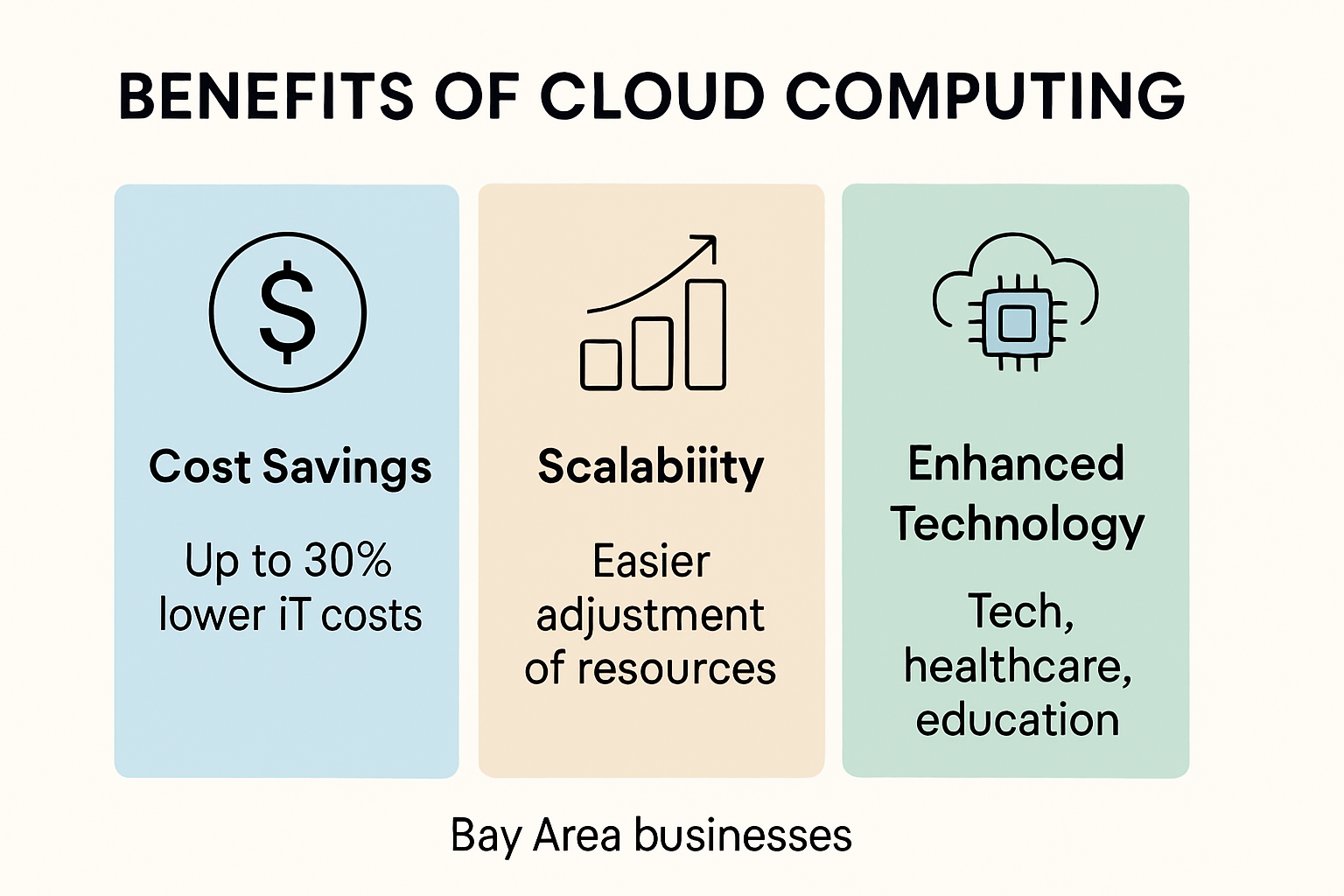
Cloud computing has emerged as a transformative technology that offers substantial advantages for local industries across various sectors. By reimagining how businesses manage and leverage technology, cloud solutions provide strategic opportunities for growth, efficiency, and innovation.
Cost Efficiency and Financial Flexibility
Research from the Brookings Institution reveals that cloud computing allows organizations to optimize their technological investments by paying only for the resources they actually need. This approach eliminates costly investments in rarely used local IT systems. Local industries can benefit from significant cost reductions through cloud computing’s inherent economic model.
Small and medium-sized enterprises (SMEs) particularly stand to gain from this approach. A comprehensive study published in the National Center for Biotechnology Information confirmed that cloud computing integration offers substantial impacts on financial performance. By reducing upfront infrastructure costs, businesses can redirect capital towards core operational activities and strategic growth initiatives.
Scalability and Operational Agility
Cloud computing provides unprecedented operational flexibility for local industries. Businesses can dynamically scale computing resources up or down based on immediate requirements, without substantial capital investments. This elasticity is particularly crucial for industries experiencing seasonal variations or rapid growth.
- Instant Resource Allocation: Quickly adjust computing power without purchasing additional hardware
- Reduced Maintenance Overhead: Eliminate complex hardware management and maintenance responsibilities
- Predictable Operational Expenses: Transform unpredictable capital expenses into manageable operational costs
Enhanced Technological Capabilities
According to research on cloud computing technology, cloud solutions offer immediate benefits that extend beyond traditional IT infrastructure. Local industries gain access to advanced technological capabilities without substantial upfront investments.
For Bay Area businesses, this means accessing enterprise-grade technologies that were previously available only to large corporations. Small manufacturing firms can leverage sophisticated data analytics, healthcare providers can implement robust telemedicine platforms, and educational institutions can deploy advanced learning management systems without massive capital expenditures.
Moreover, cloud computing provides robust security infrastructures that many local businesses could not independently develop. Cloud providers invest heavily in cybersecurity, offering advanced protection mechanisms that safeguard sensitive data and ensure regulatory compliance across various industries.
The strategic advantages of cloud computing extend far beyond mere technological convenience. By embracing cloud solutions, local industries can transform their operational models, compete more effectively, and create more agile, responsive business environments. The ability to access cutting-edge technologies, optimize costs, and scale resources dynamically positions cloud computing as an essential strategic tool for businesses seeking sustainable growth and innovation.
Cloud Computing Types and Real-World Examples
Cloud computing encompasses diverse deployment models and service types that cater to different organizational needs. Understanding these variations helps businesses select the most appropriate solution for their specific technological requirements.
Cloud Deployment Models
According to the National Institute of Standards and Technology (NIST), cloud computing can be implemented through several strategic deployment models:
-
Public Cloud: Services delivered over the public internet, accessible to anyone who purchases the service. Examples include Amazon Web Services and Microsoft Azure, which provide scalable infrastructure for businesses of all sizes.
-
Private Cloud: Dedicated infrastructure exclusively used by a single organization, offering enhanced security and customization. Typically employed by enterprises with strict compliance requirements.
-
Hybrid Cloud: Combines public and private cloud environments, allowing organizations to leverage the benefits of both. This model enables businesses to maintain sensitive data in private clouds while utilizing public cloud resources for less critical operations.
-
Multicloud: Utilizes multiple cloud providers to distribute computing resources, minimize risk, and optimize performance across different platforms.
The following table summarizes the main characteristics and benefits of different cloud deployment models as described above.
| Deployment Model | Key Characteristics | Typical Uses |
|---|---|---|
| Public Cloud | Shared infrastructure, scalable, accessible via the internet | Startups, cost-saving scenarios |
| Private Cloud | Dedicated to a single organization, customizable, secure | Highly regulated industries, compliance-focused businesses |
| Hybrid Cloud | Mix of public & private, flexible, workload mobility | Firms needing both public scalability & private security |
| Multicloud | Multiple providers, risk mitigation, optimized performance | Organizations seeking vendor flexibility |
Service Models in Action
Research from the U.S. Government Accountability Office highlights how organizations strategically implement different cloud service models. These models provide varying levels of management and control:
-
Software as a Service (SaaS): Delivers complete applications over the internet. Real-world examples include Google Workspace, which provides email, document editing, and collaboration tools without local software installation.
-
Platform as a Service (PaaS): Offers developers a complete development and deployment environment. Platforms like Heroku allow programmers to build, run, and scale applications without managing underlying infrastructure.
-
Infrastructure as a Service (IaaS): Provides virtualized computing resources over the internet. Amazon EC2 exemplifies this model, offering scalable computing capacity that businesses can rent instead of purchasing physical servers.
Strategic Considerations for Local Businesses
For Bay Area businesses, selecting the right cloud computing approach requires careful evaluation of organizational needs. Factors such as data sensitivity, regulatory compliance, scalability requirements, and budget constraints play crucial roles in determining the most suitable cloud strategy.
Local technology firms, healthcare providers, and educational institutions can benefit significantly from cloud computing by selecting models that align with their specific operational demands. A small medical practice might prefer a private cloud to ensure patient data protection, while a rapidly growing tech startup could leverage public cloud resources for quick scaling and cost-effectiveness.
Cloud computing’s flexibility allows businesses to experiment and adapt. Organizations can start with a basic model and gradually evolve their cloud strategy as technological needs change. This adaptability ensures that businesses remain competitive and technologically agile without massive upfront investments.
By understanding the nuanced landscape of cloud computing types and deployment models, local industries can make informed decisions that drive operational efficiency, reduce costs, and create opportunities for innovation. The key lies in matching cloud solutions precisely to unique business requirements, transforming technological infrastructure from a cost center to a strategic asset.
How Bay Area Organizations Can Get Started
Implementing cloud computing requires a strategic approach that goes beyond simply adopting new technology. For Bay Area organizations, the journey begins with comprehensive assessment, careful planning, and a methodical implementation strategy.
Assessing Organizational Readiness
According to the General Services Administration (GSA), organizations must first evaluate their current and future technology needs to select the most appropriate cloud solution. This assessment involves several critical steps:
- Current Infrastructure Analysis: Conduct a comprehensive audit of existing IT systems, identifying strengths, limitations, and potential areas for cloud integration
- Compliance Requirements: Evaluate industry-specific regulatory standards that might impact cloud migration
- Resource Inventory: Catalog existing computing resources, data storage needs, and operational workflows
The following table organizes the assessment steps Bay Area organizations should follow before implementing cloud solutions.
| Assessment Step | Description |
|---|---|
| Current Infrastructure Analysis | Audit IT systems, note strengths & gaps |
| Compliance Requirements | Evaluate regulatory and industry standards |
| Resource Inventory | List computing resources, storage, workflows |
Strategic Implementation Framework
Research from OpenStax highlights that successful cloud adoption requires a structured approach. Bay Area organizations should consider the following implementation strategy:
- Define clear technological objectives
- Select appropriate cloud service models
- Develop a phased migration plan
- Create robust security and data protection protocols
- Establish performance monitoring mechanisms
Navigating Technical and Operational Challenges
The Internal Revenue Service’s cloud computing guidelines emphasize understanding five essential cloud computing characteristics: on-demand self-service, broad network access, resource pooling, rapid elasticity, and measured service. For Bay Area businesses, this means developing a nuanced approach that addresses both technological and operational considerations.
Local organizations must prioritize workforce training and change management. Cloud migration is not just a technological shift but a comprehensive operational transformation. Employees need to understand new workflows, security protocols, and collaborative tools that cloud computing introduces.
Small to medium-sized businesses in technology, healthcare, education, and manufacturing can particularly benefit from a measured approach. Start with less critical systems, develop internal expertise, and gradually expand cloud integration. This strategy minimizes risk while building organizational cloud computing capabilities.
Consider partnering with local managed service providers who understand the unique technological landscape of the Bay Area. These experts can provide tailored guidance, help navigate complex migration processes, and ensure that cloud solutions align with specific industry requirements.
Budget considerations are crucial. While cloud computing can reduce long-term IT expenses, initial implementation requires strategic investment. Organizations should develop comprehensive financial models that account for migration costs, potential productivity gains, and long-term operational efficiencies.
Successful cloud computing adoption is not about wholesale replacement of existing systems but strategic augmentation. Bay Area organizations that approach cloud migration as a collaborative, iterative process will be best positioned to leverage this transformative technology. The goal is creating a flexible, scalable technological infrastructure that supports business growth, enhances operational efficiency, and provides competitive advantages in an increasingly digital business environment.
Frequently Asked Questions
What is cloud computing and how does it work?
Cloud computing allows businesses to access and utilize powerful computing resources over the internet without maintaining physical hardware. It works by distributing resources across remote servers, enabling scalability and flexibility.
What are the different types of cloud computing services available?
The primary types of cloud computing services include Infrastructure as a Service (IaaS), Platform as a Service (PaaS), and Software as a Service (SaaS), each catering to different business needs and levels of management.
How can cloud computing benefit Bay Area businesses?
Cloud computing offers several benefits to Bay Area businesses, including cost efficiency, scalability, operational flexibility, and access to advanced technological capabilities that were previously available only to larger organizations.
What should businesses consider before adopting cloud computing?
Before adopting cloud computing, businesses should assess their current infrastructure, compliance requirements, and readiness for migration. A strategic implementation plan, including employee training and security protocols, is also crucial.
Ready to Make Cloud Computing Work for Your Bay Area Business?
You have learned how cloud computing can help you cut costs, boost flexibility, and stay competitive. But making it a reality can be overwhelming without the right expertise. Many businesses in the Bay Area worry about complex migrations, regulatory risks, or not having the in-house resources to securely move to the cloud. That is where SRS Networks comes in. We understand the local challenges you face. We offer tailored cloud solutions that cover everything from migration to ongoing management, so you get operational agility without stress. If you want the cost savings, scalability, and security discussed in this article, now is the time to act. Staying ahead means taking the next step before your competitors do.
Let SRS Networks guide you through a smooth, secure transition to the cloud. Explore our Cloud Computing Solutions for small and mid-sized Bay Area organizations right now. Or, contact us directly through our main site and discover how we can customize a cloud strategy for your specific needs. Reach out today and build your future with the trusted local technology partner by your side.