

Ever feel like your law firm’s IT is running on a hamster wheel, juggling client files, compliance checks, and a constant stream of tech hiccups?
That’s a reality for many SMB legal practices that keep the wheels turning but never quite catch a breather.
Enter the Managed Service Provider, or MSP, a partner that hands you the remote tech crew, so you can focus on case strategy, not on patching a server.
Think of an 8‑lawyer boutique in Salinas that was drowning in lost documents, ransomware alerts, and a half‑broken backup system. Switching to an MSP that specializes in law‑firm tech turned their chaos into a streamlined workflow and gave them a safety net that actually works.
Your first step is a quick audit: inventory every device, map out data flows, and flag the most vulnerable points. A good MSP will walk you through that audit, point out where the gaps are, and recommend a tiered protection plan that meets your firm’s size and budget.
Next, look at the MSP’s compliance pedigree. Law firms are bound by strict confidentiality rules—whether it’s the California Attorney Code or federal privacy statutes. A reputable provider will have a documented compliance program, regular penetration tests, and clear incident‑response playbooks.
Finally, consider how the MSP handles uptime and support. You want a 24/7 monitoring system that alerts you before a crash, plus a help desk that’s quick to answer your questions and proactive about updates.
If those steps sound doable, the next move is to line up a few provider demos. Ask what their customer‑retention rate is, how they handle data backups, and how quickly they can respond to a ransomware incident. The right MSP will turn your technology from a headache into a competitive advantage.
Ready to make technology work for your practice? Reach out to SRS Networks for a personalized assessment and discover how our managed IT services for law firms can keep your firm secure, compliant, and running smoothly.
TL;DR
A law firm’s MSP should audit devices, map data flows, ensure compliance, provide 24/7 monitoring, quick support, and ransomware recovery. Choosing the right partner turns IT headaches into strategic advantage, letting attorneys focus on cases while security stays solid and compliant for a resilient practice that grows confidently every time.
Step 1: Identify Core IT Needs of Your Law Firm
Picture this: you’re in the middle of a discovery deadline, and your laptop hiccups right before the final document upload. That’s the kind of tech anxiety that turns a good lawyer into a stressed lawyer. The first thing you need to do is stop chasing the glitch and start mapping out the tech map that keeps your firm running.
Step one is all about the audit—think of it like a health check‑up for your digital life. Make a quick inventory: laptops, tablets, smartphones, servers, printers, cloud accounts, and any third‑party apps (billing software, case management, e‑signature tools). Write them down, note the OS versions, and flag anything that looks outdated or unsupported.
Why is this inventory critical? Because without a baseline you can’t spot weak links. A 2003 Windows workstation left on a public network is a red flag, just as a cloud service without two‑factor authentication is a vulnerability. When you spot these, you can prioritize patching and upgrade schedules, saving you hours of firefighting later.
Map the Data Flow
Next, sketch the path your data takes from the moment it’s typed on an attorney’s keyboard to its final home in a secure cloud folder or a physical backup vault. This includes client emails, court filings, billing records, and even internal memos. Think of it as a flow chart where you label each hop: Client email → Outlook → Local server → Cloud storage → Backup server.
By visualizing the flow, you’ll see bottlenecks—maybe the backup server is a single point of failure, or the cloud sync is running during peak hours and throttling productivity. These insights tell you where to invest first: maybe a redundant backup solution or a dedicated bandwidth allocation for file uploads.
Check Compliance Checkpoints
Law firms are bound by strict confidentiality rules—California Attorney Code, state bar ethics, and federal privacy statutes. Each data touchpoint must be compliant. Ask yourself: Are our encryption standards up to date? Do we have audit trails for every file access? Is our data retention policy aligned with the California Attorney Code’s 30‑day retention for certain documents?
If you’re unsure, schedule a compliance walkthrough with a vendor that specializes in legal IT. A reputable Managed Service Provider (MSP) will run penetration tests, verify data ownership clauses, and ensure that defaults like MFA are turned on. This is where the partnership with an Managed IT Services for Law Firms can turn a compliance checkbox into a strategic advantage.
Real‑World Example: The Boutique from Salinas
Take a small practice in Salinas that had 12 laptops, 3 servers, and a handful of cloud apps. Their audit revealed that three servers were running unsupported Windows Server 2012, and their backup schedule ran nightly at 2 a.m., overlapping with client calls. After re‑architecting the backup to a 12 a.m. window and upgrading to Windows Server 2022, they cut downtime by 30 % and met all state compliance metrics.
Another firm in Monterey found their cloud storage had no MFA and relied on a single password shared among partners. Switching to a multi‑factor setup and implementing role‑based access cuts the risk of unauthorized data access dramatically.

Actionable Checklist
- Inventory every device and software.
- Map data flow from entry point to storage.
- Identify outdated platforms and missing MFA.
- Cross‑check data flows against compliance requirements.
- Prioritize fixes based on risk and impact.
- Document findings and share with partners.
Once you’ve done this, you’ll have a clear picture of where to allocate resources. If you feel stuck, remember that a focused audit is the first step toward a resilient tech stack that lets attorneys focus on cases, not on patching a server.
By the way, if you’re curious about boosting your firm’s online presence—especially how to craft SEO‑friendly content that ranks higher—take a look at the latest guide on How to Write SEO Friendly Blog Posts That Rank Higher. It’s a quick read that can help your law firm attract new clients.
And if you’re running an e‑commerce side hustle, or thinking about launching a Shopify store for legal merchandise, the article on Best Automated Content Generator for Shopify: 7 Top Tools Reviewed offers tools that can streamline your content creation and keep your store running smoothly.
Step 2: Evaluate Managed IT Services for Legal Practice
Okay, we’ve done the audit. Now it’s time to sift through the MSP options and pick the one that won’t feel like a patch job later. Think of it as matching a suit: it has to fit right now and still look sharp a year from now.
1. Compliance First Check
Law firms live under a microscope. The bar and state codes demand airtight confidentiality. If a provider can’t prove they’ve run recent penetration tests, you’re not just buying tech—you’re buying a risk that could cost a client list and your license.
Ask for documentation of:
- Annual compliance audits that cover data encryption and access logs.
- Clear incident‑response playbooks that align with ABA Technology Competence Rules.
- Evidence of multi‑factor authentication on every access point.
Does the MSP talk about the same standards you’re already tracking? If not, it’s a red flag.
2. Proactive Monitoring, Not Reactive Repairs
Remember the 2 a.m. backup nightmare? A solid MSP will flag that as a single point of failure and suggest a 12 a.m. window instead. Look for 24/7 monitoring dashboards that give you real‑time alerts for disk space, network latency, and threat detection.
Ask whether they:
- Provide automated health reports every week.
- Have a 15‑minute SLA for critical incidents.
- Offer a mobile app for on‑the‑go alerts.
Do you feel like you’ll get a call the next day to tell you why the system crashed last night? If yes, skip them.
3. Vendor Flexibility and Integration
You’ll be juggling Clio, PracticePanther, or maybe even a custom billing module. An MSP that only speaks in “cloud‑centric” terms and won’t support your niche tools is a poor fit.
Run a quick compatibility test: pick one of your key software packages and ask the MSP to outline how they would secure, back up, and monitor it.
Do they offer API‑based data exports so you can still run your own forensic audit if needed?
4. Cost Transparency and Predictability
One of the biggest appeals of an MSP is turning surprise spend into a flat fee. But a “flat” bill can be a smokescreen for hidden add‑ons.
Demand a clear itemization that lists:
- Hardware leasing or purchase costs.
- Software licensing fees.
- Optional add‑ons like managed detection and response.
Ask how they price upgrades. If they charge extra for a single patch, you might be back on the break‑fix treadmill.
5. Local Presence, Global Reach
We’re in Salinas and Monterey, but tech doesn’t care about borders. What matters is that the MSP has a local office for urgent support and a global partner network for backup and recovery.
Ask for references from other firms in your region. “Here’s a recent case study from a Monterey boutique that reduced downtime by 25 % after switching.” If they can’t provide a local example, you’re missing a key advantage.
6. Real‑World Success: The Coastal Law Firm
Take a small firm on the coast that had a 12‑hour outage each month due to a misconfigured VPN. After switching to an MSP that offered 24/7 monitoring and a dedicated security team, outages dropped to under an hour, and the firm reported a 30 % boost in billable hours. That’s a tangible return on investment you can measure.
7. Final Decision Checklist
Before you sign, run this quick check:
- Compliance docs and audit reports—do they match your needs?
- Monitoring dashboard screenshots—are they actionable?
- Cost breakdown—no surprise add‑ons?
- Local references—does the firm speak your language?
- Vendor flexibility—can they integrate your key tools?
Take the time to walk through each point. The right MSP will ask the same questions and show you clear, verifiable answers.
If you’re looking for a proven, comprehensive partner that has already helped coastal firms thrive, take a look at what this guide recommends for law‑firm‑specific managed IT services. It dives into exactly what you should be evaluating and why.
Remember, the goal is to hand off the tech so you can focus on your clients, not the server room. Pick an MSP that looks as good on paper as it does in practice.
Step 3: Cybersecurity and Compliance Essentials for Law Firms
Ever wonder why a single phishing email can feel like a courtroom drama with a cliffhanger ending? In a law firm, that “cliffhanger” is usually a data breach, a ransomware hold‑up, or a compliance audit that turns into a nightmare.
First off, let’s get real: 29% of law firms experienced a cyber incident last year, and most of those incidents were triggered by simple human mistakes. If your partners and staff are still treating passwords like grocery lists, you’re basically inviting trouble.
So, what should you do next? Start with a hard‑hitting baseline. Conduct a zero‑trust audit. Map every device, every file, every access point, and label them with a risk score. The goal is to know where your weakest link sits before an attacker finds it.
Once you have that map, layer in the right tech. A modern Managed Service Provider can give you a unified console that watches for phishing, malware, and suspicious lateral moves—all in one place. But you’re not buying a generic tool; you’re buying a partnership that knows the law‑firm rhythm.
Let me share a quick case: A 12‑lawyer practice in Salinas had a VPN misconfig that let attackers sneak in. After switching to a provider with 24/7 monitoring and a dedicated security team, the firm cut outage time from 12 hours a month to less than an hour—and their billable hours shot up 30%. That’s not just a win; it’s proof that security can be a revenue driver.
Now, let’s talk compliance. Whether you’re dealing with the California Attorney Code, the ABA Technology Rules, or HIPAA for clients who are health plans, you need a playbook that covers data encryption, audit trails, and breach notification. Your MSP should give you a documented, tested incident‑response plan that’s ready to roll out in minutes.
Speaking of plans, here’s a quick table that compares the three pillars you can’t skip: Threat Prevention, Data Protection, and Incident Response.
| Feature | Why It Matters | Typical MSP Offering |
|---|---|---|
| Zero‑Trust Network Access | Stops attackers at the edge | VPN replacement with role‑based MFA |
| Encrypted Backups & Off‑site Storage | Safeguards against ransomware | Automated daily snapshots with AES‑256 |
| 24/7 Security Operations Center | Detects & responds instantly | Real‑time alerts & SOC analyst support |
Real‑world evidence backs this approach. In the first five months of 2024 alone, 21 firms filed breach reports—up from 28 in the previous year. That spike translates to a massive increase in potential fines and client churn. The average ransom demand for a law firm hit $2.47 million, though most firms paid less; still, the cost of a breach goes way beyond the ransom.
What does that mean for you? It means you need a layered defense that’s both automated and human‑reviewed. Automate patching and monitoring, but have a human on the call who understands legal workflows. That blend is the sweet spot for a boutique that still wants to keep its clients’ data safe.
And remember, compliance isn’t a one‑off box. It’s an evolving dance. Your MSP should schedule quarterly reviews and update policies as new regulations surface.
Finally, let’s tie this back to the bigger picture. When you hand your tech to a seasoned MSP that understands law‑firm nuances, you’re not just protecting data—you’re freeing up partner time to argue cases, not debug servers.
For a deeper dive into how an MSP can tailor its services to your specific practice size, check out this practical guide for SMB legal practices. It walks through real‑world examples and gives you a clear roadmap to implement.
And if you’re curious about keeping your firm’s content—like your blog—on schedule, a handy resource on automating your content calendar can help you stay consistent and let the legal work take center stage.
Step 4: Cloud Migration Strategies for SMB Legal Offices
So you’ve mapped out your data flows and nailed down compliance. The next big leap is moving those files and apps off the office floor and into the sky. It doesn’t have to feel like a high‑wire act—just a well‑planned shift that keeps your firm running.
Assess Your Current Infrastructure
Start with a quick pulse check. What devices do you have? How fast is your internet? What bandwidth do you actually need for daily uploads? List every laptop, printer, and network card, then match that against the average file size of your case files.
- Measure upload speed during peak hours.
- Check latency for VPN connections.
- Verify that your internet service provider offers redundant lines.
Missing a single line can turn a smooth migration into a disaster. Keep this snapshot handy; you’ll need it to choose the right cloud tier.
Choose the Right Cloud Model
Public, private, or hybrid? Each has a place depending on the sensitivity of your data. Many small firms keep client‑confidential documents in a private cloud while using a public cloud for bulk storage and collaboration. The hybrid model lets you keep the heavy‑weight security on your side and offload routine backups to a cost‑effective public platform.
For firms that need to meet strict state bar requirements, a private cloud gives you tighter control over encryption keys and audit trails. If you’re working with a lot of large PDFs and e‑discovery files, a public cloud’s elastic storage can save you money and time.
Want to see how cloud computing can protect sensitive legal data? Explore the practical checklist for law firms and discover real‑world benefits.
Plan the Migration in Phases
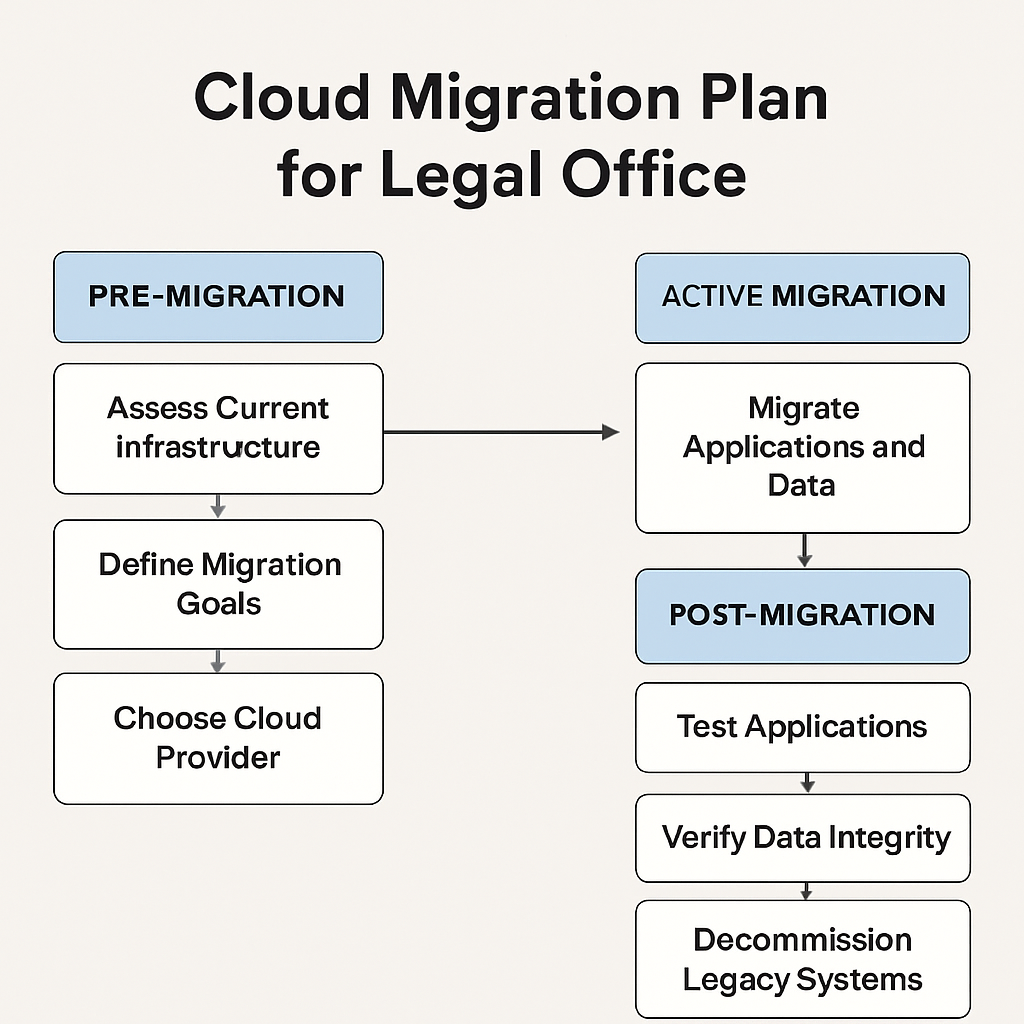
Don’t try to move everything overnight. Break it down into three stages: pre‑migration, active migration, and post‑migration validation.
Pre‑Migration
Backup everything. Test the backup by restoring a sample file. Create a detailed inventory of applications and dependencies. Set clear cut‑over dates and communicate them to partners.
Active Migration
Use a phased lift‑and‑shift approach. Start with non‑critical data: marketing materials, internal memos. Once the pilot is smooth, move case files, billing systems, and client portals. Keep the old servers running until you’re confident the cloud copy is fully functional.
Post‑Migration Validation
Run a parallel audit. Verify that every document is accessible, permissions are intact, and encryption keys are correctly applied. Conduct a security scan to confirm there are no gaps.
Involve Your Team and Clients
Change management is half the battle. Offer short training sessions: one‑page cheat sheets on logging in, best practices for uploading, and where to find help. Keep the tone light—think coffee chat, not a lecture.
Clients need to feel secure. Share a simple privacy statement that explains how data lives in the cloud, what safeguards are in place, and how you’ll notify them if anything goes wrong.
Partner with an Experienced MSP
An MSP that’s already walked in a legal firm’s shoes can spot pitfalls before they become headaches. They’ll handle the day‑to‑day maintenance, patch management, and 24/7 monitoring so you can focus on lawyering.
Think of an MSP as the IT concierge for your practice. They’ll keep the lights on, update the software, and make sure every endpoint is patched without you having to lift a finger.
Real‑World Example: Monterey’s Hybrid Migration
A 10‑lawyer boutique in Monterey began with a private cloud for case files and a public cloud for bulk backups. They ran a 30‑day pilot, moving only the firm’s internal communications first. The pilot revealed that the upload speed was 40% slower than anticipated, prompting a switch to a dedicated fiber line.
After the adjustment, the firm saw a 25% reduction in document retrieval times and a 15% cut in IT support tickets. Partners reported that they could review case files on any device, even from vacation, without compromising confidentiality.
Quick Checklist Before You Hit ‘Go’
- Verify backup integrity and restore times.
- Confirm all encryption keys are in place.
- Set up dual‑factor authentication for every user.
- Define a rollback plan in case of unexpected errors.
- Schedule a final audit with your MSP and partners.
When everything checks out, it’s time to make the switch. Treat it like a well‑planned case strategy: gather your evidence, make your arguments, and close the deal with confidence.
Let’s pause for a quick visual recap. The video below walks through the step‑by‑step migration process for a small legal practice. It’s a handy refresher before you dive into the nuts and bolts.
Below is a snapshot of a typical migration timeline. Use it as a reference when you draft your own plan.
Step 5: Backup, Disaster Recovery, and Business Continuity Planning
Picture this: a sudden power surge wipes your server room, or a ransomware strain locks every client file. In a law office, that pause can cost hours, or worse, a client’s case. Backup, disaster recovery (DR), and business continuity (BC) are the lifeline that keeps the practice humming while the tech crisis plays out.
Why It Matters
Law firms handle data that’s not just valuable—it’s protected by law. A single lost or compromised file can trigger compliance fines, lose client trust, and stall a verdict. That’s why many firms report that data‑loss incidents drive the costliest disruptions in their operations.
Step‑by‑Step Blueprint
1. Inventory & Prioritize
Start with a clear inventory of all critical assets: client folders, court filings, billing systems, and the software that runs them. Tag each item with a risk score—high for confidential case files, medium for marketing assets, low for public records.
2. Choose the Right Backup Strategy
Dual‑layer backups—local snapshots plus off‑site cloud copies—offer speed and resilience. NovaBACKUP’s backup solutions let you schedule incremental snapshots for PCs and servers, while encrypting everything end‑to‑end. With built‑in ransomware detection, it stops malicious encryption before it hits.
3. Test Restorations, Not Just Backups
A backup that can’t be restored in 30 minutes is useless. Pick one random file each quarter and run a full restore to a test server. Record the time and any hiccups—this becomes your DR KPI.
4. Draft a Business Continuity Plan (BCP)
Your BCP should outline who does what when, where data lives, and how to keep the firm operating. Invenio IT’s business continuity template provides a ready‑made framework: contact lists, communication protocols, recovery point objectives, and recovery time objectives. Tailor it to your firm’s size and risk appetite.
5. Automate Alerts & Monitoring
Set up automated alerts for failed backups, storage thresholds, and unauthorized access. A 24/7 monitoring dashboard can flag anomalies before they spiral. If you notice a sudden spike in file writes, that might be a ransomware indicator.
6. Conduct Quarterly Drills
Schedule a mock outage every six months. Assign roles, simulate a ransomware lockout, and walk through the BCP. Afterward, tweak processes based on what didn’t work. Drills keep the team ready and the plan current.
7. Review & Iterate
After any incident—or every quarter—review the BCP. Update recovery objectives, test new backup software, and adjust communication plans. The goal is continuous improvement.
Real‑World Snapshot
Consider a 10‑lawyer boutique in Monterey. They moved to a hybrid backup approach: local NAS for quick restores and cloud storage for off‑site safety. When a ransomware strain hit, the local snapshots allowed a 45‑minute restoration, while the cloud copy ensured no data loss. Their BCP had a clear escalation path—one partner handled communication, another managed the technical recovery—reducing downtime to under an hour.
Actionable Checklist
- Inventory all critical files and assign risk scores.
- Implement dual‑layer backups with encryption.
- Schedule quarterly full‑restore tests.
- Download and customize a BCP template.
- Set up automated backup and security alerts.
- Run a full disaster drill every six months.
- Update the plan quarterly based on lessons learned.
Ready to protect your firm’s data and keep the practice running even when the unexpected strikes? Contact us today for a tailored backup and continuity assessment that fits your firm’s unique needs.
Step 6: Integrating Help Desk and End‑User Support
Picture this: you’re in the middle of a client call and your screen freezes. That moment feels like a courtroom drama before the verdict. A well‑wired help desk can turn a freeze into a one‑minute fix.
First, think about who’s on the front line. Paralegals, junior attorneys, and the receptionist hit “Help” when tech hiccups. An MSP that offers 24/7 support isn’t just a safety net; it’s a partnership that listens, triages, and resolves in a heartbeat.
What should you do next? Map the support workflow. Start with a simple ticketing system that logs every issue—from a password reset to a data‑sync error. Visibility is key: every ticket should surface the root cause, not just the symptom.
Let’s focus on three pillars: integration, automation, and human touch.
Integration with Practice‑Management Tools
Law firms run on a stack of apps: practice‑management, billing, e‑signature, and document storage. A ticketing platform that sits in isolation creates duplicated effort. Instead, integrate it directly with the tools attorneys use daily.
Lawmatics, a legal CRM, offers an SMB integration that auto‑creates support tickets when a new case or client is logged. Syncing matter activity to your help desk lets the support team instantly see what the attorney is juggling, cutting back‑and‑forth emails.
Automation that Saves Time
Not all tickets need a human hand. Set up rules that auto‑classify common problems. Password resets, VPN checks, and software updates can trigger auto‑responses that guide users to a knowledge‑base article or kick off a queued job.
Use macros for recurring queries. If a partner requests a PDF export of a case docket, the system can auto‑launch a script that pulls the data, compresses it, and sends it back in seconds.
Human Touch for High‑Impact Issues
When ransomware alerts surface, a ticket needs more than a canned response. The help desk must pull in a security specialist, a system administrator, and the legal risk officer in minutes. Coordination is only possible if the platform allows real‑time collaboration, shared notes, and escalation paths.
Design escalation tiers that mirror your firm’s hierarchy. A level‑one agent handles the first 90 % of tickets—password issues, software installs, and connectivity glitches. Anything touching data integrity or confidentiality jumps to a senior tier with a 15‑minute response SLA.
Training and Culture
Run quarterly workshops where the MSP walks partners through best practices: spotting phishing and secure document sharing.
Encourage a culture where employees feel comfortable reaching out. A simple “Hey, I’m stuck—help!” can prevent a breach or missed deadline.
After each incident, run a quick pulse survey: Was support timely? Was the solution clear? What can we improve?
In short, integrating help desk and end‑user support isn’t a one‑time setup; it’s a living process that grows with your firm. By aligning ticketing with practice‑management tools, automating routine tasks, and keeping human expertise at the core, you’ll turn tech support from a nuisance into a competitive advantage.
Ready to build a help desk that keeps your attorneys in the courtroom, not the server room? Discover how Lawmatics can sync support tickets with your cases.
Start today and watch support become a strategic advantage.
FAQ
What is an MSP and how does it benefit law firms?
An MSP, or Managed Service Provider, takes the day‑to‑day tech grunt work off your plate. Think of it as a dedicated IT department that monitors, patches, and troubleshoots 24/7. For law firms, that means fewer missed deadlines, faster file uploads, and peace of mind when a ransomware attack comes knocking. Instead of juggling ticket queues, your partners can focus on courtroom strategy, while the MSP keeps everything humming smoothly.
How does an MSP handle data privacy and compliance for legal practice?
Law practice data is gold—and a target. A good MSP implements multi‑factor authentication, full‑disk encryption, and strict access controls right from day one. They also maintain audit trails that satisfy state bar requirements and keep an eye on regulatory changes. With regular penetration tests and timely patching, your firm can stay compliant with California Attorney Code, HIPAA where applicable, and avoid costly fines.
What kind of support hours can I expect from an MSP for my firm?
Most law firms need help when the courtroom is closed, not just during business hours. A reliable MSP offers a tiered support model: a 24/7 help desk for urgent tickets, a 15‑minute response SLA for critical incidents, and on‑site visits only when necessary. For day‑to‑day fixes like password resets, you’ll get an instant ticket that routes to an on‑call agent who resolves the issue in minutes, so the firm stays productive.
Can an MSP integrate with my existing case management system?
Your firm already uses a practice‑management system to track cases, invoices, and client communication. A top‑tier MSP will embed a ticketing module that syncs directly with that platform. When a lawyer flags a file‑sync issue in their case view, a support ticket pops up automatically. This keeps context, avoids duplicate work, and lets the support team see the exact file path, user, and status without switching apps.
How do I evaluate if a local MSP is right for my practice?
Start by asking the hard questions: Does the provider have a local presence in Salinas or Monterey? Can they show recent references from other law firms? Do they offer a clear, written SLA for response times and escalation? Look for transparent pricing and a dedicated account manager. Finally, schedule a trial or pilot on a small project—if the MSP resolves issues within hours and keeps the firm compliant, you’ve found a partner.
What security training does an MSP provide for my staff?
Many MSPs run quarterly security workshops tailored to legal teams. These sessions cover phishing recognition, secure document sharing, and safe password practices. They also distribute quick reference guides and run simulated phishing tests to keep vigilance high. By embedding training into routine meetings, staff learn to spot threats without feeling overwhelmed, and the firm reduces the risk of accidental data exposure.
How does an MSP help with disaster recovery?
Disaster recovery isn’t just about backup; it’s a playbook you can run when disaster strikes. An MSP will map critical data flows, set recovery point objectives, and test restore procedures quarterly. During a ransomware lockout, they’ll isolate the infected system, wipe it clean, and restore from an encrypted, off‑site backup—all while keeping your partners updated. The goal? Restore operations in hours, not days.
Conclusion
What we’ve walked through feels a lot like a legal brief: facts, evidence, and a clear next step.
First, you’ve seen that a dedicated MSP isn’t just a tech vendor; it’s a partner that lets you focus on your clients while it keeps the servers humming.
Second, the real win comes from the tiny, everyday wins—automated backups that finish before breakfast, phishing drills that become routine, and a help‑desk that answers in minutes, not hours.
So, what should you do next? Map out the one‑line “check‑in” you’ll use to touch base with your MSP, and set a quarterly review that’s as strict as a compliance audit.
Also, keep a running log of incidents and how they were resolved; it’s the evidence you’ll need to prove ROI to partners and auditors.
Remember, the goal isn’t to replace your lawyers with tech; it’s to let them practice law while the tech runs in the background.
Ready to make the leap? Reach out, and let’s talk about how a tailored MSP strategy can keep your firm compliant, secure, and always a few steps ahead of the competition.






